I’ve written a full-fledged Mac app called SetShot that’s designed to take snapshots of nearly everything you’ve configured in System Settings, after which you can compare any two snapshots to see what has changed. I’ll be writing several articles about it and the process of creating it in TidBITS, but before I release it more broadly, I’m hoping a few people here will be interested in taking a look as a sanity check.
Why might you want to take settings snapshots?
macOS updates: Have you wondered if a macOS update has changed any of your settings? Now you can know!
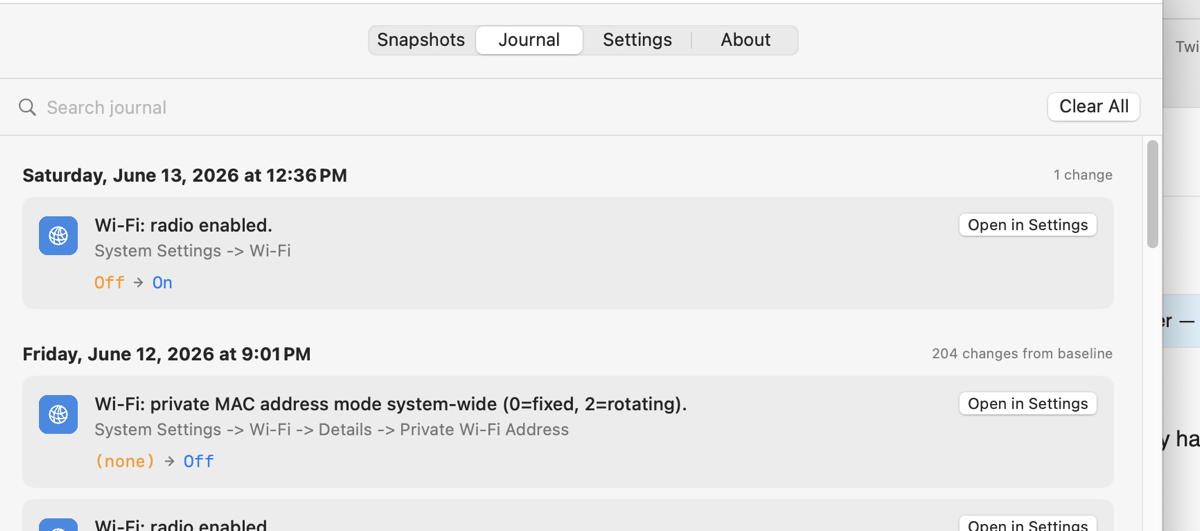
Settings journal: SetShot maintains a journal of all your settings so you can see what changed and when.
Export current setup: You can compare against a baseline and export a record of everything you’ve changed, should you want to set up a Mac from scratch using your preferred settings.
For testing, apart from just clicking around and trying things, the basic approach would be to take a snapshot, change some things in System Settings, take another snapshot, and compare them. If you end up with unrecognized changes (likely macOS noise, but you never know), you can submit them directly. Similarly if the recognized changes aren’t described well or have other issues, you can submit feedback directly. I can evaluate those submissions and update the knowledge base, which the app refreshes on every launch (or check the About SetShot dialog). If I release a new version of the full app, you can choose SetShot > Check for Updates to access that, or it will offer the update automatically if you’ve allowed that.
You can also turn on automatic snapshots (with automatic deletion of snapshots that have no changes from the previous one to avoid clutter) and just see how it works over time.
Wow, this sounds super cool! There are many times I’ve wondered what setting I changed that made something work horribly . I’ll give it a try tomorrow.
This sounds great, Adam. As I’ve mentioned elsewhere, my “recent” backup to Sequoia has had many surprises, many traced back to settings I hardly knew existed much less ever used. I’m going to go grab it.
Very cool. I’ve been very impressed with Claude Code. I do use some AI directives to coach it in terms of style and Swift version capabilities. I did notice in your case it’s using the older form of model structs conforming to ObservableObject and individually marking variables with @Published, as opposed to wrapping the entire struct in @Observable. Again, nothing wrong with the approach it took, but personally I prefer to use the latest constructs, I guess with future-proofing in mind.
It is only for reading settings—I think it would be a recipe for all sorts of disaster to try to write .plist files.
It’s a chronological log.
Hmm! I hadn’t thought about that before. I’ll ponder it…
From what I’ve gleaned about how macOS works, there’s too much traffic in the settings files to be able to tell from activity that something relevant has changed. There’s a lot of noise. So time makes more sense, but it can be just a few minutes and it will only save snapshots that have changes. (A few minutes is undoubtedly overkill, but good for testing.)
Hah! I have absolutely no idea what that means. But I’ll ask it how future-proofed its solution is.
I am very hesitant to grant a third party app full access to my system. Even to a trusted third party. Yes I know that this will not work without this permission.
Am I paranoid? Maybe a bit, but without a full open source audit of the code, this is a big NO for me.
“On your first snapshot, macOS will ask for Media & Apple Music access — click Allow. SetShot needs it to read music-related settings such as Home Sharing and library configuration.
Optionally, granting Full Disk Access (in System Settings → Privacy & Security) lets SetShot detect changes to app permission settings….”
Thanks for creating the app. I did a baseline of settings yesterday. Today I made one change for testing and SetShot listed that change in an easy-to-read format.
Sorry, guess that was TMI . To make a more practical suggestion, I would encourage the addition of architectural guidelines in your existing CLAUDE.md file. But for a non-coder, you’d have to find a source for these that you trust, and you’d need to believe it was worth the trouble. (Out of curiosity, did Claude create that file itself, or did you author it?)
If you want to pursue it, I’ve recommended elsewhere the extensive catalog of such agent files maintained by Paul Hudson. You can see them here.
If we have feedback on Journal entries where the Submit Feedback button does not appear (e.g., the first baseline snapshot), do you want that as an Issue in GitHub, or in this thread, or as a DM?
I did, and I’m very impressed. SetShot is super high quality and polished, and should prove quite useful. I have daily automatic snapshots turned on so it will be interesting to see if my settings drift at all or if it’s all stuff I actually changed.
Here’s a thing I just discovered (ok, About kind of talks about it, I just didn’t get it until now). If you compare two snapshots (select a Before and an After and click Compare in the Snapshots tab), every single recognized change has a Submit Feedback button, and all unrecognized changes have a Submit button (and there’s a Submit All (n) button). So if you’re looking in the Journal and find something you want to submit feedback on, find it in a Compare instead.
Actually, it will work fine without that permission; it just won’t be able to read the Music-related files and report on those settings.
I think that I’ll tweak things to put the Music-related checks behind a preference so people have to turn them on manually rather than be presented with a permissions dialog on the first snapshot.
See, this is why we do beta testing! I didn’t notice that the Submit Feedback button wasn’t appearing for comparisons with the baseline, or in the Journal, but I see no reason it shouldn’t appear.
Sit tight on those changes until I can add that button—it’s much easier to process things via Submit Feedback than manually,
This thread or a direct message is fine for larger comments. I’m still pondering how I want to encourage general feedback eventually.
In case you ever do consider this, you should never be writing to .plist files! All interactions with the system’s settings should be through defaults or the related API. My rough understanding is that due to caching, changes to .plist files will likely be overwritten (and may not be current at any given point in time?).
Mac OS X 10.8 introduced a caching system for app preferences (“cfprefsd”). While this probably increases performances for apps, it makes it harder for developers to manipulate preference values quickly for testing, because making changes directly to the plist files in the ~/Library/Preferences folder does not work any more with editors such as “Property List Editor.app” and the similar editor in Xcode. As of now (Dec 14, 2013), the only way to edit such preferences is by using the “defaults” command, which is rather difficult to use once it comes to editing dict or array entries.
Yet another reason to avoid writing settings back! Seriously, folks, I never want to be in a situation where a bug in SetShot—or even cosmic rays hitting at just the wrong time—could cause trouble.
Great idea for an app. I will find it very useful for the reasons you give. My first suggestion is that the text on all the top level tabs is great, except for the “Settings” tab as all the text on this tab is very small, compared to the other tabs, and is therefore hard to read comfortably.
Lots of great comments—thanks! I’ve now released 1.0b19, which you might be offered automatically by Sparkle on your next launch, or you might need to download manually, since the Check for Updates command in the SetShot menu was accidentally disabled in b17. You can always get the latest from:
The changes are pretty significant, both in terms of functionality (adding Journal notes and export) and user experience (making all text selectable to simplify reporting). And now that I write about it, I realize I forgot to mention in the release notes that Help > Release Notes now shows the release notes. And the knowledge base knows about more settings to recognize, has significant wording improvements, and will skip more noise. Submitting feedback and reporting unrecognized changes really does help, since many Macs differ slightly in which messages get written to the settings files.
1.0b19
Check for Updates fix — “Check for Updates” in the SetShot menu was incorrectly greyed out. Fixed.
1.0b18
Journal notes — Click Add note… at the bottom of any journal entry to add a personal annotation. Notes save automatically when you click away and appear in HTML exports.
Journal HTML export — Click Export HTML… next to Clear All to save your entire journal as a portable HTML file you can open in any browser.
Selectable text — Text throughout the app can now be selected and copied.
About view search — Use the search field in the About view to find specific help topics, with navigation between matches.
First-time changes — Recognized settings that appear for the first time (with no value in the before snapshot) are shown in an expandable section in the comparison window, keeping the main results focused while still making first-time values accessible. The window automatically expands to make them easier to read.
Optional Data Sources — Music App Settings and App Privacy Permissions capture are now opt-in. Enable them in Settings → Optional Data Sources when you want them; SetShot no longer requests these permissions automatically on first launch. Without them, SetShot merely captures fewer settings.
First snapshot change count — The first snapshot no longer counts the number of changes from the baseline.
Desktop Mac improvements — Battery-specific settings (sleep timers, charge limit, battery menu bar icon, etc.) no longer appear as recognized changes on desktop Macs without a battery.
More recognized settings — Added Bluetooth Sharing (file receiving behavior, remote browsing permissions), Content Caching (cache size in GB, cache location, Share Internet Connection), Remote Login (Allow Full Disk Access for Remote Users), and Internet Sharing (source and target interfaces) to the knowledge base.
 . I’ll give it a try tomorrow.
 > There are sooo many settings… does the app come with an extra tall display to show them all? <
 And the knowledge base knows about more settings to recognize, has significant wording improvements, and will skip more noise. Submitting feedback and reporting unrecognized changes really does help, since many Macs differ slightly in which messages get written to the settings files.