Apple Unveils AppleCare One for Multiple-Device Protection

Originally published at: Apple Unveils AppleCare One for Multiple-Device Protection - TidBITS

Apple has launched AppleCare One, a new device protection plan that consolidates AppleCare coverage for multiple Apple devices under a single monthly subscription. For $19.99 per month, customers in the US—it’s not available in other countries—can protect up to three devices, with additional devices costing $5.99 each per month. The plan includes all the benefits of AppleCare+, such as unlimited accidental damage repairs, battery replacements if capacity drops below 80%, and up to three annual claims for theft and loss protection for the iPhone, iPad, and Apple Watch. Don’t forget that Apple charges additional service fees or deductibles for accidental damage, theft, or loss.

A notable aspect of AppleCare One is that you can now add devices up to 4 years old to your plan, a significant change from the traditional 60-day window for purchasing AppleCare+. The only catch is that older devices must be in good condition and may be required to pass a diagnostic check or inspection to verify that fact. However, AppleCare One is a per-user plan; you can’t use it to cover multiple devices in a family.

AppleCare One offers welcome flexibility in device management: you can add or remove devices at any time, and the coverage automatically transfers when you trade in a covered device to Apple and purchase a new one—no need to manually cancel or restart coverage. For iPhone Upgrade Program subscribers, Dan Moren reports at Six Colors that you can still participate in AppleCare One by contacting Apple Support to unbundle your AppleCare+ coverage from the iPhone financing.

Deciding if AppleCare One Is Worthwhile

Apple claims that customers can save up to $11 per month compared to individual AppleCare+ plans. However, the actual savings depend on which devices you’re protecting. For instance, AppleCare+ for my 14-inch MacBook Pro currently costs $9.99 per month, and my iPhone 16 Pro is $13.99. If I were to enroll those devices individually in AppleCare+ with Theft and Loss today, it would cost $23.98 per month. AppleCare One’s $19.99 monthly fee would represent a noticeable savings, and I could get coverage for my Apple Watch Series 9 for free, rather than the usual $4.99 per month.

The value proposition becomes more complicated for those of us with existing AppleCare coverage, especially given that Apple has seemingly raised prices and discontinued multi-year plans recently. For example, I currently pay $9.99 monthly for AppleCare+ on my iPhone 16 Pro (purchased September 2024) and $279 for 3 years of coverage on my 14-inch MacBook Pro (purchased June 2025, equivalent to $7.75 monthly). I opted not to purchase AppleCare+ for my Apple Watch Series 9 due to its high durability and lower cost. My total monthly equivalent is thus $17.74 for the devices I want to protect, making AppleCare One’s $19.99 monthly fee excessive for my situation.

Also, individual AppleCare+ plans cost less for lower-end devices. If you’re protecting entry-level devices—such as an iPhone SE ($7.99/month), iPad mini ($4.99/month), and Apple Watch SE ($2.99/month)—the combined monthly cost would be only $15.97, which is well under AppleCare One’s $19.99. Even adding a MacBook Air ($6.99/month individually, or $5.99/month as a fourth AppleCare One device) wouldn’t make it financially worthwhile.

While AppleCare One simplifies device protection, it’s essential to remember that, overall, extended warranties benefit the companies offering them more than the customers buying them. Apple wouldn’t be introducing AppleCare One if it didn’t expect the program to increase its Services revenue well beyond what it pays out in AppleCare coverage. If you can afford to repair or replace a broken or lost device, self-insuring is often a more financially prudent option.

That said, AppleCare One could make sense if you:

  • Prefer the peace of mind of being able to have damaged or lost devices fixed or replaced for a relatively low service fee
  • Own multiple devices with high AppleCare+ costs
  • Have older devices that you’d like to protect
  • Prefer predictable monthly payments over unexpected repair or replacement costs

You can sign up for AppleCare One directly through your devices (in Settings/System Settings > General > AppleCare & Warranty) or at an Apple Store. Whether it’s worth it for you depends on your devices, risk tolerance, and how much you value simplified coverage over likely long-term savings.

AppleCare Recommendations

I’ve developed a set of policies surrounding AppleCare for myself and anyone who asks me for recommendations:

  • iPhones: Because they’re constantly mobile, easily dropped or lost, and rather expensive, I always get and recommend AppleCare+ with Theft and Loss. (I also always use and recommend a case; every phone will be dropped at some point.)
  • Mac laptops: Although laptops aren’t moved around as much as iPhones, they’re more fragile because of their size and the clamshell design. We also often pick them up and set them down in awkward positions, increasing the chance of accidents. I always get and recommend AppleCare+ for laptops, and doubly so for students.
  • iPads: The wide price difference between iPads changes the equation. For a $349 iPad, it’s hard to recommend AppleCare+ unless the iPad will be used by a small child or if it’s a stretch to afford even that much. The higher prices of the iPad Air and iPad Pro might make AppleCare+ worthwhile, but the iPad unibody design makes them much less fragile than MacBooks. Personally, I wouldn’t buy AppleCare+ for an iPad, but I’d tailor recommendations to individual situations.
  • Mac desktops and displays: Since desktop Macs and displays are rarely moved, I consider the standard Apple warranty to be sufficient for them.
  • Apple Watches: Given the extreme durability of Apple Watches, I never get or recommend AppleCare+ for them. I wear mine while doing fairly intensive outdoor work, and only slight wear is visible on the black case. Additionally, the Apple Watch will be attached to your body, making it less likely to be lost or stolen.
  • AirPods: Although it’s easy to drop AirPods, they seem to be quite durable and are fairly inexpensive, so it’s hard to see AppleCare+ being worthwhile. They do often go missing, which is why Apple doesn’t offer theft and loss protection. The AirPods Max may require a different decision because they’re much more fragile and expensive.
  • Apple TVs and HomePods: They sit quietly on a shelf and don’t cost much—what’s to insure? Don’t bother getting AppleCare+ for them.
  • Vision Pro: No one has ever asked me if they should buy AppleCare+ for a Vision Pro (or if they should buy a Vision Pro at all), but given how expensive and fragile they are, I’d recommend it.

Is there a more concrete way of deciding whether AppleCare+ is worthwhile, and thus if AppleCare One might be a better choice? I decided to build a spreadsheet that might shed light on that question. (It was partially an excuse to see if I could get ChatGPT’s Agent mode to extract all the AppleCare+ prices from Apple’s interactive tool, along with entry-level list prices for each product, a task that it performed well but not perfectly.) I then added a column to the spreadsheet with my estimation of damage risk and calculated the percentage of the list price that paying monthly for AppleCare+ would amount to. Please let me know in the comments if you would find additional information helpful.

3 Likes

Something to think about when deciding whether to self-insure is that it’s possible to earn interest on set-aside funds and unused funds.

A couple of examples:

  1. Each month put $19.99 into a savings or money market account. Use the funds when a repair is necessary, And don’t forget Apple’s warranty will minimize the need to make any withdrawals while it is in effect.
  2. Instead of purchasing 2 or 3 years of AppleCare coverage, put the lump sum into a 6-month or 12-month bank CD. As the device gets older, roll the funds over into a 30-day CD or a regular savings account.

Finally, when you decide it no longer makes sense to self-insure a device, you can use the principal + earnings towards a new item or recommit the $$$ to self-insuring a new item.

3 Likes

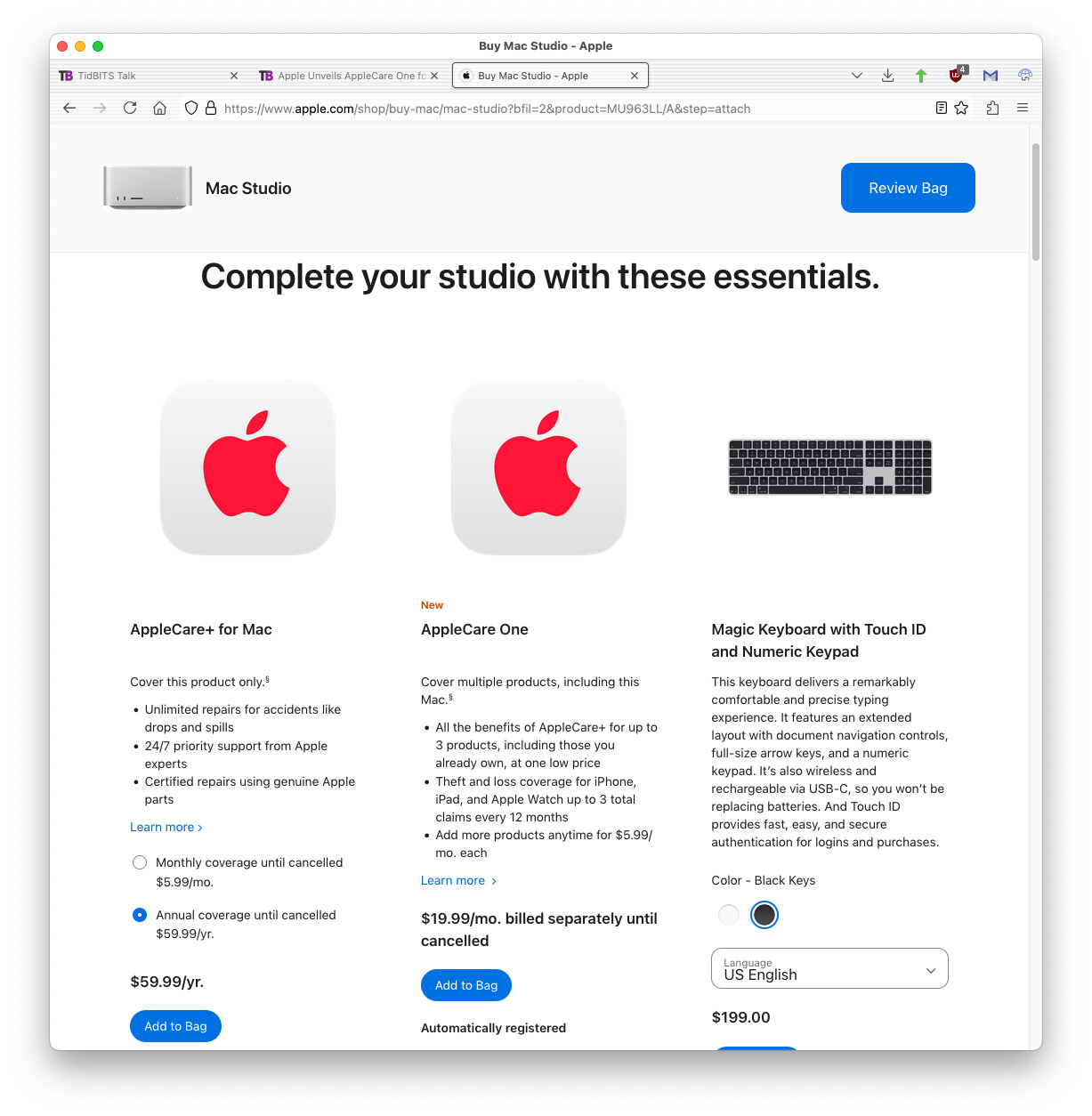
Looks like if you buy a Mac mini or Studio from the online Apple Store, there’s no longer an option to buy AppleCare+ with it – not even a monthly subscription! AppleCare is greyed out unless you buy a display at the same time, but it apparently only covers the display.

Which in itself is a big switch. From what I remember (and Google confirms), it used to be that if you bought AppleCare on an order for a Mac, it covered accessories on the same order, including displays.

The way I used to figure AppleCare cost/benefit was a) is the device difficult to repair?, combined with b) and really expensive?

So I didn’t get AppleCare for Apple desktops, because you could open up the case yourself and replace parts. That changed when Apple started gluing the iMac screen. Nor did I get it for phones, because they’re cheaper and less likely to malfunction out of warranty.

I didn’t figure breakage or theft into it. Theft would be covered by insurance. Breakage (such as cracked screen)? Don’t do that. :slight_smile:

But an iMac? It is all in one like a laptop, so if anything malfunctions, you’re completely dead until is fixed. I’m not going to try and fix it myself, so we’re looking at an expensive repair.

Which makes me wonder where current Mac mini and Studios land. Can you open them yourself without dealing with adhesives?

I just checked and AppleCare+, either monthly or annually, is still being offered. That’s without adding a monitor, using the Apple Store app on my phone.

In safari, I saw that if you chose no display that AppleCare at the bottom is grayed out as you report, but once you add the studio to your “bag” you can then add AppleCare+ (monthly or annually) or AppleCare One. It asks you right away after you add the Mac to the “bag”.

2 Likes

@glennf wrote about that recently.

1 Like

I just ran through the shopping process and the option appears after you’ve added it to your shopping bag:

What seems to have gone missing is the classic AppleCare - extend the warranty to 3 years for a fixed fee. That seems completely gone now.

2 Likes

I only get AppleCare with my iPhone, I drop them daily it seems. I’ve found Apple’s products increasingly reliable, damage and loss is the most likely need.

Apple Newsroom article says “Starting tomorrow, customers in the U.S. can sign up for AppleCare One …” - Nothing is announced for users who don’t live in the U.S.

1 Like

Weird. I added a Mac mini to my bag, and now see a choice of annual $34.99 or 3 years at $89. Same for Mac Studio: 3 years at $152.

What’s not available is a 3 year option for a Studio display.

OK. Now I’ve got to try it again…

  • Click on the “Buy” link for a Mac studio.
  • Select the base model (M4 Max)
  • Scroll down and view the options. See options for processor, memory, storage and software. Change nothing from the defaults.
  • Click Continue. Don’t choose to add a monitor.
    • If you select a monitor, there are options for AppleCare+ or AppleCare One. No option for classic AppleCare.
  • Click “Add to Bag”
  • I see the page I shared. Options for Apple Care+, AppleCare One and various accessories

Trying it again with a mini:

  • Click on the “Buy” linke for a Mac mini
  • Select the base model (M4, 10/10/16/256)
  • Change no options. Click Continue.
  • Ignore the option to add a monitor (which has its own separate AppleCare+/One offers). Add to bag.
  • Same options as the Studio: AppleCare+ or AppleCare One, plus various hardware accessories.

What about a MacBook Air laptop? Same. Only AC+ and AC1.

MacBook Pro? Ditto.

It would appear to me with the introduction of AppleCare One, they have dropped the classic AppleCare. At least in the US.

And had I been paying attention, I would have seen this coming.

Back in February, Apple dropped pre-paid AppleCare in retail stores only offering subscription-based extended warranties. It would appear that they are now doing the same for web-store orders.

Classic AppleCare is no longer listed on Apple’s AppleCare web page either.

If you’re still seeing prepaid/classic AppleCare in your location, then I assume you’re not in the US. Otherwise I don’t know why we’re seeing two different options.

It was because I was shopping via an EPP Perks at Work store link.

Major catch, @ace. This looked like a no-brainer decision for me since I pay for AppleCare+ monthly for 3 iPhones (mine, my wife’s, our daughter’s). $19.99 instead of $34.97, sign me up!

So I signed up and… I cannot add my wife and daughter’s iPhones. Even though I bought all these iPhones, I pay for AppleCare+ for all of them and we are all on Family.

(If there is a way to do this, someone please tell me!)

US only, currently.

Another thing to note, is Macs (including portable MacBook Pro/Air) are still not covered for Loss & Theft under any of these plans; AC One or otherwise.

So ultimately, even if you want the tech help & hardware cover under these AC plans, you’ll still probably need typical home insurance (often having to specify expensive items separately) if you want to cover for loss/theft. Or simply self insure using savings, of course.

I was unable to get AppleCare for my Iphone 16 because I am stuck outside the USA, had to buy it on the local host nation’s market, and AppleCare is not in this country. Might anyone know if this new program allows my phone to get covered? Thanks

IMHO it makes most sense to self insure via savings except in the special case where you know you simply cannot afford to replace an item if it’s a loss.

As a student that was the case for me and my Mac, although that was well before AppleCare+. But in the days since, Macs, especially the portables, have become far more solid (no moving parts, unibody, etc.) while things like Find My and encryption help to protect to a certain degree from theft. My main personal Mac these days is well spec’ed out 14" MBP and while I’d hate to have to shell out big $$$ if it were to get run over by a truck, I could afford it. My iPhone is a regular 15 and rather than pay Apple for insurance, I’d prefer to just get a new iPhone should mine ever get stolen. I have yet to break an iPhone (or even just its screen) even without a case because I rarely drop it. APP and the likes, is even cheaper to just replace. As always with these insurance subscriptions, if you can afford to replace your own, you’re going to be saving money.

Regardless of which route somebody chooses to go though, you absolutely positively 100% NEED a good and current backup that can be used to restore everything in a quick and reliable manner. There should be no compromise there and every once in a while testing your backup strategy to see if it actually allows you to recover everything as you’d imagine, is a good practice.

1 Like

I recently had an issue with an AppleCare+ replacement of an iPad Air - when I traded it in, I was told the screen showed signs of burn-in, and my trade-in value was reduced to $0, but I just received it a few months before as an AppleCare+ replacement (after leaving the iPad out in the rain :man_facepalming:). I’m completely sure that the device they sent me had the problem - it wasn’t caused by my use.

So now I’m completely in the self-insure camp*. I keep a spare iPhone in case something happens to one of our four, especially while we are traveling, and a spare Apple Watch because so much of my fitness stats are collected by the watch, but otherwise I’ll just repair the old one (if it’s a quick repair), or replace with a purchased new model and either repair and trade in the old model, or just recycle it. (And hope that this doesn’t happen 20-ish days before a new model is released, since I could always buy and return after 14 days and then get the new model.)

For years I’ve been setting aside money each month (in a high-yield savings acct) for planned device purchases (an iPhone every 30 months for me, one every 3 years for my wife, a MacBook every 4 years, etc.), so I’ll just add $30/month for our own “SelfCare” plan.

* Well, except my wife has an iPhone 13 mini and loves the size, so I’m keeping the monthly AC+ for that just so she can get a replacement if she needs one, until iOS no longer supports the 13, or Apple can’t replace the 13 mini with a like-new model.

Ach, sorry, I should have said that it applies to a single user, not to a family.

2 Likes

We too have spare devices for whoever might need one for whatever reason, Macs, iPads and older phones.

My son quipped when I got an extra pair of AirPods - “they’re the SparePods”.

2 Likes