Apple’s Certificate-Extension Updates Continue for Older Operating Systems

Originally published at: Apple’s Certificate-Extension Updates Continue for Older Operating Systems - TidBITS

Apple has released another batch of updates for older versions of its operating systems (see “Apple Releases OS 26.2.1 for AirTag 2, Extends Certificates on Older Versions,” 26 January 2026). Release notes for most of them largely match those from previous releases, differing only in the use of the term “certification” instead of “certificate.”

This update extends the certification required by features such as iMessage, FaceTime, and device activation to continue working after January 2027.

The full set of releases includes:

The Sixteen Stumper

When Apple finally issued release notes for iOS 16.7.14 and iPadOS 16.7.14 several days later, they matched the notes for iOS 16.7.13 and iPadOS 16.7.13, which said:

This update provides important bug fixes and is recommended for all users.

TidBITS reader David Duke wrote in after our previous article to note that iOS 16.7.13 included additional release notes in Australia, so it did indeed contain important bug fixes, probably in addition to the extended certificate:

This update addresses a mobile network issue for iPhone X and iPhone 8 models when establishing a connection to emergency services in Australia.

Australian cellular carrier Telstra has a support note about this situation:

We’re currently investigating an issue preventing some older Apple devices from connecting to our network. We’re working on this as a priority with Apple and will share updates as we have them.

Devices that may be impacted:

  • iPhone 8 updated to iOS 16.7.13
  • iPhone 8 Plus updated to iOS 16.7.13
  • iPhone X updated to iOS 16.7.13

Telstra says on that page that other iOS versions are also impacted, suggesting that we may see additional releases once Apple figures out the glitch with the Telstra network:

Apple has paused software updates released this week for some older iPhone models while they investigate. These include iOS 18.7.4, iOS 16.7.13, iOS 15.8.6, iOS 12.5.8

David Duke wrote again to report that iOS 16.7.14 restored his iPhone 8’s functionality on the Telstra network (he implied it was more than just emergency services), so it appears that Apple has finally fixed that problem. We’ll see if it triggers additional updates for Australian users of older iPhones.

The Catalina Conundrum

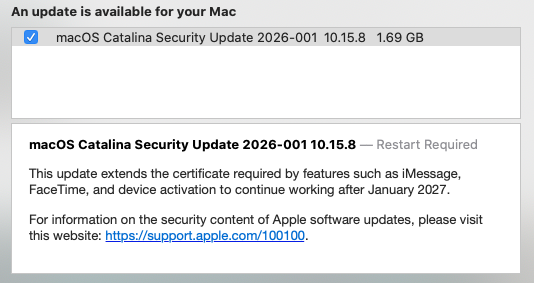
Interestingly, macOS 10.15.8 Catalina was not included in the list of new releases on the Apple Security Updates page—they all lack CVE entries—but that page does include Security Update 2026-001 Catalina. I can’t find any additional information about that security update, but TidBITS reader Jose Hill posted a screenshot showing the security update and the certificate extension language. So maybe Apple is delivering macOS Catalina 10.15.8 through a security update?

Apple Security Updates list of older operating system updates

5 Likes

Well, this is a new one. Apple has released a (or two) security updates for Catalina today (or yesterday) after years of nothing. I was surprised to discover that they’re still paying attention to older version of the operating system. Have they released similar updates across all operating systems from Catalina forward? I assume this was an important update or they wouldn’t have bothered patching an older OS.

The Catalina update was a little surprising. In the macOS Software Update panel, it appeared as “macOS Catalina Security Update 2026-001 10.15.8 1.69 GB”.

I don’t recall it generally being the case that Security Updates would increment the OS release number, so perhaps it really is a combination of certificate updates and other, unnamed security patches. At 1.69 GB, it certainly could be both, though macOS update sizes can sometimes be surprisingly large in the era of sealed system images.


Edited to add: FWIW, it took around 20 minutes to install the update, which did seem a bit long if it were only updating certificates. Maybe it took a while to calculate checksums on older hardware.

2 Likes

Yeah, that surprised me too. I kicked it off remotely, then did other stuff while I waited for the machine (a 2019 27” iMac) to reappear in the Finder’s “Locations” list. After about the same amount of time waiting as you mentioned, I got off my keister and went upstairs, only to see the update finish at that moment. :slight_smile:

It may have been re-signing all of the code signatures.

1 Like

My iMac is maxed out at 10.13.6 High Sierra and my MacBook Pro is maxed out at 12.7.6 Monterrey. Will these be affected if Apple doesn’t release updates for those versions?

1 Like

I haven’t checked to see if those OS versions have more recent certificates that aren’t affected by this issue. If they are affected, I would expect that Apple will issue updates eventually. Then again, who knows?

David has now confirmed to me that iOS 16.7.14 does indeed fix the Telstra bug, so his iPhone 8 is now functional again after a week without access to the Telstra network.

Apple has now released watchOS 11.6.2 as well, still with no release notes. I assume it’s a certificate extension like the rest.

Has anybody extracted the new/updated certificates? I’m interested in how they vary.

I’ve been wondering about the certificates in iPadOS 17. Since there are only three iPads for which iPadOS 17 is the terminal OS, I wouldn’t put it at the top of Apple’s priorities, but I’m slightly surprised that there wasn’t an iPadOS 17 update in the recent flurry of updates.

I’m curious if perhaps the certificate updates were somehow included in August’s iPadOS 17.7.10 update.

Does anyone know if iPadOS lets end users view Apple-supplied system certificates to check the dates?

This was my thinking too. But then it seems odd that Apple would be so on top of things back then when everything else they’re doing currently is a mess.

Settings > General > About > Certificate Trust Settings

On my iPhone 16 Pro running iOS 18.7.3 shows certificate store 2025031200 (1012)

That looks like a date to me, almost a year old.

I wonder what it looks like before/after on devices that can be updated? I’ll check my iPhone XS running old iOS 17 as soon as it’s charged.

You can install custom certificates using a Profile, which might prove useful in future.

For iOS 18
https://support.apple.com/en-gb/121672

And for iOS 26
https://support.apple.com/en-us/126047

Here is Apple’s public store of certificates
https://www.apple.com/certificateauthority/

Fascinating chat with details about what Apple updated (15-year-old G1) and the process that got us here (lots of temporary fixes)
https://g.co/gemini/share/c7705f7538f0

Why now?
The “hard deadline” for these old certificates is January 2027. Apple released these patches exactly one year early to ensure that the millions of legacy devices still in use globally have a full 12-month window to download the update before their “brains” (FaceTime, iMessage, and iCloud) stop working.

It seems newer devices run newer chains of trust (G3, G4) and don’t need to be updated…yet!

2 Likes

Good point. This is a useful feature of having Profile controls and is used by a lot of institutions via jamf or similar management tools.

(With large institutions/enterprise environments, this of course depends on the central controller being on the ball with updates and the users having the ability to receive those updates. I saw a university system fail at this as they had things set to only update when on the local campus network. Then Covid kept everyone working remote and many configurations actually denied the users any ability to update even basic things. Bit of a mess for people who already had a higher target profile for phishing and malware.)

Thanks for a very useful post!

It looks like devices on iPadOS 17.7.10 are using Root Store version 2024040500, i.e., the Root Store that was updated for iOS 17.4, iPadOS 17.4, macOS 14.4, tvOS 17.4, visionOS 1.1, and watchOS 10.4.

There are three certificates that are expired in the store, including the Apple Root Certificate Authority (exp Feb 10, 2025), Visa Information Delivery Root CA, and Baltimore CyberTrust Root. Several more expire in 2026 and 2027. Interestingly, according to the webpage for OS 26 certificates, the Apple Root Certificate Authority has not yet been updated.

FWIW, I haven’t run into any problems so far while using iPadOS 17.7.10 on my 6th generation iPad.

Updated to add: OS 26 does not contain certificates for Visa Information Delivery Root CA or Baltimore CyberTrust Root. I don’t know if those are no longer important or if they have been renamed.

Not sure how long the Catalina update took, probably around 15 minutes or so. It did update the version number to 10.15.8, however. Even more surprisingly, there was an update for my old iPod Touch a couple of weeks ago. Now, that was a surprise.

3 Likes

I updated my 2012 Mini to Catalina 10.15.8 today with no issues observed so far.