It’s out now :)
15.4 broke my UPnP server, FireStream (for the second update in a row). Insists I need to “Restore Purchase.” When I do that it prompts me to login to the App Store (I was already logged in). Login again, and the “Restore Dialog” just prompts me again…
Previous update also broke my CouchDB Server. Worked them out last time. But not FireStream this time.
Sent a note to Cyaneous (FireStream developer).
Cyaneous replied:
“Apple has broken something with the activation system - we are working on a fix and will be submitting it to Apple later today.”
Just updated to 15.4 and my first email reply on Proton took 3 tries before it would send. Any other suggestions? Proton support just says to try deleting and restoring the account, but I’ve already done that at least twice.
I totally agree with you about the annoying Apple auto-setting of your preferences.
For me, I am starting a checklist (which I will follow after every macOS update), for which the first two items are:
-ensure Apple Intelligence is turned OFF
-ensure sw updates are under my manual control (not Apple auto-update)
I just finished installing the WatchOS 11.4 update. It took about an hour to download and install, more than double the length of any of the other installations in the x.4 group (that includes one installation of iOS, two installations of macOS, one installation of TVOS, and an installation of HomePodOOS). My iPad and Vision Pro were already the release candidate betas and required no update.
There is also a firmware update for the AirPod Pro 2, which I installed while installing WatchOS.
1 Like
So yesterday, Apple came out with software updates, and, as usual, I began installing the updates on my various Apple products, one at a time. By bedtime, My M1 MacMini, my Gen8 iPad, my iPhone 16ProMax had all upgraded and appeared to be working fine. I left the Apple TV to update itself, and, since it was bedtime and I use my Gen6 AppleWatch to track my sleep, I decided to upgrade that next day. Upon awakening, I noticed that my sleep had not been tracked overnight. I kind of shrugged it off as I had an appointment to keep. But my wife ALSO uses a Gen6 AppleWatch to track her sleep told me that hers wasn’t tracked overnight either. Just wondering if anyone else had noticed anything similar?
Donnie
No - I updated my phone to 18.4 and my watch (still on 11.3.1) tracked my sleep as it always does. (Apple Watch Ultra.)
Another comment: I use the app Sleep++ to augment Apple’s sleep tracking. It’s free with ads, with an inexpensive one-time in-app purchase to remove the ads, and it does a much better job for me, especially tracking times that I am awake during sleep time, when I actually fell asleep and woke up, etc. I used the app AutoSleep for years before Apple supported sleep tracking but switched to Sleep++ this year, and I find it much better for me. As it’s free, it won’t hurt to give it a try and see if it works better for you.
No, changes to Apple News+ won’t affect Paprika in any way, whether or not you use Apple News.
Thanks, Doug. I guess we’ll see what happens tonight, huh?
Donnie
So apparently, I jumped the gun somewhat here. I got up a few hours earlier than normal this morning for a 9:00 AM procedure. When I checked, the Health app indicated that it had no data. Hence, my unusual early exercise at jumping to conclusions. I just now re-checked, and voila, there last night’s sleep data was, as it’s supposed to be.
Thanks everybody, sorry for the false alarm.
Donnie
But you will not be able to save the Apple News recipes in Paprika as far as I can tell.
It would be nice if they let you open the page in Safari, then save, but that would take you out of the eco system that is News. Kind of like Pinterest in that regard.
And they did. My FireStream server is back up!
;~}
I just had a simple msg. take almost 10 tries to send. Worse than before updating my MacOS.
Any other suggestions, anyone??
I confirm. Started work today with a white background. Lame.
Updating to iOS 18.4 changed my Mail setting “Ask Before Deleting” to off.
That’s a pain!
It’s easy enough to find a sample of a color you like and blow it up into a full-screen sized image and use it like a wallpaper photograph.
Installed the update on M3 MacBook Pro, iPad Pro 11” and iPhone 13 Pro.
The only issue is it knocked both my pairs of KEF wireless loudspeakers (annd subwoofers) off my wi-fi network, LS60 and LSX. At least my iPhone couldn’t find them.
Quit and relaunched Apple Music a bunch of times, with no effect.
Restarted the speakers, which I’ve rarely needed to do, and restarted iPhone.
Finally found them again, but music to the LS60s kept dropping out and coming back after a minute or so. Annoying!
After a half hour or so, it was all back to normal. Very weird.
I ran into an issue with MacOS 15.4. It upgraded well, and seemed just fine. But I noticed that many text files would not open in BBEdit afterwards. The text files in question, used by my scripting system, have non-standard extensions, such as .auto instead of .txt.
The error that popped up was this:
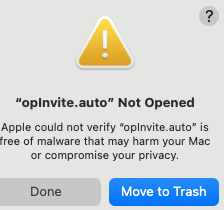
I contacted Apple support and they blamed the developer of BBEdit. I contacted them and they explained that Apple was wrong. The explained the OS is reporting this error because it has “quarantined” the files in question.
They told me a Terminal command I could use to “free” the files from quarantine:
xattr -dr com.apple.quarantine “full path to directory of files”
That worked, and the files once again opened in BBEdit. But I’ll need to do this for all directories containing these script files.
1 Like
Has anyone had success choosing different default translation apps on iOS 18.4 I have a few but only one seems to be possible. Perhaps the apps need to be updated so that can hook in.