When Apple introduced Quick Note back in macOS Monterey (2021), I thought it might be a big step forward for linking and note-taking. In fact, I thought it might include features that I had discussed over email with Steve Jobs in 2010 . I was even a bit apprehensive that Apple might be trying to Sherlock our Hookmark app.
On paper, Quick Note sounds great: quickly capture a note connected to what you’re working on. In practice, however, I’ve found some real limitations:
It seems to work reliably only in Safari and Notes. Other apps (including Apple’s own) don’t really support it.
Even in Safari, it’s hit-or-miss whether the link gets inserted.
Links are one-way: you can go from the note to the page, but not the other way around.
To capture context you need to use the mouse (select text → right click → Add to Quick Note). The keyboard shortcuts or hot corner just open a blank note.
Fascinating topic! Interested to follow the results/comments!
But no, I don’t use it. I grew up with paper and in retirement age am reverting back to it for many reasons.
Haven’t kept digital notes in a long time. Oh wait, I do take short notes in iA Writer on iPhone when out and about and paper is not at hand, but then back at home I look at the notes, deal with them and erase them. Appropriate tool for the job.
I don’t use it on any platform, although I do heavily use Notes. I keep Notes open and if I happen to be on a website with something useful, I simple “Add a link” directly into an appropriate note, often with a few words to detail why it’s there. If I don’t need the entire site, I just copy/paste what I want.
Literally this morning wanted to link an Agenda note to a cell in a spreadhsheet in Numbers, even though I knew I couldn’t.
Quick Notes I tend to use as a one way street on my iPad or iPhone to my Mac if I am goofing/researching in the evening on one of the iDevices. They arrive in Notes and at some point I remember to check and deal accordingly.
Nope, I don’t use it. I don’t want a mess of clippings, links, and reminders accumulating in a single note that I then have to break up and categorize. When I need to create a note, I open Notes.
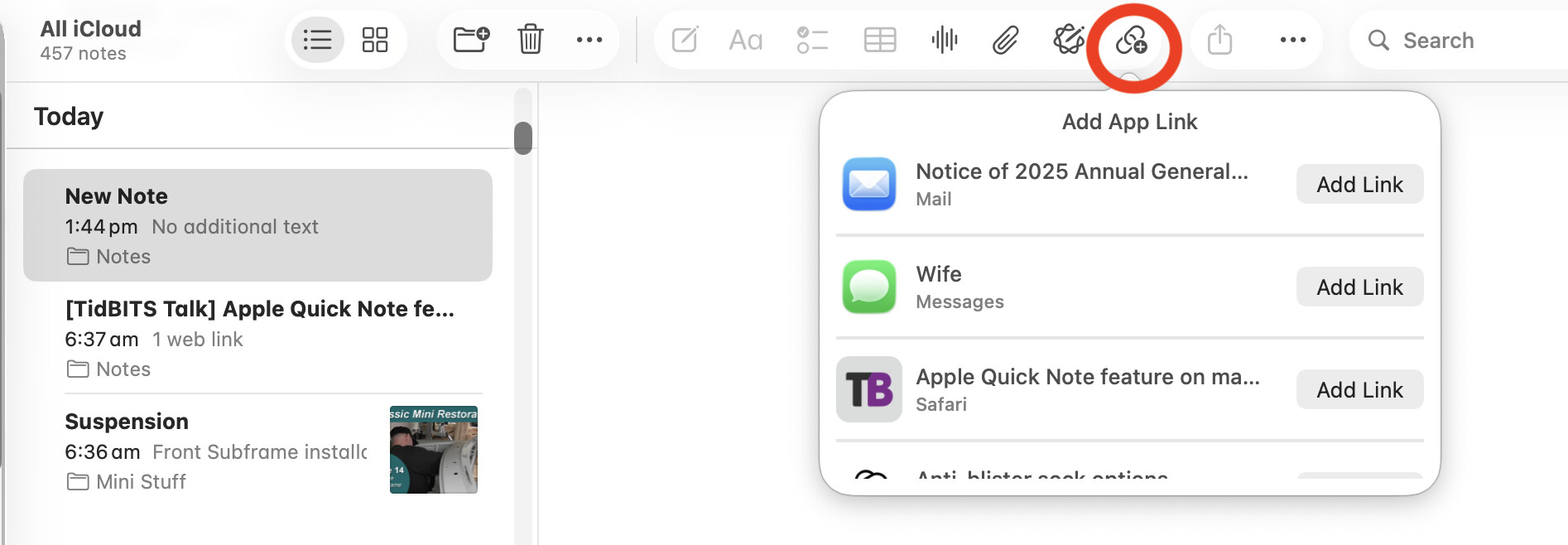
It’s pretty straightforward, just open a note then click on the ‘Add a Link’ icon and it will present a list of things it can link; the current message, email, website etc. It even offered me my current ChatGPT session.
Like I said -—on this post: Quick Note on macOS: Still Limited in 2025 – to which I forgot to link here, recently I’ve only tested it on macOS 15.7 (24G222), and in my experience it does not work with Apple Mail. Is your test on macOS 26? I’m currently traveling without access to my Mac Mini running macOS 26 so I can’t check there until tomorrow night.
It worked in one test with Messages.app, then it stopped working.
So in my experience (and I believe others have said so too) : it’s hit and miss. And even if it worked according to its documentation, the bulk of what I wrote (Quick Note on macOS: Still Limited in 2025 – Hookmark) holds. I.e., what we really need is to be able to link from anything to anything, e.g., from a Mail message to a Draft note.
Further, as noted in my post, Apple does not expose an API for linking to Messages, Podcast, etc. They are giving themselves an unfair advantage over their app developer apples. I wrote this on this subject on my Substack: Apple’s macOS Apps Are the Weak Link - Luc Beaudoin.
Hookmark goes as far as we at CogSci Apps Corp. can go to enable linking in Apple’s macOS apps. E.g., we enable linking to and from files and Apple Mail (and with many 3rd party apps) using AppleScript and x-callback-url URLs. (cf. Manifesto for Ubiquitous Linking which has made many app developers make their apps link-friendly [including automation]) But again Apple does not expose an api for Music, Podcasts, Messages etc. Not really fair.
I’m on OS26 now but I’ve been doing the same for well over a year with Sequoia (and likely Sonoma before that). I’ve always found it pretty reliable, can’t say it’s been an issue. Just to be clear, I’m NOT doing this with Quick Notes.
thank you. I do understand that you’re using the link button (my article that I had forgotten to link to covered that too). I don’t know why it’s not working on my system, but I can share a screencast if it helps at some point. I’ll check on my mac mini asap. I would love it to work.
The criticism I have of much of Apple’s software not being link-friendly is not just that it lacks an API for linking but it also lacks a Copy Link function from the U. The “add link” function in Notes app is tedious (uses a popup window). It would be much better to just allow users to Copy Link from the UI. If Apple’s apps had that ( Copy Link), then automators (and CogSci Apps Corp.) could at least use Keyboard Maestro-like automation (UI-scripting), and people could do it themselves.
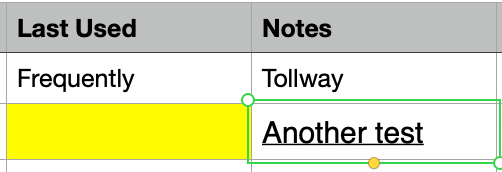
I was curious, so I tried, and this works with Hookmark! I was able to Ctrl-H to bring up Hookmark, copy as Link, and paste the link in a cell in Numbers. The selected cell below (in the Notes column) is a link to the “Another Test” note inside of Agenda.
Yet another reminder to myself that I use Hookmark less than I should. I keep finding new ways to use it!
awesome! And if you want to paste a note in Google Docs , Discourse Forum or other software that is not friendly to custom links ( like hook:// , OmniFocus:// , x-devonthink-item URL) then use Copy As Universal Link instead: