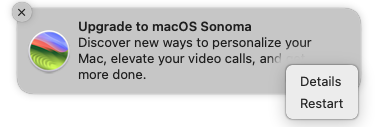
Thanks to @Quantumpanda for saying what I’ve been thinking too, especially after @Will_B’s note that an Apple Senior Advisor told him that this is a bug and was encouraging people to report the problem.
I’ve spun up a Ventura VM to see if I can get this to happen, and the Sonoma notification came up as soon as I finished installing, but my first test—clicking the notification itself—did not trigger the problem. I also looked at but did not select anything from the hidden menu.
In all my years of using and upgrading Macs, I have never seen or heard about anything of this nature. Apple computers should never “upgrade automatically” unless the automatic updates option is turned on. So while your computer might have exhibited some weird type of misfire, what you experienced is certainly not a feature of Apple system software.
Today I got the notification again and very carefully clicked the X to dismiss it, but this time after the download began, I waited a few minutes before shutting down, and the installation took place anyway.
This could be even worse: we have a bug that we don’t understand, don’t know how to stop, and don’t know how to repair.
I wonder if the problem is that Apple is sending out an update notice that is so easy to misunderstand that a fair number of people make the wrong response and accidentally initiate the upgrade. I’ve been fooled once or twice and had to stop or reverse previous upgrades because I made the wrong response.
Well, when it happened to me, I got the upgrade notification, hovered over the notification until the close button appeared, and clicked that. That’s it. If that’s now one initiates an upgrade (it didn’t used to be because I’ve received numerous OS upgrade notifications over the years and responded in the same way, just closing the notification, none of which started an upgrade), that’s such stunningly bad UX that it’s basically a bug.
As bad as forcing a major upgrade is, it’s still not apple’s worst bug ever. Back in the early days of OS X an itunes update erased any external hard drive that had a space in the name because a programmer didn’t escape the file names correctly.
I’ve tried to find a reference, but for all of the history that still exists on the net, if it isn’t recent or constantly accessed, it gets hard to find (kind of like wetware memories.)
When this bug finally bit me, I was able to thwart the upgrade process
by immediately opening Software Update in System Preferences (I’m
running Monterey) and clicking the “Cancel Update” button.
There is an assumption that by clicking a menu choice button (e.g. OK or Cancel) the human programmer has written the correct response for that selection.
It seems that in this case the subsequent (programmed) action can go two ways depending on some system settings/characteristics that have not shown up in testing. For example (but unlikely) maybe the testers assumed all Macs are set to auto-update.
So the Sonoma upgrade annoyance is not necessarily a user error.
As it happens I have a Macbook Air M2 running Sonoma (before this annoyance occurred) and a legacy iMac that I am keeping on Mojave for numerous reasons. Fortunately the iMac is not “eligible” for Sonoma but it does sometimes nag me to upgrade to Monterey or something. Hence my reference above to the Terminal command “Ignore” no longer working.
I can see that, but my iMac isn’t, and never has been, enrolled in an MDM and I don’t have either of the auto-update settings checked, yet it still tried to auto-update me.
Neither myself or my friend use MDM (I had to look it up… :-} or have any auto-update settings activated. My friend’s Ventura system has tried it twice.
Are you sure it said Install and Info? I’m just curious because when I got a similar notification in my Ventura VM, it had different options, which I find curious. I wonder if there could be different notifications.
I’m on Monterey, and this is the notification (with those exact options) I got two days ago. I chose ‘Details’ which either opened a page on Apple’s site or Software Update in System Preferences (can’t now remember which). Because I’d been following this thread, I was very cautious and immediately checked in ‘/System/Volumes/Update’ and opened Activity Monitor to see if there was any unusual network activity by update processes. I didn’t find anything to indicate that Sonoma was being downloaded. However, I restarted anyway to be safe and no update ran (my backup plan was to immediately power off if I saw the update progress bar under the Apple logo).
I think my VM might have had Details and Restart because it was set to the default option of “Download new updates when available” and had already downloaded something. I didn’t have any trouble with clicking the ⓧ.
It may be that @Shamino had Info and Install because his Mac hadn’t yet downloaded the upgrade.