From the number of people having problems finding, understanding and controlling all these options for all those apps, it seems to me the iOS control system has become so complex that it is failing for many iPhone users.
In addition, I think Apple’s ingrained cultural love of “no manual, no documentation” combined with the demise of the Human Interface Guidelines have made Apple’s products more difficult to use.
7 Likes
Actually, there is a user guide for all Apple devices that are associated with your account, accessible through the Tips app. There is a User Guide section at the bottom. I did notice that my iPhone app shows a guide for my HomePods, but the Mac version does not.
Furthermore, there are free epub versions available via the Books app or web version available via the Support tab of apple.com.
3 Likes
Yes. I do think, though, that Apple’s minimalist approach to packed-in documentation and the requirement to seek out Support articles and User Guides hurts ease-of-use.
Somehow this reminds me of the response Arthur Dent received when he had trouble finding information in the Hitchhiker’s Guide:
“But the plans were on display…”
“On display? I eventually had to go down to the cellar to find them.”
“That’s the display department.”
“With a flashlight.”
“Ah, well, the lights had probably gone.”
“So had the stairs.”
“But look, you found the notice, didn’t you?”
“Yes,” said Arthur, “yes I did. It was on display in the bottom of a locked filing cabinet stuck in a disused lavatory with a sign on the door saying ‘Beware of the Leopard.”
― Douglas Adams, The Hitchhiker’s Guide to the Galaxy
It’s not quite that bad, I will admit, but after seeing “Tips” pop up a few minimally informative bits of information, I wasn’t expecting it to hide instructions for turning on the built-in flashlight – which, by the way, I still was not able to get to work.
2 Likes
There is a proper iOS manual on Apple’s web site as well. Here’s the one for iOS 26:
Apple used to put manuals in the Books store, but they stopped doing that a while ago. The last version there is for iOS 16.5.
My first encounter with this book was the BBC TV production and the radio-play scripts. These productions (as well as the UK release of the novels) use the proper British word, and say “with a torch”.
My American brain, upon hearing this, immediately thought of a wooden log with a burning kerosene-soaked rag at the end. Clearly not the author’s intent, but even funnier, IMO.
3 Likes
Thanks for the link to the online iPhone user guide. I also discovered Douglas Adams and the Hitchhiker’s Guide on BBC radio. He had a wonderful gift for pointing out the absurdities of life, like the way that companies hide away the information that users need.
Agreed that there is little written documentation with the iPhone. However, the first sentence of the enclosure that came with my iPhone 17 Pro states:
“Before using iPhone, review the iPhone User Guide at support.apple.com/guide/iphone.”
So the packaging actually guides you to the documentation. They should let you know about access via the Tips app, but once discovered, it is memorable.
Because much of the interface is not static, it would be a waste of paper to provide extensive printed documentation that very few would read. Regrettably, Apple appears to have stopped making book format (PDF or EPUB) available for those who find things via browsing.
I do agree that directly searching for Apple Support is a mess. My method these days is to initiate a search in Safari with the Customize Search Engine extension pointing to Perplexity. Hopefully, one of the sources is an Apple Support page, which I then open.
1 Like
Oh for the good ol’ days:
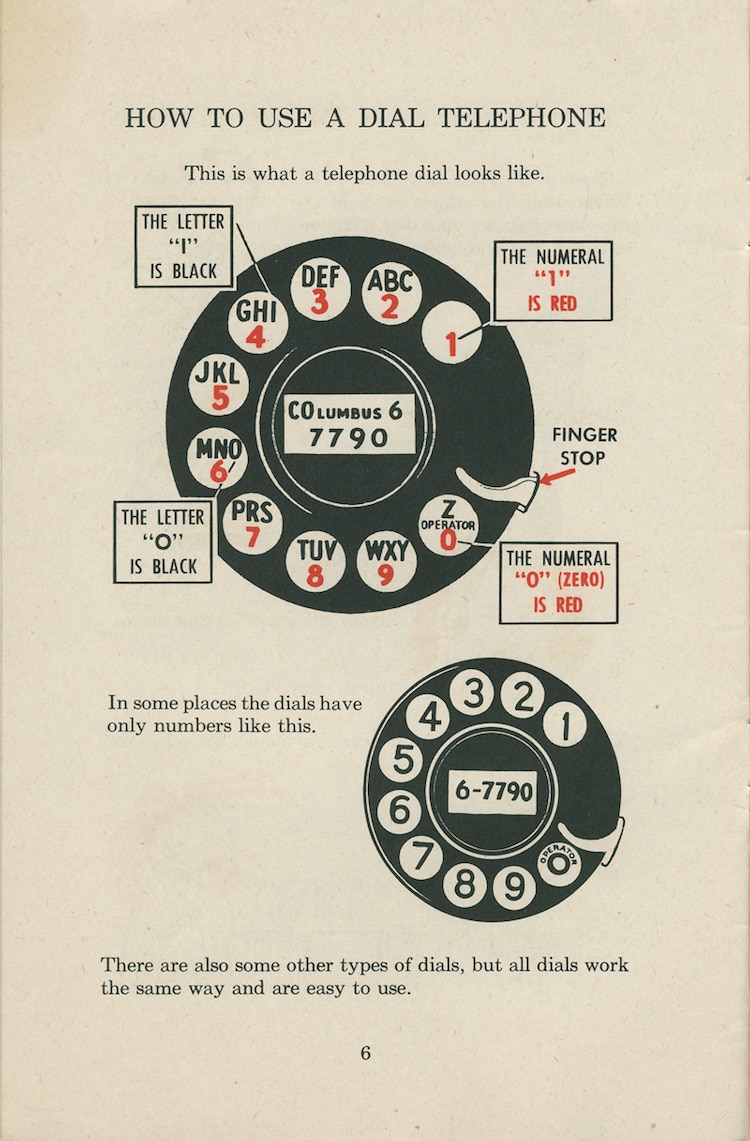
8 Likes
That’s actually a great reminder to not take familiarity with something for granted. Those instructions must have been very useful in the 1920s and could actually be useful with GenZ’ers and beyond.
Starting my search with:
site:support.apple.com
Works really well for me, with either duckduckgo or google. If you do it often, you could even do a text replacement.
1 Like
Maybe I am not understanding? With Google (Safari, macOS Tahoe 26.2), when I search for just “iphone support” (without the quotes), the first result is “iPhone - Official Apple Support” https://support.apple.com/iphone.
Not just the 1920s! As a child in 50s/60s living north of Chicago, our telephones had live operators, no dials but instead “Number, please” . Phone numbers went as low as 2 digits -my mother’s hairdresser was 14. When my little brother got stranded at the skating rink, operator got his name and tracked down our number and called Mom. I vividly remember the day when the phone company man attached a dial to the side our phones and taught us to add a 3-digit prefix (Cedar4 i.e.234)and then to add zeros in front of any number less than 4 digits. Thus Rose the hairdresser became complicated 234-0014! It was a major milestone in our lives. And this was is in proper suburb, not a hamlet in the boonies. Who’d a thunk it then that we’d be having such a discussion as this one today🤣
5 Likes
My post was a response to, “I do agree that searching Apple support is a mess.”
Adding the site specification to a search like “silence texts and calls” restricts search results to Apple’s support site, rather than getting results from other places.
1 Like
There is always CHAT what ever or Gemini that might help you out in tracking down solutions to your iPhone, iPad or Mac problems and Youtube.
iPhone User Guide
iPad User Guide
Mac User Guide
As a child in 50s/60s living north of Chicago, our telephones had live operators, no dials but instead “Number, please” . Phone numbers went as low as 2 digits -my mother’s hairdresser was 14.
I think this also highlights something else – that things have gotten immensely more complicated, making it challenging to document things effectively.
(We also shouldn’t overestimate how well Apple did in the past – I seem to remember someone connected to this site writing an entire book about how to get started with the Internet, way back when)
I sometimes wonder how much of that complication is necessary, and how Apple could better manage that complication. I suspect a lot of us start with the defaults that come preset in the device and may not think about changing the settings until something goes wrong. Then the problem becomes finding the magic buzzword needed to find where the instructions are hidden.
I find an even bigger problem is that Apple tech support people are no longer being trained. For the last year - possibly longer - each time I’ve called Apple support, the person I’ve spoken to had to Google the answer. Literally, I have been asked to wait on hold & told they’d be right back after Googling for the info. Not looking at Apple resources, purely Googling.
If they don’t come up w/an answer to my question, they give me suggestions how to continue the search on my own using Google. To me, that’s unacceptable. Between my iMac, iPhone, iPads, & Apple watch, I have a lot of $$ invested in Apple products. I expect more tech support than an untrained person using Google.
Now, after the support person has done a bit of “googling”, I ask to have my call escalated. So far it appears the higher tier can often provide an answer w/o resorting to Google. But if you have to call back for further assistance, you can’t initially escalate the call. Still have to go back to the 1st tier, run thru the issue, & again ask to have the call escalated.
My pet peeve.
1 Like
You need a iPhone Pilots License to operate a iPhone these days since even Tech Support at Apple can’t figure out half of the features on a iPhone. The biggest snafu that Apple implemented was “Focus” since it tends to block other features on the iPhone. I just refuse to use it.
I’m not sure if it’s been mentioned, but Apple Support also has a good YouTube channel.
I think if you take a look at a lot of them, they have very good walk-throughs of some things that seem to trip people up often.
1 Like