Their Discord channel would be the spot to answer specific questions. But on first glance no.
1 Like
Those of you who have to deal with a managed Mac from work might like to know that it doesn’t have any requests which require an admin authorisation. We have saving to external drives barred for example, but it is now quick and easy to move files directly from Mac to Mac or iOS device and ignore Sharepoint.
1 Like
And taking your advice, one of the first questions on their Discord I saw was the one I had, and Blip’s response was “Auto-accept from people has been requested a lot and will likely be one of the first features we work on after we reach platform parity with Windows.”
Pretty sure I auto-accepted myself (might be a new therapy there…) between my Macs.
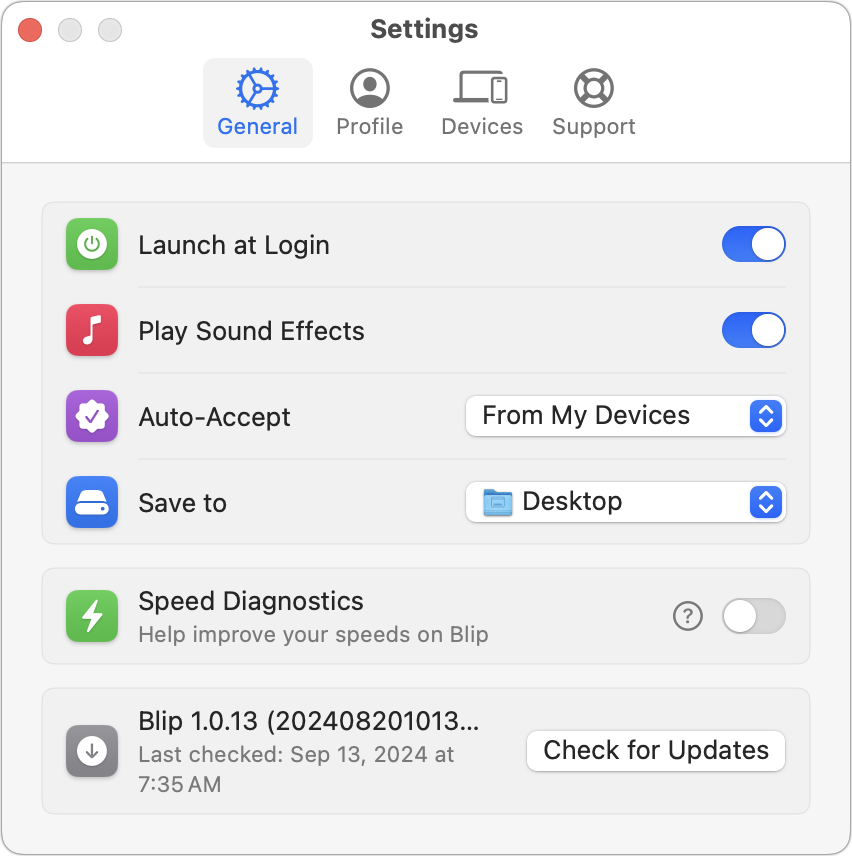
Auto-Accept can be set to From My Devices or Never right now. I could imagine allowing it in general or perhaps for certain people so people could send you things when you’re not present.
1 Like
Aha. And that adds the missing nuance to the company’s response I quoted. You can currently auto-accept, but my guess is that drop-down doesn’t include “From My Contacts” (or some other way to assign a transmission to an individual). That’s the enhancement that “has been requested a lot”, and which is apparently on their to-do list.
[Edit: OK, re-read Adam’s reply and he enumerates the two current values for Auto-Accept: “From My Devices” and “Never”. Sorry for glossing over that!]
1 Like
Have you guys seen NoUSB.co ? It’s all web based so nothing to install and truly multi-platform.
You just need to flash a QR code to create a portal between devices, more that two devices can join at the same time, and since nothing it stored, all sharing stop as soon as you close the tab.
It’s quite convenient for quick file transfers between devices that can’t necessarily install apps.
Also you don’t need to create an account to use it.
1 Like
Two more options that do much the same thing:
- LANDrop: https://landrop.app (cross-platform, currently free, and in the App Store for those more comfortable with that)
- LocalSend: https://localsend.org (cross-platform, App Store, and open source: GitHub - localsend/localsend: An open-source cross-platform alternative to AirDrop)
These are both local network-only transfer apps. That means they’re not suitable for Adam’s specific use case, which needs to work over the Internet. That adds complexity to the implementation, which I suspect is (unconsciously) behind the hesitation a few people are expressing.
But if your use case is just local transfers between your own/family devices, or colleagues in a less-restrictively managed office, these both work well.
I’m partial to LocalSend, as the open source means it’s harder to hide bad intent, whether in terms of security, or a change to non-free.
5 Likes
There’s now a Windows version of Blip for those who want cross-platform transfers.
My utility of the year last year, so useful.
2 Likes