FedEx and UPS differentiate between individual customers (example: you create an account at FedEx to send a birthday present to a friend) and business customers (example: you create an account at FedEx so that the bookshop you own can make shipments to people who order books from your store).
Based on my quick review of FedEx and UPS services for this discussion thread, it looks like individual customers cannot make shipments using the FedEx and UPS service offerings that use the USPS for the “last mile”. But it looks like the Street Addressing add-on for P.O. Boxes makes it possible for individual FedEx and UPS customers, who only have access to services where FedEx and UPS handle a package’s entire journey, to have shipments delivered to P.O. Boxes.
Yes, as long as the owner of the P.O. Box has added the Street Addressing service to their P.O. Box and the sender has followed the USPS requirements for the recipient’s address.
In 1998 the Post Office changed the numbers of some areas in the 021xx zip code to 024xx, and in some cases divided the old zip codes into two or more. The problem for the change of 02159 to 02459 (one of about a dozen zip codes in Newton, MA) is described Newton ZIP codes have been changed As I recall, adjacent Waltham was divided into 4 zip codes in the 024xx group at the same time; it’s mapped here https://www.zipdatamaps.com/en/us/zip-maps/ma/city/borders/waltham-zip-code-map
Another non-obvious practice is that some zip codes may have two names, one for the part of the city and one for the city as a whole. So you can send newton either to Newton 02464 or Newton Upper Falls 02466. Many years back some magazine publishers programmed their computers to assign the one of the city’s 12 or so zip codes to all subscribers who listed their address as Newton, MA, causing delivery chaos.
A curious related issue. My laptop is plugged in to a/c power and connected to the internet via Cat6 cabling to my router, then by fiber to my ISP’s server. When I launch the maps app and ask it to show my current location, the computer replies that it has no idea unless I turn on Wi-Fi. When I do that, it drops a pin right on my house!
When you’re on a wired connection, your “location” is your ISP’s central office, which may be far from your location. In my case, it’s in a different county.
When Wi-Fi is enabled, even if you’re not connected to any access point, then the system will get the list of nearby access points and the signal strengths of each one. It can use a database of known access points (for example, WiGLE) to triangulate your location. It’s also possible to triangulate from cell towers and Bluetooth devices, if your computer has the corresponding receivers.
The result is surprisingly accurate in most populated areas, due to the presence of at least one access point in nearly every home and business these days.
I’ve found the precision of the map supplied by “Get Info” for a photo is extremely precise in an urban hardscape–e.g. the exact place, to scale, on the curb where my nephew parked (at Advance Auto Parts in North Platte NB) when he was on a road trip a couple of years ago. A little unnerving, if anything . . .
That accuracy can be confounded by logical problems. If you park your car in a huge (or small) lot at your home airport and smugly remember that your iPhone has stored your location, BUT you rent a car at the other end of your flight, THAT location will be what’s remembered. WHO cares exactly WHERE I turned in a rental at LAX? There must be some way to get around this (probably more manual input, such as snapping a photo of your parked car that includes the parking lot location marker).
Why IS that? Can that affect things like Ookla SpeedTest (which provides a list of “nearby” servers when one runs it? Also, if I turn on my desktop computer’s Wi-Fi radio but don’t bond to it intentionally, it still shows as my preferred known network, Does that mean the OS and computer prioritize wireless over wired connections?
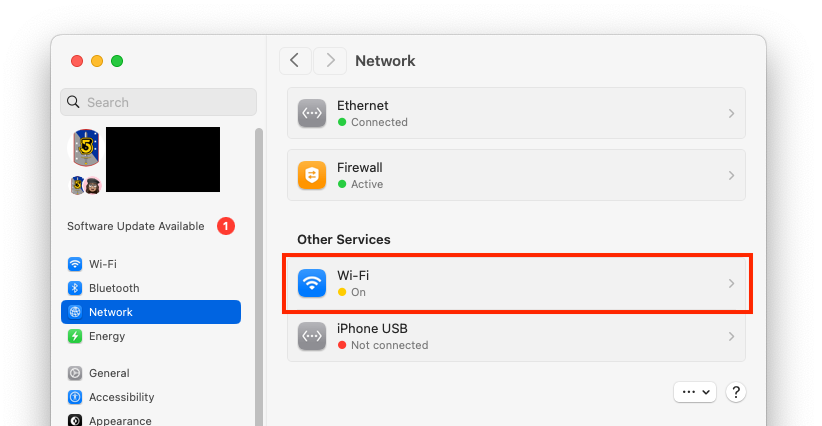
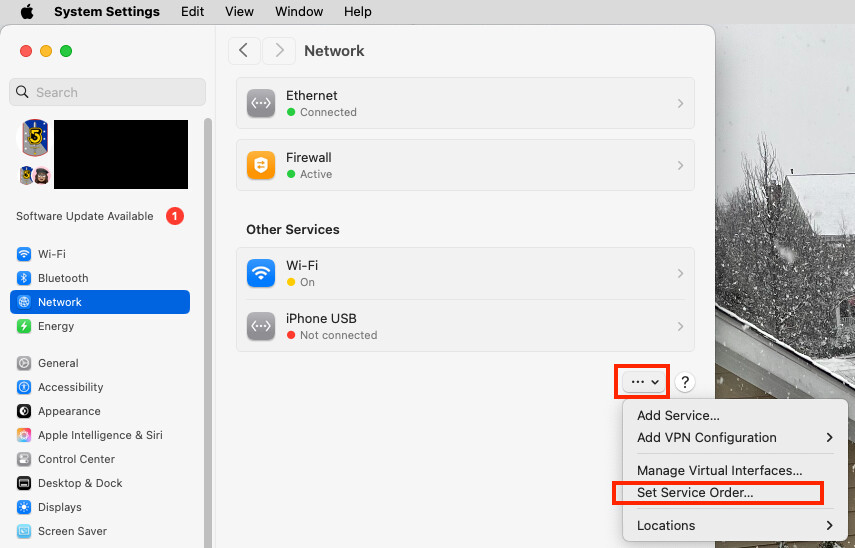
“Set Service Order” is an “additional option” under an clickable button designated by an unnamed ellipsis. When I activate that, the services are listed in roughly the same order as they appear at Settings>Network (with “Wi-Fi” well below Ethernet, in fourth position, but when I ask maps to locate me with Wii-Fi turned OFF, the computer has no idea where I am. Does that mean that because the request cannot be resolved by my primary network connection it’s passed to Wi-Fi? I don’t disconnect my Cat6 cable when I select “Wi-Fi” from the MenuBar and “light up” the Wi-Fi Chevron.
With respect to a phone, it will use your GPS coordinates, which are extremely precise if you can receive the satellite signal (which generally means any time you’re outdoors and in buildings with construction that permits the signals to pass through the walls).
When GPS is not available (e.g. in a concrete building), then location services will fall back to triangulation based on things like cell towers and Wi-Fi hot-spots. The accuracy will vary depending on where you are - the more access points it can see, the better it will be. But it will require Internet connectivity, because the database of access points is too big and changes too frequently to keep it cached on your devices.
You could put an AirTag in your car.
Or you could to it the old-fashioned way (that I still do). When I park at the airport, I write the lot/aisle number and shuttle-bus stop on the back of the claim ticket (that I receive on entry to the lot). Since I’m keeping the ticket in my wallet, I won’t forget my car’s location.
(You don’t want to leave that ticket in the car, because it will allow a thief to exit the lot without even being questioned. And many airports let you pay for parking in the terminal, if you have it with you.)
Because on the Internet, the only thing remote servers know about you is what you send them and your IP address.
If your web browser sends your location (usually asking your permission first, if you don’t have it configured to auto-send your location), it will use your operating system’s location services. This uses data collected from on-board radios (GPS, Wi-Fi, Bluetooth, cellular) to compute a location.
If your computer has no radios (not present or disabled) or if you chose to not send your location, then the server only has your IP address. But IP addresses are not geographically assigned. There are databases of who owns each allocated IP address block (e.g. the network of whois databases), and servers will frequently use the address of an address’s owner. But if you aren’t paying for a static address (and maybe even if you are), the registered owner of that IP address will be your ISP, so any location based on that address will be your ISP’s address, not yours.
Large ISP like Verizon and Comcast will typically register the locations of the router(s) that manage the address blocks, not the main corporate address, so an IP address will usually produce the location of the central office that is serving your IP address. Depending on where you live, it may be nearby, or it may be quite a long distance from your location. (e.g., if you have satellite Internet access, that central office could be thousands of miles away.)
Absolutely. The Ookla test works by sending/receiving data to/from a server. The data is timestamped by the sender so the receiver can determine how long it takes each packet to move between you and the server. This allows the software to determine the amount of time it takes for individual packets to get to/from the server (latency) and the total amount of packets that can be delivered for a certain amount of time (bandwidth).
Ideally, you want the server to be at the same location as the next-hop on your network (e.g. your ISP’s central office), so it will measure the bandwidth and latency of the link from your home to that central office.
If, however, the server is further away, then that data is going to travel through more routers - possibly over the Internet through other service provider networks. All of those intermediate networks will increase latency and reduce bandwidth.
Think about it this way. If you have two computers next to each other in your home, with nothing more than an Ethernet switch between them, then you may be able to move a full gigabit-per-second over that link. Maybe even faster if you have 10G equipment.
But if you measure the link to, let’s say, the TidBITS server, you’re going to see something much slower. That number will be affected by the speed and latency of all the links between you and TidBITS, all the routers along that path, the level of service you (and all the intermediate networks) have paid for, and the speed of the server itself.
When Ookla presents a nearby server, they mean “nearby” in the sense of network-distance. Which server can be reached with the least number of “hops” between routers. The closest ones will usually produce the best numbers (e.g. for testing the link you paid for). But a server further away may be a more accurate measure of performance when accessing services on the Internet.
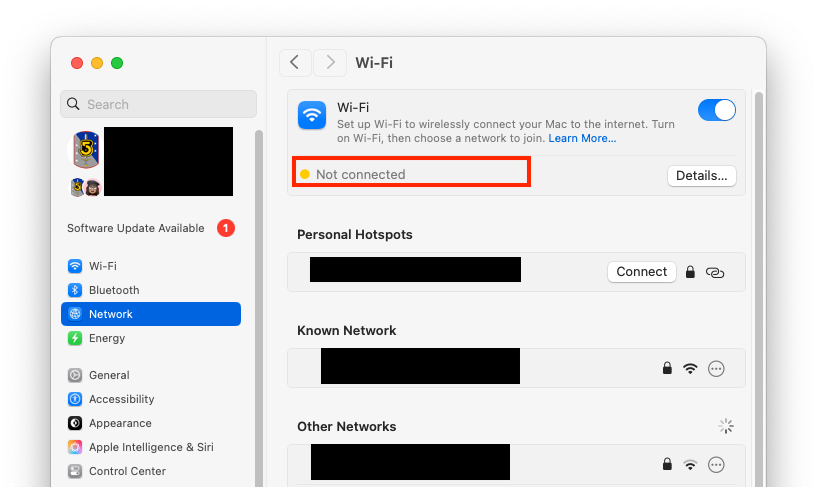
You can enable the Wi-Fi radio but not connect to any access point. This is actually how my desktop system is configured, because the Wi-Fi radio is necessary for AirDrop to work. But all my data moves over Ethernet:
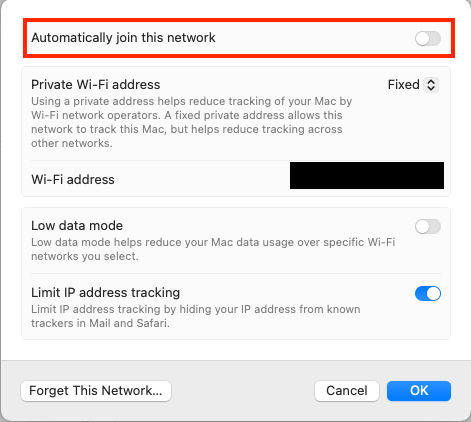
Even if you are configured for your local Wi-Fi, you don’t have to auto-connect to it. On the Wi-Fi properties for an access point, you can tell it not to:
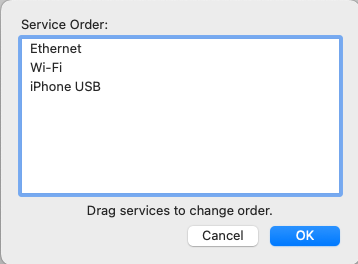
If you use both Ethernet and Wi-Fi and have your Wi-Fi connected to an access point, your operating system will pick one or the other, depending on how you have it configured. On macOS, you can set the “service order”:
It’s because you have wifi turned off. The order only affects among interfaces that are on. But if you turn something off entirely, it’s gone. Regardless of order.
So turn wifi on, but do not select a wifi network to join. Also, make sure you have Gigabit selected above wifi in the order. Then you get everything you want. You have fast wired networking, but you also get the location services benefits of wifi (and others).
This is why Google Maps Street View cars also scan for Wi-Fi networks when photographing streetscapes. Apple does something similar.
For anybody interested, more info, including how to supposedly opt-out of Google and Apple logging of your Wi-Fi network (I’ve had my networks opted-out for years but have no way to test it because I am surrounded by many, many other networks), is here:
I can sometimes notice that the weather app places me at a bit funny location names but when looking at Photos the names seems quite excellent down to naming city areas, museums and national parks. I live in Sweden so perhaps it is a US unique issue?
The US ZIP code system does seem to be a mess. But thank goodness it was developed and implemented while a postal service still exists. Otherwise we would all be relying on the Google Maps database, or equivalent.
As it happens I live on a corner (in Australia) and my official, original address (electricity supply etc) was one street but my “postal” address, driveway and front door are in the second street.
Early Google Maps only knew of the original address which meant that (lazy) couriers would not complete the delivery. It seems to be sorted out now.
On a related issue people who own more than one property in NSW might have to pay a land tax. Every few years I get a letter from the Office of State Revenue because their computer has found I have two addresses!
I still have this problem in downtown Chicago - my building (built in the 1890s) has a business address and entrance on one street and the residential entry on a different street around the corner. Couriers frequently go to the business’ door, and if the business is closed (or worse, the space was vacant for a few years during Covid), claim not to able to deliver. The daily USPS person knows where to go, but the USPS package delivery folks frequently fail to find the correct entrance, as does UPS, FedEx, food delivery, yadda yadda. For some delivery, I use the second line of the address to say “Residential Entrance on” the other street, but not all delivery folks pay attention. I wanted to paint a large arrow on the sidewalk, maybe with footsteps, but of course, the City would frown on this.
The Denver location problem is almost certainly because Apple is only using the first three digits of the Zipcode. That designates a postal distribution center, and the following two digits identify the various post offices served by that distribution center. A lookup table for 5-digit Zipcodes would be 100 times larger than one for 3-digit prefixes.
This also explains why some of the postal mail that you receive has the city name for the distribution center instead of the name for your local post office. When a 5-digit or 9-digit Zipcode is present, the city name is actually irrelevant for mail sorting purposes.
Go to USPS.com and experiment with the different kinds of lookup that are available.