Do we think this lockout/forced change was only affecting users with an old account? My Apple ID dates from Apple iTools on 4/27/2000.
You’ll need to regenerate your App Specific passwords by logging into appleid.apple.com. When you reset your Apple ID password, it wipes out the App Specific passwords.
If you use an Apple Watch to unlock your Mac; it also tosses a token or something. I had to unpair and reset my Watch then restore from backup before I could enable the unlock feature in macOS.
2 Likes
Many, many years ago I had a financial institution that would lock your account after three consecutive failed log-in attempts. The reset process involved physically visiting a branch. When I tried to explain to their support how dangerous this was, they were condescending and rude to an astonishing degree. So I guessed the CEO’s likely log-in name and wrote a little script.
They fixed their system a few days later.
15 Likes
 whatever works!
1 Like
I’m still dealing with some weirdness from this whole fiasco five days later. As was mentioned by another poster, application passwords are deleted with an Apple ID password change.
I use Fantastical which signs into my Apple ID to access my calendars. I created a new application password for Fantastical on my Mac a couple of days after everything went down. At some point yesterday the version of Fantastical on my iPhone started prompting me for a new password too.
When I logged into appleid.apple.com to create another application password, I got caught in a login loop every time I tried to generate the application password. It took me several tries to complete the process.
1 Like
Yes. Frickin’ annoying! Particularly the bit where they just silently slaughter your app-specific passwords, requiring you to guess where you might have put them. (Pro tip: mostly SMTP, in my case, and largely obsoleted by using a SMTP relay on my local network, so you might do that in future if you have a similar setup.) I also love that you can get caught out again if you boot up an affected device after going through the enforced reset, so you really need to know where all your devices stand. I was very fortunate to be within physical reach of all of them at the time, but I still got an unpleasant surprise when I booted up my MBP a day or so later. Just charming really. Also for some reason creating a new app password absolutely required me to log in using a password (passkey not allowed), and my AirPods pairing keys and Apple Watch unlock got thrown away (quick, but irritating fixes, both). And this all kicked off for me just as I was drifting off to sleep. Just all very horrible honestly and I hope (against hope) that Apple gives us some explanation. Because frankly we deserve one. Nearly had a heart attack when I got the account locked message.
The best laugh I have had this week!
4 Likes
Wondering whether Mr Cook was asked about this/raised it himself during the recent revenue call?
I’m guessing not as I still haven’t seen any reporting about Apple even just acknowledging this problem exist(s).
1 Like
No. Jason Snell at six colors posts a transcript of the call; here is the one from this week: This is Tim: Complete transcript of Apple’s Q2 2024 analyst call – Six Colors
2 Likes
Here’s a thing I just discovered. I had the same thing happen, and after going through the horrible experience to recover (dialogs on top of dialogs, being told on my iMac I couldn’t do anything there and to use one of my other devices, one of which was the iMac I was using, being told to fix things I had to log in to my Apple ID, which of course I couldn’t, etc), it turns out I also have to reverify the payment methods for my Apple ID. Hopefully I caught it before it renews my AppleCare+ today.
I don’t remember being told about this, but my iPhone was showing dialogs on top of dialogs and the whole thing was so confusing I could have missed it, but worth looking into if you had the problem.
1 Like
Re: " have two Apple IDs as many do, going back to the early days when there were separate services. I use one for iCloud and one for purchases …"
FYI about doing this on any device (i.e., logged into an iCloud Apple ID for using iCloud Drive, iCloud authentication, etc., etc. and a different Apple ID for Media, Purchases, Subscriptions, etc.) is that the latter “hides” Subscriptions (maybe Purchases as well?) made by the other Apple ID.
I just found out about this when I discovered I was still being charged (annually) for AppleCare+ (renewing until cancelled) for my 2018 Intel MacBook Pro – which I still have, but just as a last-resport “cold backup” for my M2 Mac Mini. I couldn’t “see” the AppleCare+ subscription on any of my devices – they all use two Apple IDs.
The fix was to temporarily log out of the second Apple ID (on any of my devices), then go to Subscriptions in Settings. Where I could see and cancel that hidden hidden Subscription. Ah, be sure to log back into that second Apple ID for purchases in order to keep track of its subscriptions.
[And, yes, it’s awkward even getting ahold of Apple Support nowadays. Over 72 hours, I waited in vai, twice promised callbacks from “another specialized group”… until the third time I called Apple Support and (gently but persistently) insisted on a conference call instead of a callback.]
Me too. I have:
• been added to a church mailing list,
• had a script for a TV show sent to me,
• been set down as the address of an employee of a company and was getting his pay slips, tax statements, etc
• been set up as the e-mail address of a bank customer, asked to verify the e-mail, then without me replying, sent his bank statements to the unverified address! I could have used this to access his bank accounts. When I contacted the bank (Wells Fargo), they were not interested.
Moral: Do not use just your name as an e-mail address. Too easy for mistakes from other people with similar names, or for spammers to make up addresses.
1 Like
Re: “Moral: Do not use just your name as an e-mail address. Too easy for mistakes from other people with similar names, or for spammers to make up addresses.”
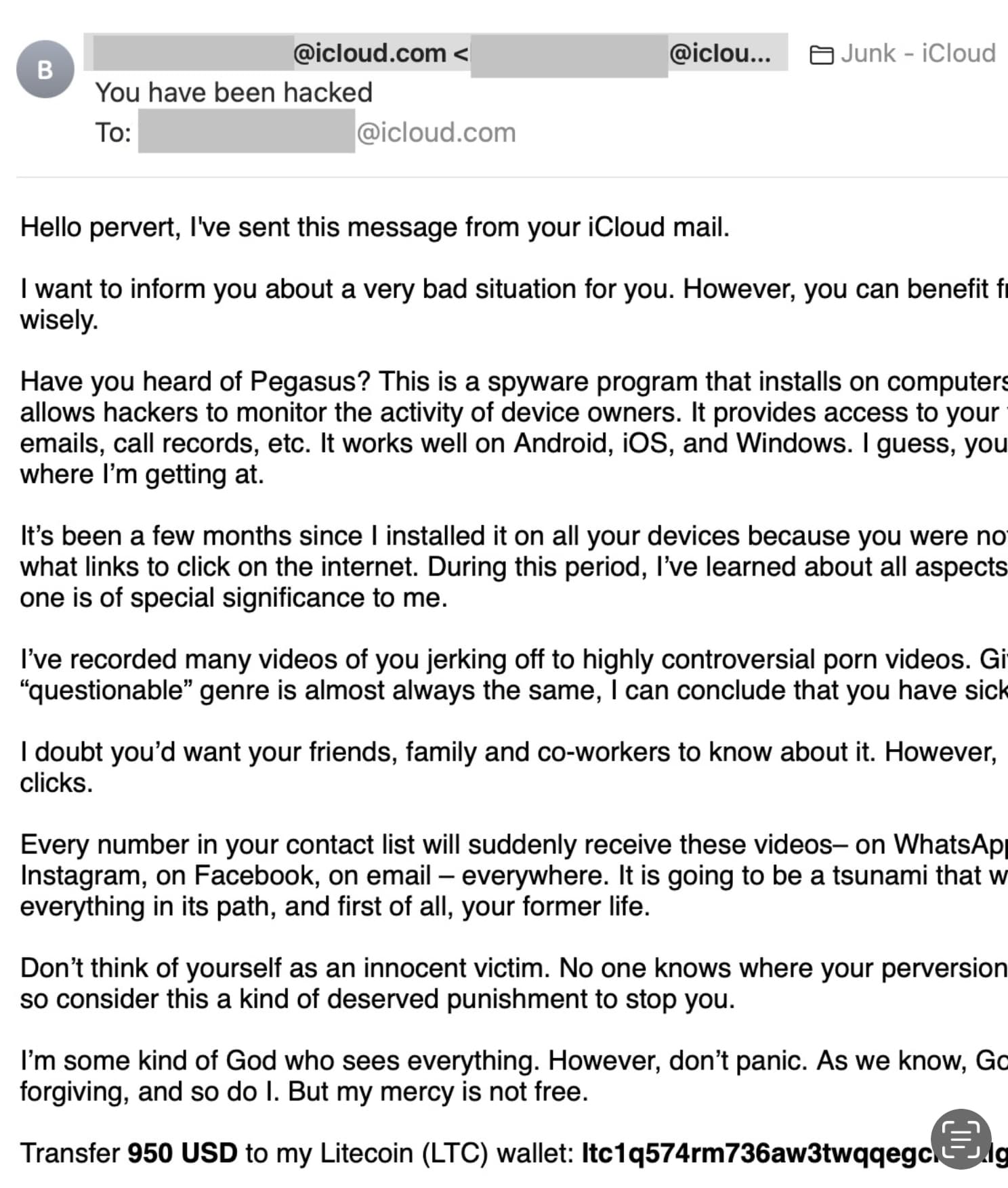
Yet Another associated problem: spammers can send you email from what looks like your account – to try to convince you that you’ve been hacked.
In the screenshot (from Mail on my Mac), I’ve redacted the name (same under all the greyed-out places. Yes, the From address has been faked.
1 Like
Hey, I just got that message, from “me” to me.
If I understood the headers correctly, it originated in the Seychelles.
Or at least the (insecure or hacked) mail server where they injected the message is in the Seychelles. The attackers themselves could be anywhere in the world, of course.
I appreciate the nuance, and it’s obvious once you state it. Thank you.
It reminds me of the joke about three professionals on train that enters Scotland, where they see some black sheep.
One person, whose profession I have forgotten, says, “In Scotland, the sheep are black.”
A second person, whose profession I have forgotten, says, “No, in Scotland, some of the sheep are black.”
The mathematician (see, I remembered one profession) says, “No, in Scotland, there exists at least one group of sheep whose members are black on at least one side.”
2 Likes
Happened Again! It’s 10 days later and out of the clear blue, just like on 26 April 24 at 8:15 p.m. ET, I just got locked out of everything, called Apple support, demanded to speak with an Apple Engineer, was finally connected to some kind of senior person who said they can’t refer anyone to engineers (which I know is for sure not true), and then me get out of the reset, reset, reset loop, where I couldn’t even create a new password, even if I wanted to.
For future folks reading this, what happened this time was…
This person had me logout of my iCloud account, create a new password (yet again), and then suggested two things:
- delete old VPN configurations that I no longer use (hmmmm), and
- turn off Stolen Device Protection (SDP)
The SDP does seem very problematic. I have had mine set to require the security delay only when I’m away from familiar locations, but that just doesn’t work and the Apple senior somebody I just spoke with confirmed that SDP doesn’t know or honor familiar locations. So, maybe an article on the efficacy of this feature might be worthwhile. Unfortunately, I’m leaving for Europe for a month and will not have this safety feature turned on because in case this is what’s causing the drop everything and reset your password right now insanity occurs again.
So, for now, I’m back in to my computers with yet another new password, waiting for the 1 hour to pass to turn off SDP, even though I’m sitting at home where I’ve been for the past 10 years, and using my time to make new app-specific passwords…again.
A no doubt way too late suggestion for most. Do not use your real name for an apple id or for emails unless absolutely required to do so. Doing so makes one a ’ soft target ’ for most all scams etc
I have mostly done this for years since I found out one of my real name emails was hacked/exposed (pwned) in drop box over a decade ago.
So I use made up names which make it nearly impossible to find anything about me
example ( not real just made up/ ) Apple id = peachswim35 email = grateturn21@ xyz…
RE banklockout-- happened to me cuz a bank screwup- because they assumed ( wrongly ) I used text on an iphone and did not reply since I use only a simple landline ( voip ) luddite style pushbutton phone- they eventually- a week later sent me a letter about not replying - but no other in fo. It was a few weeks before I found out account was locked. had a hard chat in person with local bank officer and made sure that never happened again- and after that bank gave options to notices via voice phone or text. Thats one small step for a luddite- one short leap for internet kind
This whole fiasco demonstrates a few failure points of Apple.
Firstly the Apple ID account and log on business is a total mess. With Apple claiming to be ‘smart’ in so many things, Apple cannot seem to get a customer relationship and management installation running that is standard practice for so many government organisations and enterprises. Just the rigmarole of logging in if you have more than one user account on an Apple device is ever frustrating and time wasting.
Secondly there’s the issue of having more than one Apple ID issued by Apple. I wasted time when I had two Apple ID (the mistake of being an early adopter) and apparently could not delete one. This was only resolved when I used the Australian government consumer organisation to heavy Apple Australia, which caused Apple Australia to remove one of my Apple ID very quickly - not so hard after all.
Thirdly, the extreme difficulty of getting Apple to recognise that there is a problem/bug/error/stupidity in a software release, especially macOS. It’s difficult even finding someone in Apple to contact let alone someone take responsibility to push the issue up to senior levels.
Fourthly, there is the overwhelming reluctance of Apple to admit that some update has gone wrong and worse still not to advise its customers that something has gone wrong. Added to this is Apple’s inability to promote a solution so we do not waste time trying to explore possible solutions and also causing us to believe that the problem is user caused. Apple has its customers’ email addresses and what Apple devices they own and so sending an email alerting of a current issue and providing solutions, or even ‘a don’t worry we are fixing the problem’ message. Maybe Apple’s nascent foray into AI might get an AI mailer to send out tailored alerts.
Lastly, those geniuses in the Apple shops are not so great nor so informed (see previous comment). They can’t seem to comprehend that a mac, which was working absolutely fine before the system upgrade, but not with the upgrade, has an upgrade issue and not a user issue. Always it is their default response to say it is a user issue. Surely they should be trained out of this practice.
This whole business shows how valuable TidBits is to the Apple user community in alerting such issues and using the talent to advise solutions. Given I have had to help a few relatives and friends who did suffer this latest farce by Apple, I could not have given any help without TidBits. I’m pleased to be a subscriber.
As a postscript, I was getting annoyed with the Europeans causing headaches for Apple and was sympathetic to Apple. But I’m not so sympathetic after these latest failures of Apple. I would like some government consumer organisation take on Apple and cause it to do better in customer support by issuing penalties until Apple passes muster. There’s no useful organisation in the US that can do this and so it might have to be the Europeans to take on Apple (again).
4 Likes
Same messsge to me last week! Since some of the claims were bogus about capturing video I knew it was phishing