So then at the very least that button and its associated circle-i information section would be inconsistent. That is indeed quite a “problemo”.
No! As I said, the two updates were CLEARLY listed separately. No need to click on the little i near the Tahoe part. The one for Sequoia 15.7 was clearly there. I just selected that, and the update, as expected, proceeded easily and cleanly. No need to make it difficult to select the i.
I'm waiting until I have my new iPhone before updating to iOS 26!
I remembered in the nick of time that the last two times I got an iPhone – my 15 Pro two years ago, and 14 Pro a year before that – I’d jumped at installing the new iOS on my previous phone as soon as it came out, so I could play with it.
By the time I had the new phone, I’d already updated to a .0.1 bug-fix release in the intervening days. The new phone arrived with the .0 version, and the Migration Assistant was unable to do a simple migration of the contents of the old phone because it was running a newer version of the OS. Each of the last two times.
It required a lot of extra jumping through hoops to get to a state where I could migrate the old phone onto the new and get back to using my iUniverse.
This time? I’m staying on iOS 18 on my iPhone 15 Pro until I pick up my new iPhone 17 Pro on Friday. I’ll let the Migration Assistant on the new phone call the shots from there.
Of course it’s possible Apple has fixed this problem in the intervening time, and can manage a migration from old phone (with new OS) to new phone regardless, but I’m not counting on it.
2 Likes
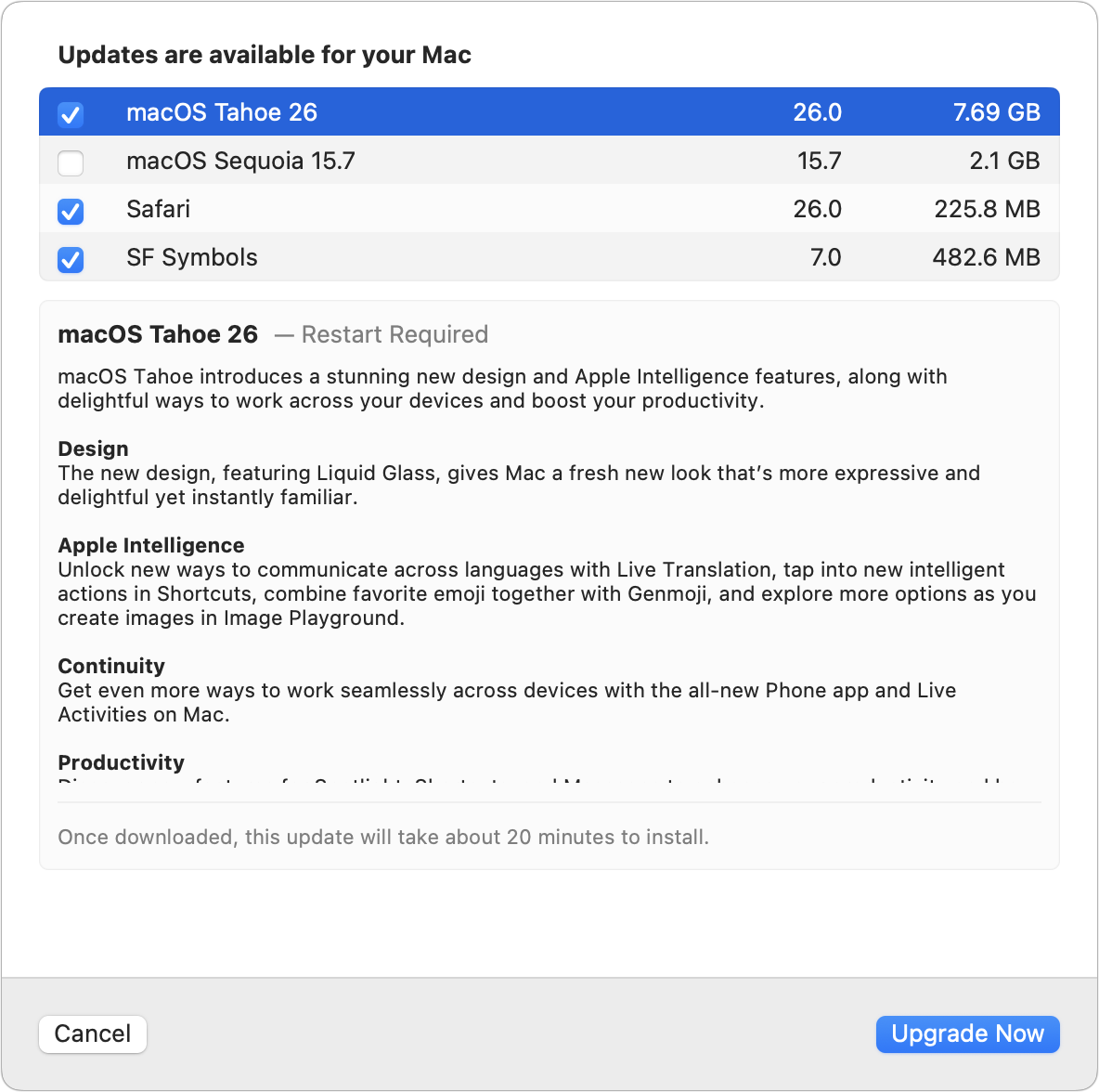
Good catch. Yes, when I click the i button next to 15.7, I get this selection, which wants to install Tahoe:
1 Like
Hmm! Did you try a migration via iCloud? I would assume that would work.
I can’t say I’ve run into this explicitly, and I’m often running betas on my old iPhone.
I’ll see what happens on Friday, when the new one comes.
Perhaps you see no need. But perhaps the rest of us do. The 15.7 section says
Other Updates
macOS Sequoia 15.7 and
1 more…
The only way to find out what that “more” means is to click the circle-i. And when you click that circle-i next to Sequoia update, you see Tahoe is selected and Sequoia update is not. And that is just plain bad usability.
5 Likes
Yup, tried a local migration and a migration from iCloud backup. I wouldn’t expect you would see this if your old phone was running a beta, since the new phone’s release version would be newer than that.
As I said, it might be that this has been addressed and won’t happen this year, but it was such a pain the last two times that I’m not taking the chance, and wanted to share a warning for anyone who might also be about to get a new phone and was considering updating the old one first.
When I went looking for the 15.7 update I found Tahoe on the of updates and as a Cautious User went looking for 15.7 rather than just clicked on Tahoe. That kind of glitch can be annoying.
If you have an M3 Ultra Mac Studio, like me, the answer is NEVER. That’s because macOS 26 Tahoe WILL NOT INSTALL on these machines; you can’t update the existing system nor install it onto an external drive.
I spent HOURS trying to figure out what I might’ve been doing wrong, and I just found this page:
https://discussions.apple.com/thread/256136192?sortBy=rank
Everyone there has an M3 Ultra Mac Studio, and like me, they are all experiencing the same problem: whether installing onto another drive or trying to update the internal drive, the process completes and then restarts back into 15.7 again. Logs show an Apple Neural Engine “hardware failure,” where Tahoe is trying to call a driver that isn’t there.
BTW, I used the same installer and the identical drives on my M4 MacBook Pro, and everything went without a hitch.
I called Apple about this, but the guy I spoke with didn’t know anything. I also filed a report, but I’m posting here in hopes of getting the word out on this and putting some pressure on Apple to fix it!
2 Likes
I already had read about the two “updates” on another site, so I was well aware of what the one for Sequoia entailed. Also, the coming of V15.7 had been mentioned for a number of days already. Hence, I knew to just select it, and it worked as expected.
But I do agree with you that it was just plain bad on Apple’s part to make it so difficult. As Tom Hanks said in “Forrest Gump”, Stupid is as stupid does. Aplle is the stupid one in this instance.
Also, Apple used to adhere to the KISS philosophy: Keep It Simple, Stupid. But that went by the wayside a number of years ago.
1 Like
I went to update a second machine to 15.7 and was surprised to see Tahoe selected when I clicked the “i” next to the 15.7 button (similar to the screenshot that @ace included above).
It truly is a poor UX design, adding to the irony of Apple beginning its September product event with the famous Steve Jobs quote:
“Design is not just what it looks or feels like; design is how it works.”
I would go as far as saying that this particular update interface qualifies as a “dark pattern”, whether intended as such or not.
1 Like
I’m a seasoned Mac user and yet turned to TidBITS for advice on this matter; and sure enough he had this helpful post. I’ve been running MacOS 26 on my 2026 Mac Mini since July, but will wait and check back here (and on Michael Tsai’s blog) before upgrading my main (2021) Macbook.
Like Adam, I’m not a big fan of Liquid Glass, and like Bike Outliner’s developer, (Jesse Grosjean; discussion here) we’ve held off on updating our app to Liquid Glass – though we will need to do it.
I updated my iPhone SE(2), iPadAir (2022) and MacBook Air (M2) to OS26.
After all I´ve read in the past months I was almost a bit disappointed, that I had NO problems at all. Everything just works like before.
I´m not so much concerned by looks like a lot of other people. I get used to a new look in a very short time and just keep on working.
(just my two eurocent…)
3 Likes
I would like to assume that this is a bug (and one they absolutely should have caught during the beta cycle) and will be fixed in the future.
It would shock me if this was intentional.
A better philosophy is “Everything Should Be Made as Simple as Possible, But Not Simpler” (source).
But Apple doesn’t follow that either.
2 Likes
Yeah, definitely a poor Apple design! Too bad Apple does not adhere to Steve’s belief anymore. And this snafu is just a perfect example of what I said above: Stupid is as stupid does. And also Apple keeps getting further and further away from the KISS philosophy: Keep It Simple, Stupid.
Why not try to make things simpler? That would seem to be the way to go.
By the way, I’m surprised no one else has mentioned another reason not to move to Tahoe right away (I have said it a couple of times). One needs to insure that any third party software they use is compatible with Tahoe, especially critical applications. Seems like recently whenever an article is posted about upgrading, that critical piece is left out.
For me, given that I use all third party software for just about all my tasks, such a precaution is obvious and necessary.
Suggesting a more complicated principle is in violation of… the KISS principle. 
2 Likes
It’s a subtle point, but I think this touches on one of the most important changes in how operating systems have been viewed over the years.
I’m painting with a broad brush and oversimplifying a bit, but as recently as the early 2000s, people tended to put the applications first, especially in the business context. Operating systems were seen as stable foundations upon which to run your applications. New OS features were welcome, but the feeling of the sands shifting under your feet was not. Application features mattered more than new OS features, and because they were foundational, new OS features were expected to be very carefully thought out. In other words, applications are what drove the decisions of OS and OS version.
It seems that nowadays, in the era of major annual OS updates, the roles have flipped, and operating system changes seem to be driving app changes. There is pressure to “upgrade” to a new OS, even when the new features are cosmetic ones of dubious value, and it is expected that app developers will quickly invest in updating their apps to accommodate the OS. The OS has become as much about keeping up with fashion as it is about running apps effectively.
I write that as someone who has spent most of my adult life as an early adopter of apps and new OS versions. I feel that in 2025, the tail is wagging the dog.
Harrumph.
6 Likes
Well stated. But the “flipping of roles” has been going on for quite a while. And based on what you said, and also how one depends on 3rd party applications, it still needs to be emphasized about 3rd party software compatibility before “moving/upgrading” to a new Mac OS. Again though, that has been definitely missing in numerous recent articles about upgrading to the new Mac OS. That includes Tidbits. Fortunately I can make the point here about third party software compatibility.
Two of my critical applications are Onyx and SuperDuper!. For just about every new Mac OS, Titanium Software releases a version of Onyx for the new OS shortly after the OS arrives. But for SuperDuper! (SD), the past couple of Mac OS releases have been problematic for SD. Fortunately, David Nanian, SD’s developer, has been dedicated, persistent, and relentless in getting SD to work with each new OS. I am definitely appreciative of David’s efforts, and SD still continues to be the only backup software that makes bootable backups.
For the remainder of the third party software I use, it’s been quite a while since a newer version needed to be developed for each new Mac OS. Maybe those programs are “generic” enough to survive each new Mac OS, but that is just a guess on my part.
1 Like