Someone mentioned Word. I was fighting with a newer version last week. I had 3 lines sitting on a second page. Something, decades ago, had a “make it fit” option where it would slightly modify the font and margins to do what I wanted. Perhaps WordPerfect. But I could not force Word to do what I needed and send the document off with the orphans.
I can’t remember a “make it fit” option in any word processor. What I did when I needed to to make it fit was to shrink the font size, change to another font, fiddle with the margins, or edit what I wrote.
The most stupid thing I have seen Word do is create a bar across the top of screen that lets you select different editing modes which deliberately limit what types of editing you do. The most maddening is the Review mode which does not let you change font, type size, and other features affecting the type which I need to use, such as subscripts. That means you have to go back and forth between between “Home” and “review” to change a character from normal to subscript.
I think these are different points. I’m not sure there is a general lack of choice—I’m being inundated by pitches for new apps now. There may be specific areas where there aren’t many choices, or the choices may not be comparable in the way that matters to you, but there are boatloads of apps out there. They’re not from Apple, for sure, and they’re probably not even from large companies.
As far as lock-in goes, yes, that’s absolutely a thing and absolutely a problem.
Yeah, but that hasn’t been true for decades. Apple provides the platform and basic set of apps for those who don’t know or care to look for anything more interesting.
Amusingly, I just got an email advertising a free Zoom session on Friday, August 14 entitled “Make Computers Fun Again.”
righto! I don’t think I wrote that it hasn’t been interesting for decades… I have been using Apple products for over 4 decades and was so enthused way back that I waited hours in line for the first (and later) iPhone and various store openings etc.
I was still enthused and early adopting when keynotes were live and they were doing new products and focused on users. At some point it’s transitioned to mega-corp and computing has become, for me, more of a defensive activity than explorative and fun.
But companies change, people change, needs and wants change. It just is. I’m glad I got to experience the fun years!
How ironic. Zoom started out with an elegant simplicity and ease of use that made it a widely used success. But in the last couple of years it has become extremely complex and tries to capture as much as they can of the traffic, with their own Zoom email and a calendar that goes to Google but not to the Mac Calendar unless I grab it and put it into the Mac Calendar. I may be doing something wrong, but this is not the user-friendly Zoom that made it a success.
This IMHO cannot be emphasized enough. Those of us who experienced the Apple II, SE/30, and DarkCastle days are incredibly fortunate. While I will certainly critique modern developments I believe go in a fundamentally wrong direction, I’m also very grateful that I got to experience this awesome era of personal computing. To think of the tremendous leaps we got to witness first hand from the Apple II all the way to the iPhone, that is really quite something. Most humans never got to see that unfold first hand and enjoy all the improvements along the way. We did. Just one more blessing to be grateful for.
Remember the utility that played the audio from that scene in When Harry Met Sally whenever a PowerBook was plugged into the power? Or Oscar the Grouch living in the Trash whenever there was something in it? That was fun!
Many a year ago we had a screen saver called “dead cows” or similar. Cows would slowly drop from the top of the screen and at some random point would suddenly fall at a great rate, letting out an ungodly “moooo”, before hitting the bottom of the screen with an appropriate splat, and turning into a pile of steaks. It seemed hilarious at the time - but I suspect a vegan/vegetarian’s nightmare.
You’re right about “life phase” and about moving on to new challenges, or at least things that seem more interesting. BUT… right now I’m viewing that world trough the eyes of a 13-year-old grandson, who seems every bit as excited about “building towers with blocks” as he approaches building his own computer from components. Sure, the components and software are different, today. But for him, it’s just as much “exploration” as we experienced. “Life phase” can be seen through the eyes of the beholder; for me, right now, the “beholder” is his eyes, not mine. And it’s fun!
I really had to dig for this because I can distinctly remember sitting at my desk at a specific job doing this. And this is what I found:
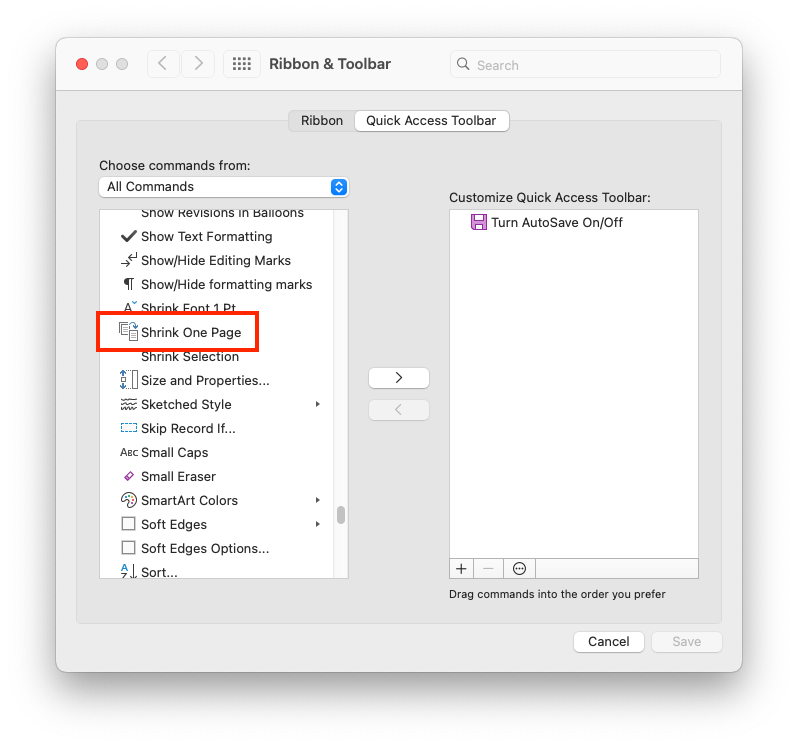
Word does currently have the feature. It is called shrink to fit, and I can’t even tell you where to find it in the menus, but I was able to put it on my quick access bar. There are no options within it, it literally will take your entire document and shrink it into one page. Which would work great if you only have a couple of lines that spill over. And yes, I know they have orphan control somewhere as well.
WordPerfect however, was called Make It Fit. This came out in the mid 90s under the Novell ownership. And it sounds like it is still there in the current version (which I really should look into considering how much I hate Word but unfortunately need the compatibility for odd documents)
WordPerfect’s option was way more flexible. You could actually take the document of any length then tell it to be on however many pages you wanted, you could take a 3 page document and stretch it out to 4 pages. You could also tell it whether you wanted the margins changed or not, or maybe you just wanted to change font size. I did not remember the specific options, but Google tells me there were settings for left and right margins, top and bottom, margins, line, spacing, and font size. And left a word perfect for dummies link as a reference.
Your mention of WordPerfect reminds me that Pearson / Prentice Hall made WordPerfect the standard word processor for its technology books into the early 2000s, but changed to Word by 2005. As I recall, they felt WordPerfect was better for technical stuff like equations and Greek letters and other technical symbols. Then it all just faded away, and I do not have any working Mac that can read my old WordPerfect files, so I can’t print out the instructors manuals the books set with WordPerfect.
Hello Jeff, there are ways to recover old WordPerfect files, without installing it, look for the WP Helper files and instructions on this forum dedicated to WP for Mac, I have these installed on my Mac as I also have old WP files. Hope this helps - https://groups.io/g/wordperfectmac/topic/119690125
The book “Enshittification: Why Everything Suddenly Got Worse and What to Do About” by Cory Doctorow gives a good account of this (he popularized the term “enshittify”). There’s a standard arc companies follow to eventually make stuff that is horrible but very profitable (for them). Apple not as guilty as some, but a glaring exception is the 30% they charge using the App Store.