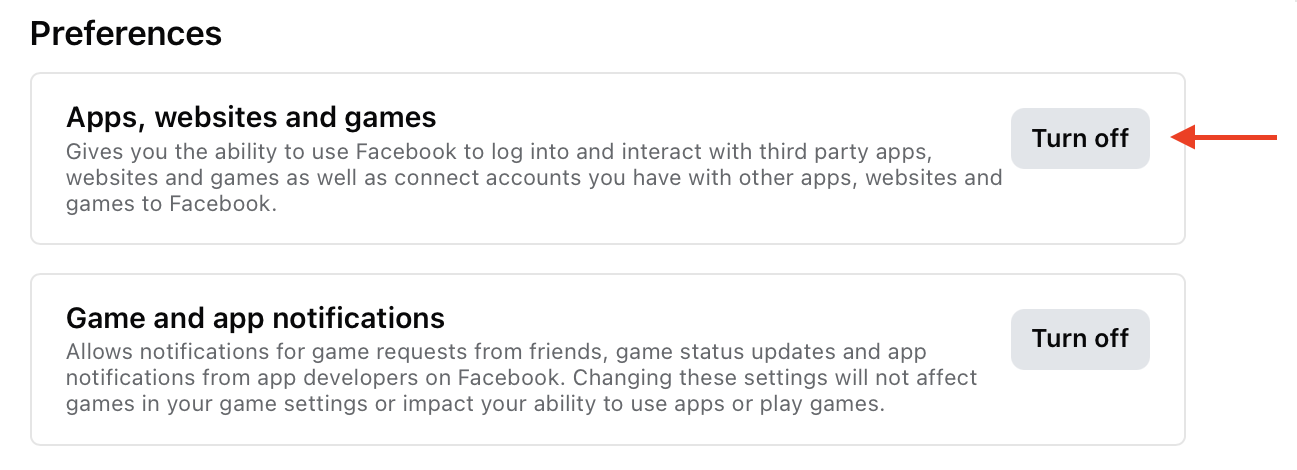
Apparently, you can turn off “Sign in with Facebook” here:
https://www.facebook.com/settings?tab=applications&ref=settings
For more details, see:
Apparently, you can turn off “Sign in with Facebook” here:
https://www.facebook.com/settings?tab=applications&ref=settings
I can confirm that I have a few sites I visit that will not function using AdGuard DNS. I may try the Cloudflare 1.1.1.1 to see if I can use their on-off switch to easily go between 1.1.1.1 and the AdGuard DNS.
Cloudflare WARP app is available for MacOS
Interested to know which ones?
Because AdGuard DNS is open source (see earlier GitHub link) you can file an issue to get them to reassess blocks that might be affecting a site attached to a DNS.
@mschmitt I’m intrigued by your custom scripts for blocking bad behavior. Would you be willing to share them?
Ublock Origin is amazing with Firefox. I switched from Adblock Plus.
I use a piehole and then on my iOS device I have a little app that can turn it off for one minute five minutes or 30 minutes.pi hole remote plus on App Store.
Seems to work well. If you mess around with something on your router, yes you have to log into your router or as folks said you could just connect to a VPN temporarily, but then you have to disconnect from it.
What I like about this method is that it automatically switches back after period of time, and you can set the time limit of course all the devices now on your network are no longer protected during that time.
With the pie hole, you can also do scripting like you could script it so that on pie hole, you could have a device that is taken out of the block list for a time or so currently the app can’t do this, but then all your other devices would still be connected to the pie hole.
This is my User Rules in AdGuard for Safari:
! Contextual ads
||intellitxt.com/*.js
||kontera.com/*.js
||skimresources.com/*.js
||viglink.com/*.js
!
! Modifies cut-and-paste text
||tynt.com/*.js
||license.icopyright.net/*.js
!
! Modifies back button
||exitjunction.com/*.js
!
! To block
||2mdn.net^
||adbrite.com^
||adinterax.com/*.js
||adtechus.com^
||bounceexchange.com/*.js
||brightcove.com/js/*.js$domain=macworld.com
||brightcove.net/*.js$domain=macworld.com
||com.com/*/Ads/*.js
||c-on-text.com^
||*pubads.g.doubleclick.net^
||elekted.com^
||infolinks.com/*.js
||googlesyndication.com^
||lijit.com^
||liqwid.net^
||myspace.com/*js
||newsinc.com/*.js
||ppjol.net/*.js
||pointroll.com^
||serving-sys.com^
||shorttail.net^
||tremormedia.com/*.js
||tribalfusion.com^
||vizu.com^
||ad.yieldmanager.com^
||zedo.com^
I haven’t changed this list since I switched to AdGuard in 2020. There’s a reason for that.
I used to use Adblock Plus in Firefox to figure out which script to block, but it became harder when Firefox ended support for XUL extensions. And I found that in Firefox and Chrome, it was just as effective to block trackers using EFF’s Privacy Badger. So, I stopped spending the effort to determine what scripts to block.
Don’t overlook the native element-hiding feature in recent versions of Safari. It’s found in the pop-up menu for the Reader mode by clicking the

icon at the far left of the address field.
Distraction Control in Safari
I had not discovered that - thank you!
Why has no one mentioned Ghostery, which is listed as a “fantastic free tool” in the Ad Blocker chapter of Take Control of Your Online Privacy (5th Edition):
This just popped up in Google app on my phone…the algorithm provides!
This is (paid) AdGuard app,
not (free) AdGuard DNS.
But, as I understand, AdGuard’s app offers many more features and greater granularity than simply using their DNS.
So, it’s not just paid vs free, right?
It’s good that it’s auditable, but is their a way to customize the list that’s used on one’s computer?
Apparently, there are two different ways that ad blockers work:
I prefer the concept of a DNS blocker because intercepting a domain at the DNS level means privacy of the page content is preserved; all the blocker knows is the domains I tried to visit. For example, it knows that I visited my bank’s website but it does NOT know my bank account number.
Questions:
UPDATE September 6, 2025 5:42 PM
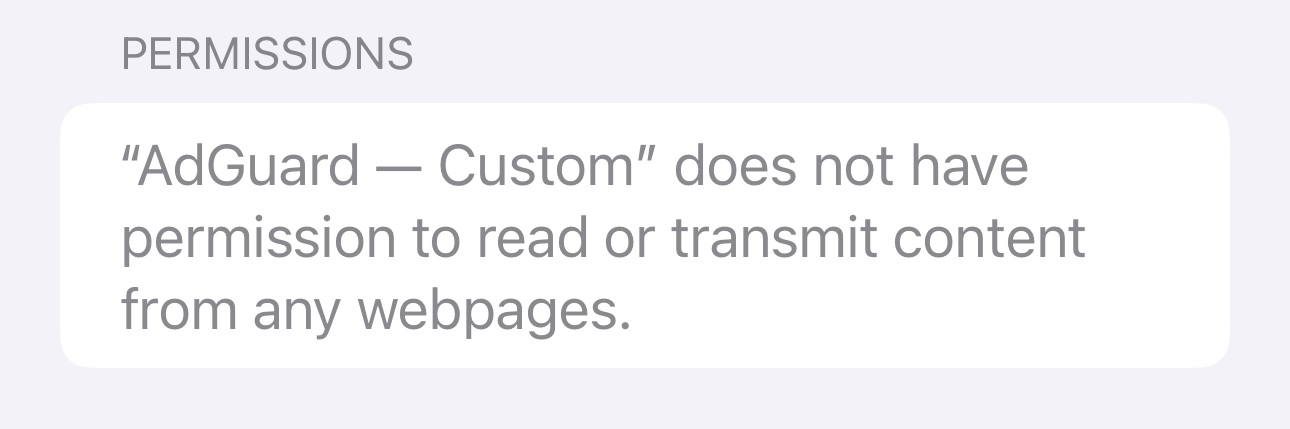
Now that I’ve installed the AdGuard app, I see these permissions texts on most of the modules; this one is for ‘AdGuard — Custom’.
Is this trustworthy? Are these permissions enforced by the operating system? Are they why I should be comfortable with AdGuard reading and altering webpages containing sensitive information?
Of course, it’s just the easiest/shortest way to refer to the two.
No, but if you want that sort of feature AdGuard DNS Private (paid) version or NextDNS allows you to do adblocking and such with your own allow/deny modifications to the list. I’ve used that to block Apple update servers for a short time back in 2022.
DNS prevents access to the resource entirely. So nothing can be found, never mind loaded.
This is an Apple message. A bit like the one that appears when you give a keyboard “full access” they have to go heavy on the warning to cover themselves. I go by the fact that the OS should disallow the app from doing anything nefarious, app approval process should vet that the app isn’t doing anything nefarious, and the privacy policy of the service provider being truthful that they’re not being evil. It’s good to questions things, but in this instance if you want the adblocker to modify pages you have to give it access to do so.
I don’t feel too strongly about the warnings, but the added hassle of the app setup is why I prefer to use DNS blocking.
Anyway  in other news today I noticed Google Analytics (analytics.google.com) wasn’t working due to AdGuard DNS (verified by activating my VPN and being able to get to the site). I filed this issue at GitHub. In the process, I noticed I had in fact filed the same issue about Google Analytics once before back in 2021 and the issue was dealt with in a day or so. Judging by the referred issues, it seems they block it and then unblock it about once a year. Make of that what you will.
I used to block sites by domain name, using DNS and/or with a Proxy Autoconfig file. I found it to be less useful than a traditional ad blocker (which examines the content of web pages):
Sometimes the ads and the content you want are served by the URLs with the same hostname. So DNS can’t block one while allowing the other - you need to examine the rest of the URL.
A proxy autoconfig file can examine the entire URL, but I never took the time to learn the necessary syntax. I assume it can be as flexible as you want, since it is ultimately JavaScript code, but I haven’t done the work to be sure.
You often can’t just block the domain. You often need to redirect it to a server that will provide a response of some kind. If you just return an error or redirect ad domains to 0.0.0.0 or some other IP address that never responds, you’ll find that some ad scripts will see the errors and go into a loop to retry the access, causing the web page to hang (some times for minutes at a time) before the scripts give up (if they ever do).
My workaround for this was to implement a fake server that would respond to every URL with the same fixed content (I had it return a one-line HTML file saying “content blocked”). This would make most of the scripts think they got content, but it didn’t work with them all.
I did notice that the PiHole system does provide the ability to spoof responses instead of just black-holing ad domains. If you use that feature, then it may not have the problems I encountered when rolling my own solution.
Redirecting ad domains to something (whether it’s a bogus address or a fake server) can create a lot of bogus traffic on your LAN.
When I switched to a browser-based ad blocker, which could explicitly delete content from downloaded pages based on URLs and other patterns, these problems went away. Instead of just blocking the ad server, they will delete the script that’s trying to access the server.
AdGuard responded that this time they will not unblock analytics.google.com because it’s now used a domain for trackers. But for whatever reason the iOS Analytics app still works so I’ll use that.
@Shamino I use PAC to route certain domains and sites to my proxy. I fumbled it by hand many years ago but ai can write it today. https://g.co/gemini/share/0ef2feedd216
Using a PAC to direct domains to proxies (including my fake server app) is easy. I blogged about that a long time ago (originally as a SlashDot journal post in 2004):
But, as I wrote, I never took it to the next step, to filter based on the contents of the URL. I only filtered based on the hostname.
Thanks for sharing the link that shows the (really simple) command for filtering based on parts of the URL beyond just the domain name.
Gemini is wrong, however, when it says that you need to host the PAC file on a web server. Every web browser I’ve used has included a preference you can use to specify the URL for a PAC file and file:// URLs have always worked for me.
In addition to a web ad blocker I also use an /etc/hosts file to block ads.