WARNING! Backblaze now ignoring Dropbox

Yes maybe a storm that is waiting to break.

Maybe part of their logic is why backup to their cloud something that is “backed up” to another cloud? My own decision to stop using Backblaze was partly this, plus saving money by introducing a third backup, off site instead. I think CrashPlan and Backblaze flourished in an era where not everything was on iCloud… so for me even if everything local was destroyed I could sign in on a new computer and everything downloads.

OK, so it’s slightly less disastrous than it at first appears, though it’s hard to know this because of a bit of terrible UI design / technical writing.

It is correct that Backblaze is no longer backing up any Dropbox folders, from about 22Sep2025 depending on when your Mac updated to the ‘no Dropbox’ Backblaze SW version and then next ran a backup.

However, Backblaze are not deleting the existing Dropbox backup. You just can’t see it by default, because when you open the ‘Restore’ option in Dropbox you are presented with this (without the red writing, which is mine!).

By default the start date will be ‘Beginning of Backup’ and the ‘to’ date will be the current date and time.

My reading of this was that you’d therefore see any files/folders uploaded between those two timepoints. My Dropbox folder upload falls within those two points, so to my mind should appear.

What Backblaze intend it to mean is effectively that the ‘to:’ date is the last date a file was uploaded to them.

In my case, starting on 22Sep2025 and working forward, I could see my Dropbox folder and its contents up to and including 13Nov2025, then it disappears with that date set to 14Nov2025. I was away over this period, so it’s likely this was when my Mac updated itself to the ‘no Dropbox’ version of Backblaze.

The good news is, I can therefore get at data backed up before that date, including most particularly earlier versions of documents and deleted documents.

The bad news is, that backup is now more than a month out of date, and I wouldn’t have known unless I’d gone looking for something yesterday. So I still say, be warned!

Rob.

EDIT: I realise belatedly that my label is really no better than Backblaze’s! ‘Files NOT uploaded AFTER this date would perhaps be better?

Thanks for the warning. I just had a frustrating conversation with BackBlaze’s AI chat, and then a slightly more informative but still frustrating conversation with a human.

According to the human, this was not a BackBlaze policy change but, “Dropbox themselves made a change to their application which now prevents other applications from being able to access those files.” I have no idea if that’s correct.

I asked if users were notified of this change, since it is fairly significant and could affect a backup strategy. The human said, “Being able to backup files stored in the Dropbox was never an intentional feature of Backblaze. This wouldn’t require an announcement as it’s not a change that we made and doesn’t prevent the intended activity of backing up files that are stored on your local hard drive.”

When I pointed out that most of my dropbox files are stored on my local hard drive, he said something to the effect of, “And they are also cloud synced to Dropbox” and then, “If you’d like those files to be backed up by Backblaze, we suggest creating copies of those files and saving them to a different folder which Backblaze would then be able to access.” (That’s not something I am going to do.)


While I liked the idea of having BackBlaze save another copy of dropbox, I suppose I’ll survive without it. As long as Dropbox is working, I can retrieve work from online, and I also run a TimeMachine backup so I have copies there. Still, I find it disingenuous that BackBlaze thinks this is an insignificant change.

While I agree that Backblaze should be more upfront about owning their side of this issue, passing the buck and blaming the other guy is one of the oldest practices in tech support. If you’ve ever worked helpdesk for a specific software or hardware package, you learn very quickly that the official response to, “Your product no longer works with <other company’s product>,” is always going to be some variation of, “We don’t support using our product with <other company’s product>,” or, “You need to contact <other company>.”

In this case, it’s complicated by the fact that while Backblaze has never officially supported backing up the Dropbox folder, they’ve provided sufficient information about how to do it that many customers have come to expect it to work. So having it pulled out from under them without notice or warning feels like Backblaze breaking a commitment, when in reality they’ve never officially committed to being able to back up the Dropbox folder.

Backblaze probably would have been better off in the long run if they’d simply always said flatly, “Backblaze will not back up folders committed to other cloud services.” Their mistake was trying to provide something customers wanted that they couldn’t guarantee would always work.

Ok, I’m thoroughly confused here. So Backblaze will not backup files in the Dropbox folder at all anymore, even if they’re hosted locally on my computer? A quick search on the Backblaze support site shows only one brief reference to this with no details.

This is a significant issue for me as I mirror my entire Documents folder in Dropbox to have my files available on my laptop, desktop, and iPad wherever I am. As this folder contains multiple gigabytes of data, it’s not practical to drag a copy of it somewhere else just so Backblaze will recognize it.

I already make external backups locally but I liked the ease of BB’s cloud backup as a redundancy.

I guess I need to do some testing and add looking for alternatives to BB to my To-Do list, if this is actually the case vis a vis DB and BB.

Peter,

Sadly, that is correct.

There is only one reference to it, in the release notes for the Backblaze client:

(scroll down to version 9.2.2.878 or search for ‘Dropbox’). The same thing has been confirmed to me and a number of others here now in messages from BackBlaze support.

Unfortunately there’s a lot of old stuff on the BB website about how nicely they play with Dropbox. They really need to remove all that now.

Several people have now suggested to me that the Maestral ‘unofficial’ Dropbox app somehow doesn’t identify the folder it’s syncing as a ‘Dropbox’ folder, and so BackBlaze will continue to back up those folders, but I haven’t tried this for myself yet - as you say, all just more things for the to-do list.

Harumph. Thanks for confirming my fears. And I did look at my BB files online and also confirmed that DB files are no longer there. I know I checked them in the past year and they were there so this is recent.

I’m a little bit wary of Maestral, as an “unofficial” app, and not least because I don’t really understand what it does. It seems to largely be solving for other problems that don’t apply to me. I’m also not terribly comfortable with command-line interfaces.

I guess I’ll search the forum for recommendations, but quickly, does anyone have a cloud-backup solution that plays nicely with Dropbox? Or do I need to start looking for alternatives to Dropbox too?

Thanks!

Peter,

What we’ve established is your Dropbox backup will still be on Backblaze, up to the point where it stopped backing up.

By default you won’t see it. In the Backblaze ‘Recover’ screen you need to adjust the end date to a date when Backblaze was still backing up Dropbox. We think the Backblaze version that made this change was released around 22-Sep-2025, so set the ‘to’ date to then and you should see it, then adjust forward until it disappears (-which will probably be the date your Mac updated itself to that BB version).

Of course, this backup will now be out of date, but at least you can still recover old files, file versions or deleted files.

Rob.

Echoing brianallenlevine’s approach:

When Apple decide to take over management and storage of cloud-synced data and I did not have room in any internal drive for my entire dropbox and the future was ‘iffy’ at best”:

I created an external volume dedicated to a replica of Dropbox storage contents using Maestral.app. I then set Dropbox to create offline instances by default. (This paralleled the creation and similar use of external volumes for Movies, Music, and Pictures.) These external volumes, along with some others, are included in all backup processes excepting VM storage to Time Machine. The gives me, the user, essentially complete control of what is backed up in isolation from Apples cloud storage mechanisms and some control of how data is stored locally without overflowing any internal drive. Of course, data for Books.app in particular is in ~/Library… regardless of user preferences. However, it is probably a mistake to make your functional Home folder be cloud-based. A little too much control of your data is not in your hands.

tl;dr - Store a Dropbox replica in a folder not called “Dropbox” on an external volume. Back that up.

tl;dr - Maestral.app has been reliable in my usage. It is a “dumb app” dedicated to synchronizing content between online Dropbox and a local folder on a complete file basis. It makes no decisions except to make Dropbox and the Maestral replica contends identical.

I became curious if Backblaze’s prohibition on backing up cloud-synced files extended to the standard Desktop and Documents folder when the macOS Desktop & Documents Folder syncing is turned on (which I do). I can confirm that I was able to see and restore a file from my desktop using Backblaze just now, so that seems safe.

So those who are running into issues with syncing everything with Dropbox could consider switching to Desktop & Documents Folder syncing via iCloud Drive as a way of maintaining the same files across multiple systems. I’ve found that highly effective.

2 Likes

I downloaded BB to test something and this was certainly in front of mind, as I use D&D in iCloud.

I’m wondering if backups will be complete if you have Optimise Storage turned on. Perhaps it only backs up the local copy of Desktop and Documents, and would skip anything which has been offloaded to be cloud only.

I’m not currently using Optimise Storage (so can’t test it), but it’s not beyond the realms of possibility I will in the future. It also raises the question of what happens to files which were backed up when available locally, but later offloaded to iCloud (no longer having a local copy). Will they be removed from the backup because they’ve disappeared from their original location?

I wonder if that also is the case with Microsoft OneDrive syncing of Desktop & Documents, which is a standard (though optional) OneDrive feature.

Thanks, Rob. This is helpful to know, though I’m fortunately not needing to recover any files at the moment.

This may have been noted above already…(not sure, I just skimmed some of the posts), but BB’s AI support bot told me today that as long as I have everything in Dropbox downloaded to the local drive, it will keep backing up the files in there. I’m a little skeptical, but I’m downloading all the files I had only in the cloud to see whether this makes a difference.

The BB AI bot first told me that the problem was caused by my Windows system, and I had to gently inform it that I don’t have any Windows systems. It was at this point it told me everything would work as before if I downloaded all my DB files locally. We’ll see.

Next step if this doesn’t have an effect is to experiment with Adam’s D&D syncing idea. Thanks all for the expertise.

I very much suspect not. Only Carbon Copy Cloner, as far as I know, has ever backed up cloud-only files by downloading them, backing them up, and then evicting them again.

I would think not because the stub would still exist, but that would definitely require testing.

I’m still really interested in what happens if you point Backblaze at a duplicate, such that the Dropbox files are in a cloud storage location, but on a drive that isn’t Dropbox-active. Since having a duplicate is a good backup strategy in general, it would provide a workaround with minimal extra work. And it would be an interesting question to consider how Backblaze’s deduplication would handle all cloned data that was identical to the original, except that it was on a different drive.

Peter: What the BB AI Support bot has today you today is categorically wrong. My entire Dropbox folder (most of which is ‘available offline’ files, so actually on my hard drive) is no longer backed up to Backblaze, and a human (I think, but who knows?!) BB representative has confirmed that is now how they expect things to be.

(But it is interesting that the message about this change doesn’t even seem to have spread fully across BackBlaze itself!)

Well, the bot seemed to indicate that EVERY file in your Dropbox had to be downloaded for off-line access for BB to still work. Which doesn’t make a whole lot of sense.

It also wouldn’t exactly be the first time an AI bot didn’t have a clue what it was talking about.

Right now I’m using this whole fiasco as an excuse to clean dead files out of Dropbox, which are taking a while to sort through. If I find out anything further, I’ll post here.

Here’s the BB bot’s text for curiosity:

Great news! On Mac, you can back up iCloud Drive files (and Dropbox works similarly) as long as the files are saved locally on your computer and not stored solely on remote servers.

The Windows reparse point issue doesn’t affect macOS. However, there’s an important requirement: your Dropbox files must be fully downloaded and stored locally on your Mac for our backup to work properly.

If you’re experiencing backup issues with Dropbox on Mac, it’s likely because some files are stored remotely rather than locally. You can check your Dropbox settings to make sure files are downloaded for offline access.

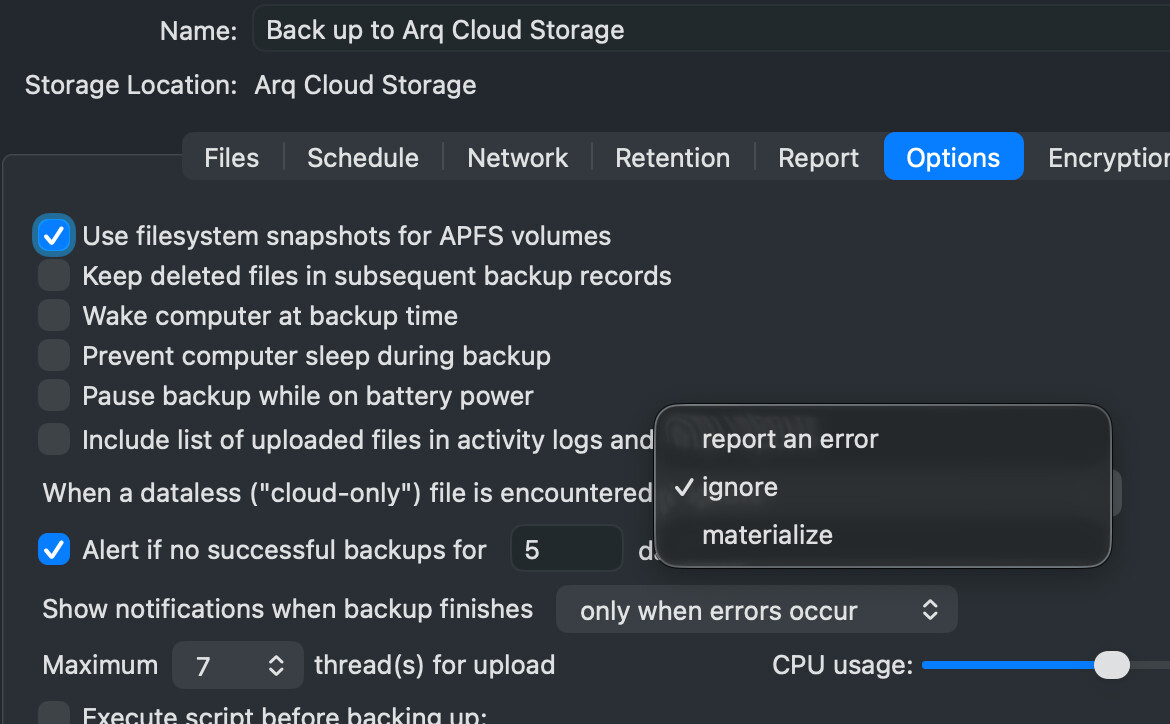
I don’t have Dropbox, but I’m wondering if Arq’s setting for “dataless (“cloud-only”)” files (see below, mid-screen) implies it could back up DB files? Or am I mixing apples and oranges?

Today you can use CrashPlan as an individual. (This might have been otherwise before CrashPlan became its own company.) And it works well for backing up in the scenario you describe.

Happy new year, everyone!

Yes, it appears that Crashplan, having scared off all their individual users a couple of years ago, is now courting them as long as they pretend to be small businesses with just one employee! A bit cheaper than Backblaze, but with fewer options, I think, for those looking to retain deleted files for extended periods or forever.

However, they clearly say they will not backup Dropbox ‘online only’ files (ie. files that aren’t actually on your hard drive), and then get themselves into a bit of a pickle about whether they will back up other Dropbox files or not, this document:


https://support.crashplan.com/hc/en-us/articles/24938541208973-Back-up-cloud-services

first saying they will, then noting that where Dropbox files are now stored by default they won’t back up. They do have a 14 day trial so I’m about to set it up and give it a go.

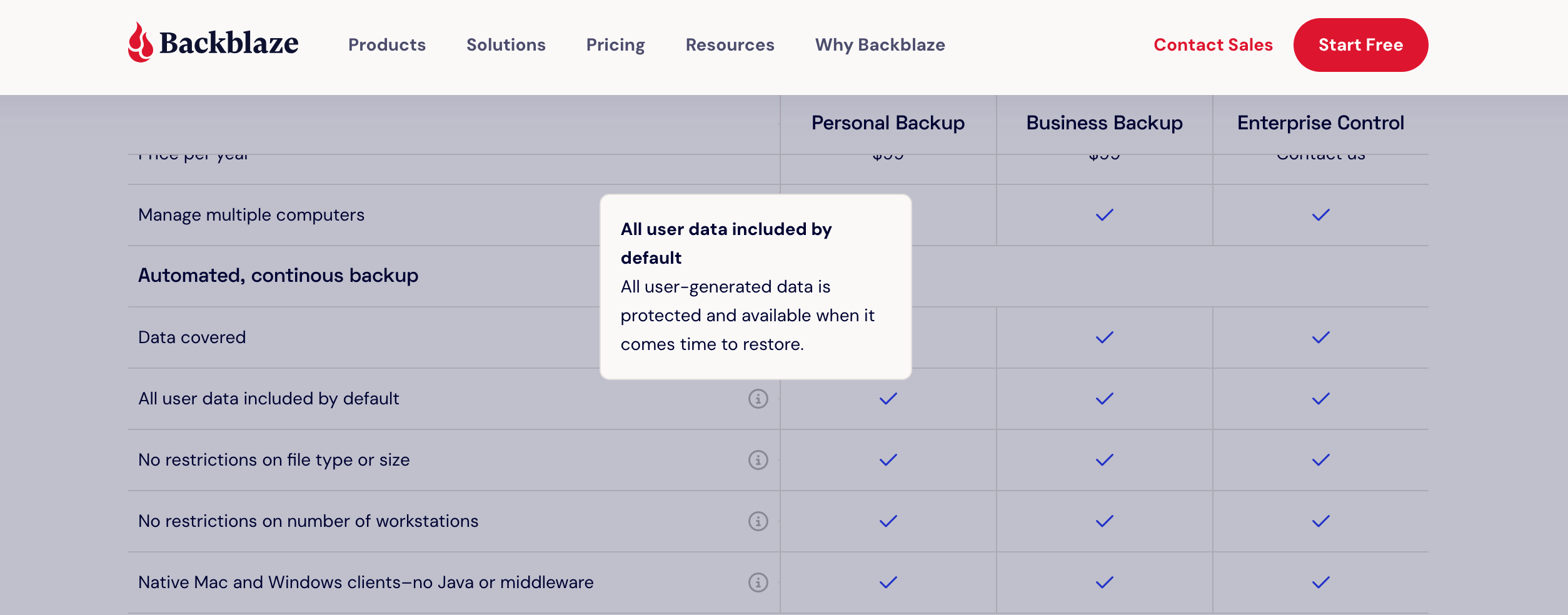
Interestingly the main splash page for Backblaze as of today, 1Jan2026, feels alarmingly inaccurate given all we now know: ‘all user generated data is protected and available when it comes time to restore’ is factually wrong for those storing the data they generate in Dropbox…