Thank you again for the info. Quick update; I received the book and CD-ROM today. The CD-ROM has a huge crack in it! Neither MBPro would open it - though both displayed the size of the contents - 189 MBytes and some crude file indications. I connected the DVD/CD-ROM drive (Lite-on) to my sister’s Windows 10 laptop. After installing Quicktime for Windows it runs! Everything seems to work, menu system, video files etc. I then made an ISO disc image and copied it to the M1 MBPro. Nothing I have will open it inc. VLC. Will try the Intel MBPro next. And digest above suggestions for opening it.
Here’s something you might like, if you’re not aware of it already (disclosure: I particpated in the Kickstarter campaign)…
and
https://www.kickstarter.com/projects/ozmarecords/voyager-golden-record-40th-anniversary-edition
I’m surprised it’s readable at all, if it is cracked. Maybe it’s just a deep scratch?
But the fact that Windows can mount it and make an ISO image from it, means that the data is good.
After doing a bit of analysis on one of my hybrid Windows/Mac CDs (see below), the disk is probably organized with two file systems. One that appears to be a Mac hard drive, with an Apple Partition Map and an HFS-formatted partition, and another with an ISO-9660 file system.
Unfortunately, macOS sees the Apple Partition Map and assumes that that’s all there is (the ISO partition appears as unallocted space), so when it fails to mount the contained HFS partition, it stops there, Finder presents and error, and that’s that.
Unfortunately, at this time I don’t know of any way to tell macOS to try and mount that unallocated space as if it was a valid ISO-9660 file system. Diskutil doesn’t assign it a device name. If this was Linux, I suspect I’d be able to map that unused space to a file of some kind and perform a loop-mount on that file. But I don’t know if there’s an equivalent feature in macOS.
(Details of my experiment follows)
Using an old hybrid CD from my collection (Backyard Baseball), it won’t mount on my Mac (running Sonoma).
If I use the cdrdao utility to read the disc’s table of contents, I see that the disc has only one session:
$ sudo cdrdao read-toc --device 'IOService:/AppleACPIPlatformExpert/PCI0@0/AppleACPIPCI/XHC1@14/XHC1@14000000/HS14@14600000/MacBook Air SuperDrive@14600000/IOUSBHostInterface@0/IOUSBMassStorageInterfaceNub/IOUSBMassStorageDriverNub/com_apple_driver_AppleUSBODD/IOSCSILogicalUnitNub@0/com_apple_driver_AppleUSBODDType05/IODVDServices' foo.toc
Password:
Error in string constant '"IOService:/AppleACPIPlatformExpert/PCI0@0/AppleACPIPCI/EHC2@1A,7/EHC2@fa000000/PRT1@fa100000/IOUSBHostDevice@fa100000/AppleUSB20InternalHub@fa100000/PRT2@fa120000/MacBook'
Error in string constant '"IOService:/AppleACPIPlatformExpert/PCI0@0/AppleACPIPCI/EHC2@1A,7/EHC2@fa000000/PRT1@fa100000/IOUSBHostDevice@fa100000/AppleUSB20InternalHub@fa100000/PRT2@fa120000/MacBook'
Cdrdao version 1.2.4 - (C) Andreas Mueller <andreas@daneb.de>
IOService:/AppleACPIPlatformExpert/PCI0@0/AppleACPIPCI/XHC1@14/XHC1@14000000/HS14@14600000/MacBook Air SuperDrive@14600000/IOUSBHostInterface@0/IOUSBMassStorageInterfaceNub/IOUSBMassStorageDriverNub/com_apple_driver_AppleUSBODD/IOSCSILogicalUnitNub@0/com_apple_driver_AppleUSBODDType05/IODVDServices: HL-DT-ST DVDRW  GX30N	Rev: RP09
Using driver: Generic SCSI-3/MMC - Version 2.0 (options 0x0000)

Reading toc data...

Track   Mode    Flags  Start                Length
------------------------------------------------------------
 1      DATA    4      00:00:00(     0)     58:00:34(261034)
Leadout AUDIO   0      58:00:34(261034)

PQ sub-channel reading (data track) is supported, data format is BCD.
Raw P-W sub-channel reading (data track) is supported.
Cooked R-W sub-channel reading (data track) is supported.
Analyzing track 01 (MODE1): start 00:00:00, length 58:00:34...

Reading of toc data finished successfully.
So it’s not using two sessions (as I had assumed it would), but there are definitely two file systems, because Windows sees a valid file system with only the Windows installer, and (older installations of) macOS sees a valid file system with only the Mac installer.
And diskutil shows something weird:
$ diskutil list
...
/dev/disk4 (external, physical):
   #:                   TYPE NAME   SIZE       IDENTIFIER
   0:    CD_partition_scheme       *614.0 MB   disk4
   1: Apple_partition_scheme        534.6 MB   disk4s1
   2:    Apple_partition_map          1.0 KB   disk4s1s1
                (free space)        158.2 MB   -
   3:              Apple_HFS        376.1 MB   disk4s1s2
I suspect there’s some additional data in there the macOS isn’t recognizing - probably part of that 158.2 MB of “free space”.
I also noticed that if I hex-dump that CD, I see enough to be convinced that there is both an HFS and an ISO-9660 file system on the disc:
$ hexdump -C /dev/disk4 | less
...
00000210  50 4d 00 00 00 00 00 02  00 00 00 01 00 00 00 02  |PM..............|
00000220  4d 52 4b 53 00 00 00 00  00 00 00 00 00 00 00 00  |MRKS............|
00000230  00 00 00 00 00 00 00 00  00 00 00 00 00 00 00 00  |................|
00000240  41 70 70 6c 65 5f 70 61  72 74 69 74 69 6f 6e 5f  |Apple_partition_|
00000250  6d 61 70 00 00 00 00 00  00 00 00 00 00 00 00 00  |map.............|
00000260  00 00 00 00 00 00 00 02  00 00 00 13 00 00 00 00  |................|
00000270  00 00 00 00 00 00 00 00  00 00 00 00 00 00 00 00  |................|
*
00000410  50 4d 00 00 00 00 00 02  00 04 b6 ee 00 0b 35 58  |PM............5X|
00000420  54 6f 61 73 74 20 33 2e  30 20 50 50 43 20 48 46  |Toast 3.0 PPC HF|
00000430  53 20 4f 70 74 69 6d 69  7a 65 72 00 00 00 00 00  |S Optimizer.....|
00000440  41 70 70 6c 65 5f 48 46  53 00 00 00 00 00 00 00  |Apple_HFS.......|
00000450  00 00 00 00 00 00 00 00  00 00 00 00 00 00 00 00  |................|
00000460  00 00 00 00 00 0b 35 58  00 00 00 13 00 00 00 00  |......5X........|
00000470  00 00 00 00 00 00 00 00  00 00 00 00 00 00 00 00  |................|
...
00009310  01 43 44 30 30 31 01 00  41 50 50 4c 45 20 43 4f  |.CD001..APPLE CO|
00009320  4d 50 55 54 45 52 2c 20  49 4e 43 2e 2c 20 54 59  |MPUTER, INC., TY|
00009330  50 45 3a 20 30 30 30 32  42 41 53 45 42 41 4c 4c  |PE: 0002BASEBALL|
...
00009440  20 20 20 20 20 20 20 20  20 20 20 20 20 20 48 55  |              HU|
00009450  4d 4f 4e 47 4f 55 53 20  45 4e 54 45 52 54 41 49  |MONGOUS ENTERTAI|
00009460  4e 4d 45 4e 54 20 49 4e  43 2e 20 20 20 20 20 20  |NMENT INC.      |
00009470  20 20 20 20 20 20 20 20  20 20 20 20 20 20 20 20  |                |
*
00009540  20 20 20 20 20 20 20 20  20 20 20 20 20 20 54 4f  |              TO|
00009550  41 53 54 20 49 53 4f 20  39 36 36 30 20 42 55 49  |AST ISO 9660 BUI|
00009560  4c 44 45 52 20 43 4f 50  59 52 49 47 48 54 20 28  |LDER COPYRIGHT (|
00009570  43 29 20 31 39 39 33 2d  31 39 39 36 20 4d 49 4c  |C) 1993-1996 MIL|
00009580  45 53 20 53 4f 46 54 57  41 52 45 20 47 4d 42 48  |ES SOFTWARE GMBH|
00009590  20 2d 20 48 41 56 45 20  41 20 4e 49 43 45 20 44  | - HAVE A NICE D|
000095a0  41 59 20 20 20 20 20 20  20 20 20 20 20 20 20 20  |AY              |
000095b0  20 20 20 20 20 20 20 20  20 20 20 20 20 20 20 20  |                |
Followed by what looks like the directory for the Windows files (including the “Win32S” libraries needed to run 32-bit Windows apps on 16-bit Windows systems):
...
0000aeb0  00 01 43 41 54 41 4c 4f  47 00 06 00 00 00 00 17  |..CATALOG.......|
0000aec0  00 01 53 59 53 54 45 4d  05 00 00 00 00 18 00 03  |..SYSTEM........|
0000aed0  53 45 54 55 50 00 06 00  00 00 00 1f 00 03 57 49  |SETUP.........WI|
0000aee0  4e 33 32 53 05 00 00 00  00 21 00 03 57 49 4e 39  |N32S.....!..WIN9|
0000aef0  35 00 04 00 00 00 00 22  00 03 57 49 4e 47 0a 00  |5......"..WING..|
0000af00  00 00 00 19 00 04 57 49  4e 33 32 53 2e 31 33 30  |......WIN32S.130|
0000af10  08 00 00 00 00 1d 00 04  57 49 4e 47 2e 31 30 30  |........WING.100|
0000af20  05 00 00 00 00 1a 00 08  44 49 53 4b 31 00 05 00  |........DISK1...|
0000af30  00 00 00 1b 00 08 44 49  53 4b 32 00 00 00 00 00  |......DISK2.....|
...
0000b830  01 00 00 01 0c 41 55 54  4f 42 41 53 45 2e 45 58  |.....AUTOBASE.EX|
0000b840  45 00 2e 00 37 00 00 00  00 00 00 37 04 01 00 00  |E...7......7....|
0000b850  00 00 01 04 61 08 07 14  16 3a 00 00 00 00 01 00  |....a....:......|
0000b860  00 01 0c 41 55 54 4f 42  41 53 45 2e 49 4e 46 00  |...AUTOBASE.INF.|
0000b870  2c 00 38 00 00 00 00 00  00 38 31 00 00 00 00 00  |,.8......81.....|
0000b880  00 31 61 08 0b 0f 0b 30  00 00 00 00 01 00 00 01  |.1a....0........|
0000b890  0b 41 55 54 4f 52 55 4e  2e 49 4e 46 2e 00 39 00  |.AUTORUN.INF..9.|
0000b8a0  00 00 00 00 00 39 36 05  02 00 00 02 05 36 61 08  |.....96......6a.|
0000b8b0  0b 0b 33 38 00 00 00 00  01 00 00 01 0c 42 41 53  |..38.........BAS|
0000b8c0  45 42 41 4c 4c 2e 42 4d  50 00 2e 00 7a 00 00 00  |EBALL.BMP...z...|
0000b8d0  00 00 00 7a 00 8e 00 00  00 00 8e 00 61 08 0e 0b  |...z........a...|
0000b8e0  01 13 00 00 00 00 01 00  00 01 0c 42 41 53 45 42  |...........BASEB|
0000b8f0  41 4c 4c 2e 44 33 32 00  2e 00 8c 00 00 00 00 00  |ALL.D32.........|
0000b900  00 8c c0 22 00 00 00 00  22 c0 61 08 0e 0b 01 13  |..."....".a.....|
0000b910  00 00 00 00 01 00 00 01  0c 42 41 53 45 42 41 4c  |.........BASEBAL|
0000b920  4c 2e 44 4c 4c 00 2e 00  91 00 00 00 00 00 00 91  |L.DLL...........|
0000b930  70 54 00 00 00 00 54 70  61 08 07 0a 15 2c 00 00  |pT....Tpa....,..|
0000b940  00 00 01 00 00 01 0c 42  41 53 45 42 41 4c 4c 2e  |.......BASEBALL.|
0000b950  45 58 45 00 2e 00 76 2f  01 00 00 01 2f 76 4a a9  |EXE...v/..../vJ.|
...
Followed (much later), by what looks like an HFS directory:
0ad473b0  00 00 00 01 08 42 61 73  65 62 61 6c 6c 00 01 00  |.....Baseball...|
0ad473c0  00 00 00 0f 00 00 00 02  b0 18 8d c6 b0 18 a1 4a  |...............J|
0ad473d0  00 00 00 00 00 00 00 03  25 00 00 00 00 30 16 46  |........%....0.F|
0ad473e0  72 65 64 64 69 20 46 69  73 68 20 32 20 44 65 6d  |reddi Fish 2 Dem|
0ad473f0  6f 20 28 31 29 00 02 00  00 00 48 65 48 65 00 00  |o (1).....HeHe..|
0ad47400  00 04 25 00 00 00 00 52  0a 51 75 69 63 6b 54 69  |..%....R.QuickTi|
0ad47410  6d 65 aa 00 02 00 00 00  49 4e 49 54 8c 6e 64 36  |me......INIT.nd6|
0ad47420  21 00 00 00 00 00 00 00  00 00 00 05 00 00 00 00  |!...............|
0ad47430  00 00 00 00 00 00 00 00  00 00 00 00 00 00 00 00  |................|
*
0ad47590  00 00 00 00 00 00 00 00  00 8c 00 62 00 38 00 0e  |...........b.8..|
0ad475a0  00 00 00 04 00 00 00 00  00 02 00 0b 00 00 25 00  |..............%.|
0ad475b0  00 00 00 01 08 42 61 73  65 62 61 6c 6c 00 01 00  |.....Baseball...|
0ad475c0  00 00 00 0f 00 00 00 02  b0 18 8d c6 b0 18 a1 4a  |...............J|
0ad475d0  00 00 00 00 00 00 00 06  25 00 00 00 00 02 0c 42  |........%......B|
0ad475e0  61 73 65 42 61 6c 6c 20  28 31 29 00 02 00 00 00  |aseBall (1).....|
0ad475f0  48 65 48 65 48 65 42 42  01 00 00 9c 00 80 00 00  |HeHeHeBB........|
0ad47600  00 07 25 00 00 00 00 02  0c 42 61 73 65 42 61 6c  |..%......BaseBal|
0ad47610  6c 20 28 72 29 00 02 00  00 00 48 65 48 65 48 65  |l (r).....HeHeHe|
0ad47620  42 42 01 00 01 04 00 80  00 00 00 08 25 00 00 00  |BB..........%...|
0ad47630  00 02 0e 44 65 73 6b 74  6f 70 20 46 6f 6c 64 65  |...Desktop Folde|
0ad47640  72 00 01 00 00 00 00 00  00 00 00 1a b0 18 8f 2c  |r..............,|
0ad47650  b0 18 00 00 00 09 25 00  00 00 00 1a 00 00 03 00  |......%.........|
0ad47660  00 00 00 00 00 00 00 00  00 00 00 02 0e 44 65 73  |.............Des|
0ad47670  6b 74 6f 70 20 46 6f 6c  64 65 72 00 00 00 00 0a  |ktop Folder.....|
0ad47680  25 00 00 00 00 1f 00 00  03 00 00 00 00 00 00 00  |%...............|
0ad47690  00 00 00 00 00 02 05 54  72 61 73 68 00 00 00 00  |.......Trash....|
0ad476a0  00 00 00 00 00 00 00 00  00 0b 25 00 00 00 00 23  |..........%....#|
0ad476b0  0c 50 75 74 74 7a 6f 6f  20 44 65 6d 6f 00 01 00  |.Puttzoo Demo...|
0ad476c0  00 00 00 07 00 00 00 51  ae b2 23 99 ae d4 7a db  |.......Q..#...z.|
0ad476d0  00 00 00 0c 25 00 00 00  00 24 10 41 69 72 70 6f  |....%....$.Airpo|
0ad476e0  72 74 20 44 65 6d 6f 20  28 31 29 00 02 00 00 00  |rt Demo (1).....|
0ad476f0  48 65 48 45 48 65 41 44  01 00 00 00 00 0d 25 00  |HeHEHeAD......%.|
0ad47700  00 00 00 24 10 41 69 72  70 6f 72 74 20 44 65 6d  |...$.Airport Dem|
0ad47710  6f 20 28 39 29 00 02 00  00 00 48 65 48 45 48 65  |o (9).....HeHEHe|
0ad47720  41 44 01 00 00 00 00 0e  25 00 00 00 00 2b 0a 51  |AD......%....+.Q|
0ad47730  75 69 63 6b 54 69 6d 65  aa 00 02 00 00 00 49 4e  |uickTime......IN|
0ad47740  49 54 8c 6e 64 36 21 00  00 00 00 00 00 00 00 00  |IT.nd6!.........|
0ad47750  00 0f 25 00 00 00 00 30  15 41 70 70 6c 65 20 53  |..%....0.Apple S|
0ad47760  79 73 74 65 6d 20 53 6f  66 74 77 61 72 65 01 00  |ystem Software..|
...
Unfortunately, this doesn’t bring me any closer to being able to mount the ISO partition from macOS, but maybe this is enough information for others to think of some ideas.
1 Like
It is possible to mount the ISO9660 file system on a hybrid disk! It took some trial and error, because none of the Google results worked, but I finally figured out a method that works…
First list the CD structure:
~ % diskutil list
/dev/disk8 (external, physical):
   #:                       TYPE NAME                    SIZE       IDENTIFIER
   0:        CD_partition_scheme                        *797.0 MB   disk8
   1:     Apple_partition_scheme                         693.9 MB   disk8s1
   2:        Apple_partition_map                         1.0 KB     disk8s1s1
   3:                  Apple_HFS                         587.4 MB   disk8s1s2
We need the 2nd disk id: disk8s1. I know, this seems weird since we don’t want the Apple partition, but trust me.
Create a mount point. It won’t work to create the directory in /Volumes. This is a Traitors Gate CD so I’ll mount it as TG in my current folder: mkdir TG
Mount the ISO-9660 file system with mount, using the device id and chosen mount point:
sudo mount -t cd9660 /dev/disk8s1 ./TG
The CD won’t show up in the sidebar or on the desktop, but will appear as the contents of the mount point you created.
When you’re done, unmount it: sudo umount ./TG, and delete the mount point directory.
3 Likes
Here’s a photo of the disc:
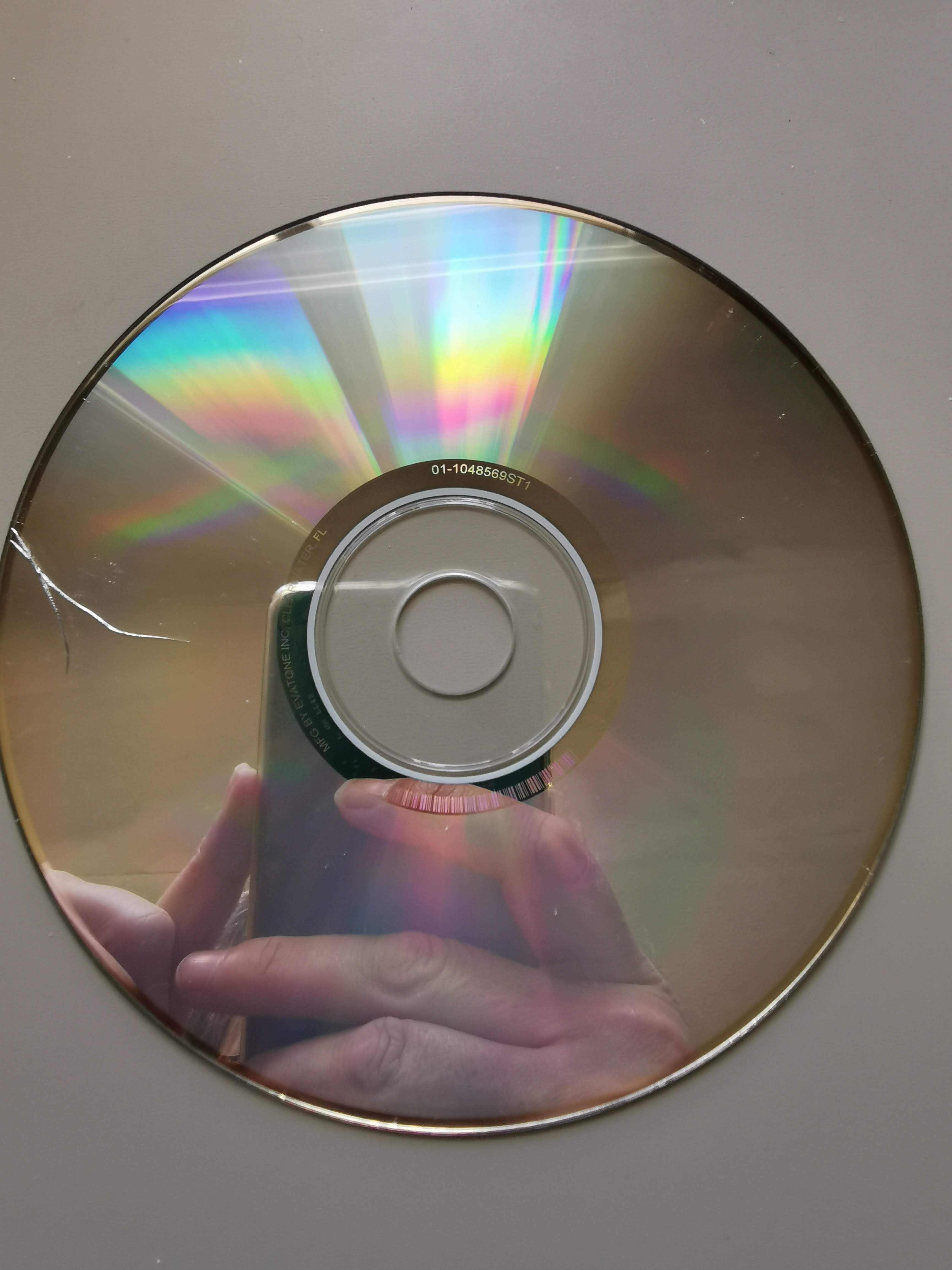
It was made in 2008. Each of the 24 video files is 2-5Mb so only 30 seconds or so. The menu provides an excellent text to accompany each video explaining what it’s illustrating eg aspect ratio, editing, cinematography, mise-en-scene etc. There is an installer on the disc for Windows versions of Quicktime and Macromedia Shockwave which I installed on my sister’s Windows 10 laptop. Also installers for the equivalent Mac versions (I think). For testing purposes here’s the disc image to download and experiment with (178Mb): https://drive.google.com/file/d/1umB7YD58ZTJWByic7Iqwf1SJUsOQrh1O/view?usp=share_link
Wow. I wouldn’t put that disc in a drive. Cracked discs can shatter when spun at high speeds. Just use your image. Burn a CD-R from that image if you want to continue to use it as a disc.
I assume that there’s simply not a lot of data on this disc (178MB is about 27% of a standard 650M disc). CDs record data starting from the center and working out. So if the data ends before it gets to the crack, then that would explain why you were able to read it.
1 Like
You can just see the slightly darker/denser circle of data in the centre and it looks like it ends just before the crack. How lucky.  (But, yes, no way I would have put that into a drive!!
  )
)
Update, neither MBPro will open the disc image. Perhaps if I download a virtual machine - Virtualbox or UTM? Then try to find a disc image for OS10.6 and see if that works on either MBPro.
Any version of macOS (Mac OS X, or Mac OS) 10.14 or older should be able to read HFS volumes.
Apple provides a page of links for downloading most recent macOS releases.
Versions 10.13 through 14 are via the App Store, and may have problems if the Mac doing the download aren’t able to natively run it, but versions 10.7 through 10.12 are direct links to disk image files containing the installer. You should be able to make installation media from one of these, which can then be used to make an installation onto a VM.
Of course, if you have installation media for something older, that can also be tried. 10.5 and 10.6 may run in a VM on Intel systems. 10.4 and older will probably need to run via a compatible emulator (PowerPC or 68K), but if you can get them to work, they should also have no problem accessing HFS volumes, including your CD image.
I have a Mac running 10.13.6.
I downloaded the ISO. When I double click it, I see this warning:
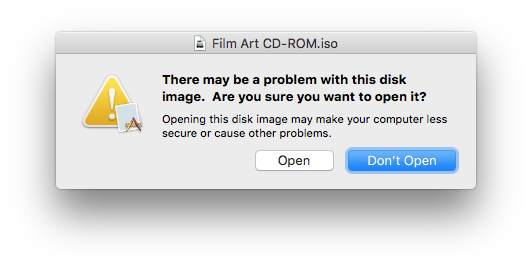
… but if I click Open, I haven’t seen any further problems.
The top level looks like this:

I see some video files:

In brief testing, these seem to open and play ok on this machine in QuickTime Player.app, although that app needs to do a conversion first. If I use the IINA.app player instead (I’m using an old version, 1.0.7, but I expect a more recent one would be ok), it plays straight away, without conversion.
I’ve created a DMG of the top level files, using these settings (I haven’t put a lot of thought into this - I hope these are appropriate):
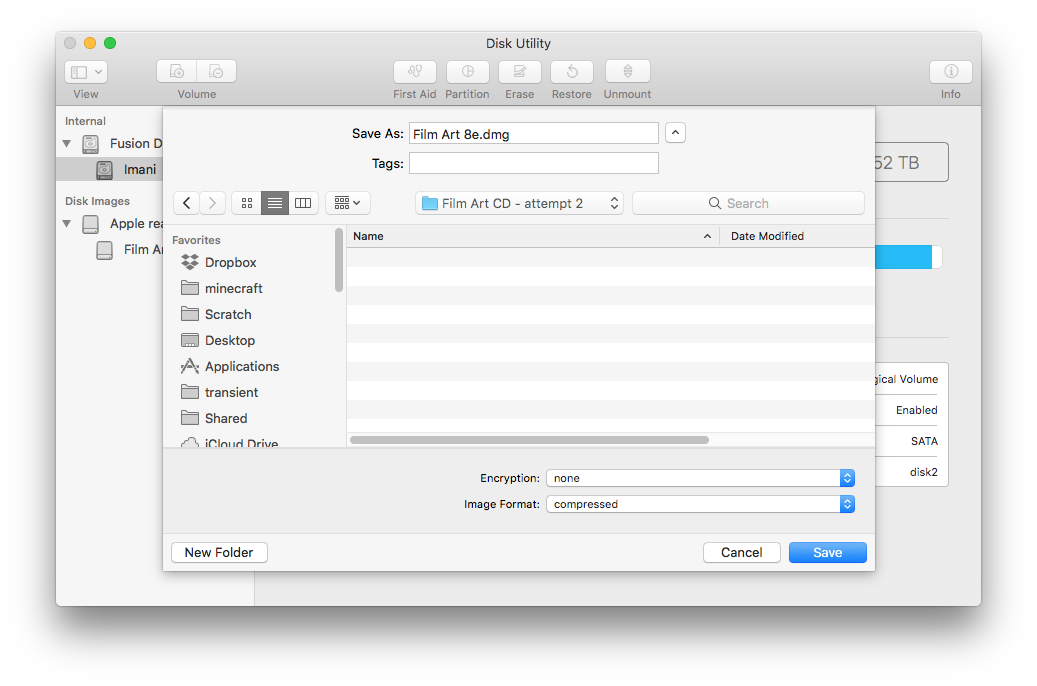
I’ve put that DMG file up here:
So hopefully that gets you a step nearer to being able to use this on a modern Mac?
Please let me know when you have the file, and I’ll take it down again - not wanting to redistribute copyrighted materials, just trying to do a TidBITS friend a favour.
4 Likes
Ashley, thank you for doing that. I’ve just downloaded the file. Will have a look tomorrow.
2 Likes
So I got a little confused as to which OS I should run in which virtual desktop application… I’d like to see it running on my MBPro M1 machine. I assume the disc image may be written for PowerPC processors given it was released in 2008. The last OS able to run PowerPC applications was OS 10.6 Snow Leopard. But it states here: macOS version history - Wikipedia that that only runs 32bit PowerPC apps running on Intel processors with Rosetta… Is there a virtual desktop app which will run Snow Leopard one my M1 Mac?
Jolin posted earlier in this thread about using the UTM app for installing Tiger on an M1 so that is a possibility along with Leopard for PowerPC apps.
1 Like
An M1 processor’s ARM architecture is fundamentally incompatible with Intel, PowerPC and 68K processors. So you can’t run any of those versions of macOS through a virtual machine.
You should, however, be able to run emulator software to emulate the CPU and other associated hardware) of an Intel, PowerPC or 68K Mac. You should be able to install a compatible version of macOS within such an emulator.
Setting up an emulator and installing macOS is something I haven’t done, but others here may be able to help out. Or if you want to figure it out yourself, E-Maculation is a web site dedicated to Mac emulation. It provides articles and links that may be enough to get you up and running, including guides for emulation of PPC and 68K systems. (You will need your own copy of a compatible version of macOS, and possibly also a ROM image for the model Mac you want to emulate.)
Correct. Mac OS X 10.6 only boots on Intel Macs. It includes Rosetta, which can be used to run 32-bit PPC Apps.
Since you have an M1 Mac, you’ll need an emulator in order to run Snow Leopard. But once you get it up and running, it should be able to run PowerPC apps. Rosetta will convert the PPC code to Intel. Then your emulator will run the Intel code.
UTM is based on QEMU, a very popular software package for emulating a wide variety of different kinds of processors. So that should work to either emulate an Intel Mac (which would then use Rosetta to run a PPC app), or a PowerPC Mac (which should be able to boot Mac OS 9 through 10.5).
I don’t know if UTM supports emulation of 68K Macs (it’s not mentioned in their documentation), but if it doesn’t, you can use Basilisk II or mini vMac to emulate a Mac capable of running one of these old systems.
1 Like
Yes, installing Leopard (and I think Snow Leopard) is definitely possible with UTM. But for this (which is similar to my use case), I’d probably stick with 10.4 Tiger for performance reasons. Emulating a PPC definitely introduces a performance hit!
3 Likes
Joplin, I don’t understand why you didn’t set UTM to emulate the better processor - an Intel machine rather than an ancient PowerPC? Is that because performance takes a hit when emulating Intel - even on an M1 machine?
I would only mention that when Apple switched from PowerPC to Intel, those first machines were single core as I recall so they weren’t all that much faster than previous models in some cases.
If you have a Tiger DVD, it is going to a PowerPC one so you need to emulate that. Leopard did come in both versions depending on the computer but the retail DVD was PowerPC as I have both from many years ago.
I’ve used the regular Snow Leopard DVD with VirtualBox and it does install so you don’t need the server version unless something changed in the last year or so.
VMware Fusion does enforce the server requirement but there is some way around it which has been posted previously.
1 Like
This is actually a more interesting question than you may realize.
Rosetta is not an emulator. Well, more accurately, it is a Just-In-Time compiler. It bulk-converts PPC code to Intel (or Rosetta 2 converting Intel to ARM code), and then runs the Intel code natively.
If you’ve got Apple Silicon hardware, there is going to be emulation taking place no matter what you do. The question is which of the following is going to be faster:
- Running a PPC app directly on a PPC operating system, via a PPC emulator.
- Running a PPC app that has been JIT-compiled to Intel via Rosetta, on an Intel operating system, via an Intel emulator.
There’s no guarantee that either one will be faster. It will depend greatly on the relative efficiencies of the PPC and Intel emulators and the quality of the Rosetta compiler.
And if someone wants to try both along with some PPC benchamarks and share the results, I’d love to see it.
If the app you need to run is PPC, then it’s an open question which will truly be faster. See above.
Note that emulating a PPC does not necessarily mean you’re emulating the same clock speed. Your emulated PPC, when run via a modern emulator on a modern Intel or Apple Silicon processor, may well run faster than the equivalent PPC hardware ever ran.
I just checked with MacTracker. The only single-core Intel Mac Apple ever shipped (not counting developer kits) was the low-end Mac mini from 2006 (featuring a Core Solo processor). All other Macs (higher-configured 2006 mini, all later minis, all iMacs, all laptops and all Mac Pros) have at least two cores.
I think you’re off by a generation.
Tiger (10.4) retail boxes were PPC-only. The first generation Intel Macs shipped with Mac OS X installation media that has an Intel build, but that never shipped in any retail box. So Intel releases of 10.4 exist, but only on hardware-specific installation media that you might have a hard time getting to work in an emulator.
But there’s an advantage to running Tiger on a PPC emulator. It was the last version of Mac OS X to include the “Classic” mode code needed to run 68K apps. (Mac OS 9.2 needs to also be installed for Classic to work.) So if you’ve got some really old apps, a Tiger/PPC installation can give you access to them.
Leopard (10.5) retail boxes shipped with both. I installed that DVD on my two PPC Macs, but there was only one retail distribution (but with two SKUs - one for single-system installations and “family pack” boxes licensed for up to five installations). Owners of those first-generation Intel Macs bought the same retail box in order to upgrade.
Snow Leopard (10.6) was Intel-only.
Thanks for that info. Do you happen to know if Leopard (10.5) can be installed in VB (without a lot of hacking)? I don’t have a 10.6 installation disc, because that version came and went before I bought my first Intel Mac.
2 Likes
I was only referring to the retail DVD which as I recall was only PowerPC which is what I had at the time (PowerBook G4).
I don’t know about that as I only have the PowerPC DVD’s unless I have some other Leopard disks laying around that might be Intel. I recently completed a Leopard PPC install using UTM as Jolin mentioned but am still testing it out and updating. I think that would be the best bet for M1 or higher computers.