Zoom has implemented some security changes (e.g. see https://blog.zoom.us/wordpress/2020/04/01/facts-around-zoom-encryption-for-meetings-webinars/ )
but I doubt if they have addressed all of the issues raised by Glenn:
https://tidbits.com/2020/04/03/every-zoom-security-and-privacy-flaw-so-far-and-what-you-can-do-to-protect-yourself/
Any thoughts on BlueJeans? https://www.bluejeans.com Have found best audio & video, moderating, screen sharing, but their freemium model is a 30 day start window.
We updated to the article over the weekend to cover everything Zoom fixed or responded to, including the changed mandatory password behavior, through April 5th.
I’m sorry you that did not also test the free and open-source Jitsi. I would have been very interested in your conclusions.
Fellow dinosaurs should not forget the venerable and I assume retired pioneers CU-SeeMe and QuickTime Conferencing and their revolutionary postage stamp sized video conferencing :)
2 Likes
Richard! So nice to see you here. CU-SeeMe was indeed truly revolutionary, and I still remember testing it with my sister and her boyfriend when she was an undergrad at Cornell several years after I had graduated.
And of course, CU-SeeMe was used to broadcast the first movie on the Internet, and @glennf and @tonya and I were there.

2 Likes
I will never forget a conversation I had at a conference maybe around 1997 with Netscape’s webmaster. He said he had been on a panel about the future of video on the Web and how it might one day be a source of revenue. Everyone on the panel was talking about the quality issues and consistency and size. And there was a woman on the panel who ran the video side for Hustler. And she said, our subscribers are happy to pay premium fees for 240 by 360 pixels at 10 frames per second in black and white! A good lesson about the compromises people accept in exchange for content they want.
4 Likes
Has there been any look at the merits of Discord? I will mostly be using video chat for gaming with up to eight people involved, and most of the people I will be doing this with already use Discord.
1 Like
For gaming, Discord is the app to use, be it on a mobile device or PC or Mac. If the people you play with already use Discord, that pretty well makes the decision for you. I have never had any issues with Discord.
One factor which had been bugging me was the constant issue with headphones on and wanting to use the rather good internal speakers on the 2019 iMac. I have a good pair of Sony studio over-ear headphones but would normally prefer to listen to music from the internal speakers, they’re that good and the studio is that small…
What with all the Zooming and Teams meetings I needed to use the headphones given my wife’s studio proximity to mine. But as we all know you can’t swap between the internal speakers and headphones via software. Endlessly reaching behind to pop in and out the headphones was a pain the proverbial so I began a quest for a suitable USB alternative, not fancying a bluetooth pair.
The last time I had considered this was the old days of the Griffin iMic, no longer available. There’s an excellent piece of software Soundsource which can swap between audio sources, both system wide and per app, can control volume and add effects. It seemed just the thing, and there’s a TidBITS member deal on it too.
The Wirecutter recommended the Audioquest Dragonfly Red which arrived today. It was more than I wanted to pay but an audio pal of mine recommended it enthusiastically "you won’t regret it, use it on your phone too, you’ll not believe it’.
Oh boy, he was right, now I only want to use my headphones… I always say audio folks have different ears than the rest of us, I’m getting an education.
1 Like
My Apple User Group could no longer hold meetings so we moved online with Zoom. We purchased the Webinar component and are very happy with the result. We are based in Canberra, Australia but have members spread all over the country - mostly after retiring.
For many it was the first time they had participated in a meeting for many years. There are two types of Participants: Panelists and Attendees. We initially were going to have a couple of Panelists to answer questions with the remainder of members participating as Attendees. We ran three familiarisation test webinars to familiarise members with the operation of Zoom, but we quickly decided to make all members Panelists because they can share their video with everyone whilst Attendees do not have the option of appearing on video. It was great to see people, some of whom I had only exchanged emails with.
The Webinar function works extremely well. Most of our members are elderly, our eldest at 99 managed to join in. The fact that users don’t need to setup an account, they just have to click on a link made it easy for us to choose Zoom.
2 Likes
This whole story makes me so happy! Great job!
I did a Zoom test call for the book I’m working on with a random array of people. One person has a group of about 75 amateur photographers in their area, and they had 50 on a recent Zoom call meeting!
This is the kind of thing that is so great to hear right now.
At work we routinely hold a weekly Zoom meeting with about 200 people. About 70 or so have video on. I see that pushes ~2Mbps on my end. So far, so good.
We also have had site wide Zoom meetings with about 600 attendees, but those are broadcast only. If you want to say something you have to use chat.
Now it seems Teams has a vulnerability (apparently fixed by a recent update):
Hey, look—Skype added a virtual background feature.
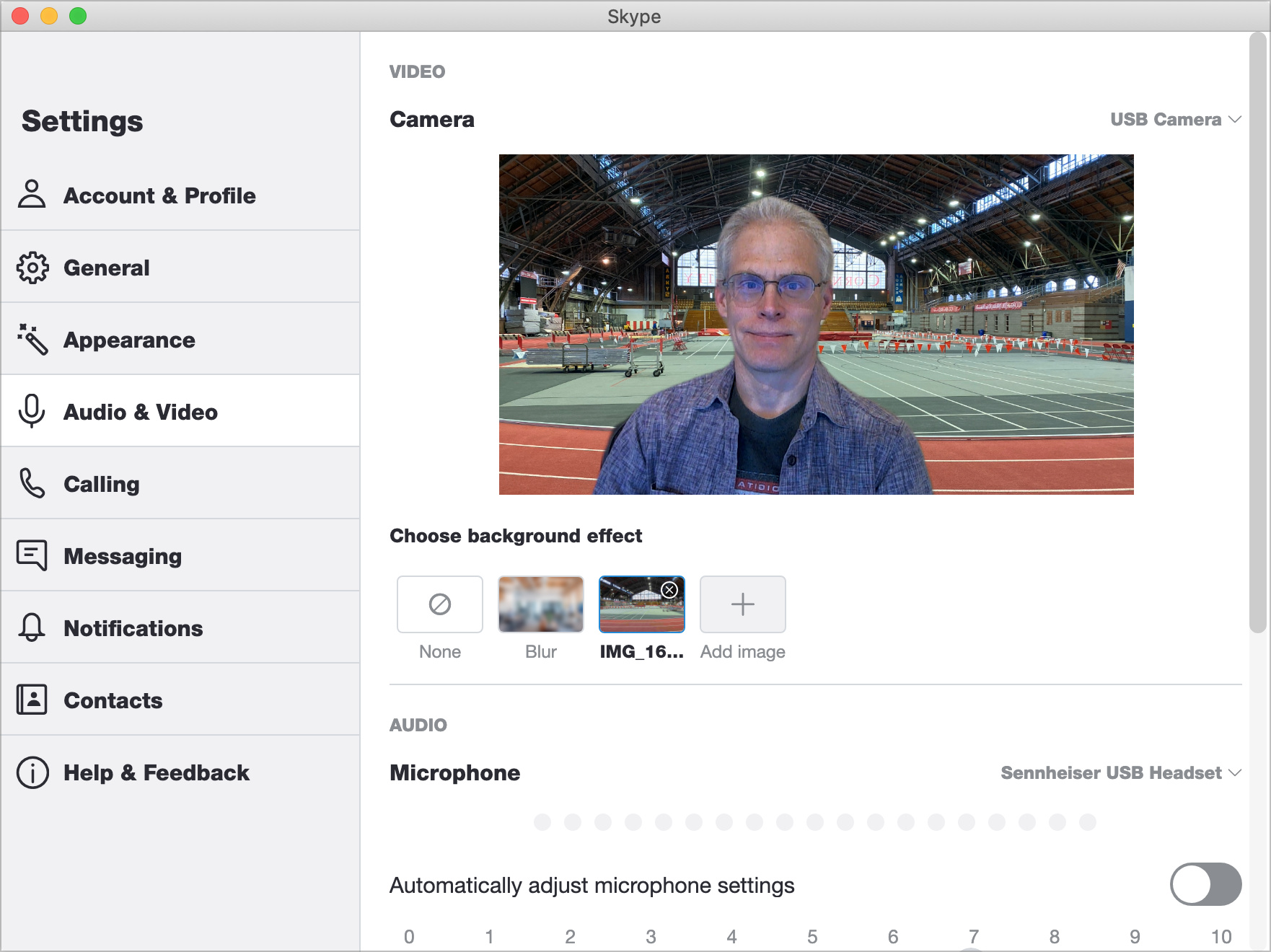
Note that it only links to the image, though, so if you delete it, you’ll lose access to it in Skype.
As expected, some of the expansive free offerings and tiers are starting to shift as people get accustomed to working from home and limited re-opening occurs around the world. Cisco just announced starting 1 July 2020, Webex will only allow 50-minute meetings (down from unlimited) and VoIP-based calling (no dial-in numbers).
1 Like