Thanks for reminding us of the Create Quick Event box, which does indeed let you specify time zones. However, it may not be quite what @Gobit wants since although you can enter times in two different time zones (whose abbreviations you have to get exactly right—I’m in EDT now, so it wouldn’t accept EST), they’re collapsed to a single time zone when the event is created, though with the correct times.
2 Likes
Couldn’t agree more. I don’t understand why the ostensibly more powerful platform is the one that can’t do this! You’re very welcome, glad I could help.
2 Likes
BusyCal will definitely let you do create an event with Floating as the default on either platform (they recently added the default option for the iOS app).
And I believe Apple’s Calendar.app on the desktop will give you an option to make it default.
Someone wrote a Shortcut you can run on iOS to create a new event that is set to Floating-it’s a little strict on data entry and the iOS interface doesn’t help, but it does work.
Useful tips - thanks Adam and others.
I just entered some flights details and, as advised above, had to use the iPad for entering the appropriate time zones. But they display clearly on the Mac:
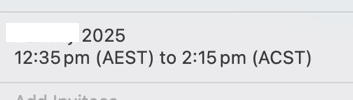
I cannot find that option. If you know where it is, please tell me.
As an aside, while poking around Calendar, I found two shortcomings (my opinion) in the Sequoia version. After restarting Calendar, the Settings dialog box does not remember where I last placed it if I had moved it. Also after restarting Calendar, the displayed account under Alerts is On My Mac, even if I had changed it to iCloud in the previous session. Again, it’s my opinion, but this feels like sloppy programming by Apple.
1 Like
…Mac window management failings rearing its ugly head again, unfortunately.
While improved, many apps’ windows still fail to open where they were left on you chosen Desktop screen after a restart too.
I moved from France to Canada (their Eastern time zone). I still teach students in Germany (UTC +1).
The easiest way to deal with it was to continue to schedule their classes in Kiwi/Gmail Calendar — set to UTC +1 — and have Fantastical mirror that calendar, but set in EST.
Yeah, two calendar apps, but when you have to be awake at teaching class at 02:30 local time, whatever works!
1 Like
I agree with UTC. It ought to be in use everywhere, then we’d all be on time. My watch (non-smart) is set to UTC.
And we could also use a better calendar: http://hankehenryontime.com/
Ed.
I frequently am in a different continent with a radically different time zone. What I have done for years is keep my laptop set in my home time zone and let my watch and phone adjust to local time (when I started doing this I had to set my watch manually and I didn’t have a phone).
I can view any day in the Calendar app on my laptop and it is in home time, and I can view any day in the Calendar app on my phone and see everything in local time. I find this works well, with the only difficulty being that events in the “floating” time zone alert on my laptop and phone at different times and I need to remember to ignore them on my laptop and only pay attention to them on my phone.
1 Like
For a few years I lived in a town on Central Time, but work on Mountain Time (out of a railroad terminal whose crews worked west and then back). My watch was always on MT. It was only an hour, but I was still surprised how quickly I habitutated to adjust appropriately.
It’s not that simple! They display correctly on the Mac when you open them in the Calendar—until you click to edit them, then they revert to your local time!! I guess I’ll re-revert to floating. 
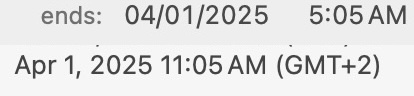
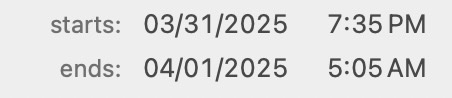
Edit: I cannot delete the time zone once I’ve added it on the iPhone! “Floating” is not an option!
1 Like
Adam, while it is not specifically related to time zones, here is my pet peeve about Calendar. I sync my iPhone and iPad calendar to an Outlook calendar on an Exchange server which I view on a Windows machine. If I create an all day event on the iPhone, it shows up in the “all day” portion of the Outlook Calendar, but also shows the entire day, from 12:00 AM to 12:00 PM as being busy. (It is of course not like that on the iPhone.) Opening the all day event in Outlook and turning the “All Day” box off and on resets the event properly - unless someone else has created the event, in which case it can’t be altered. Annoying.
First an enthusiastic endorsement of TripIt. A wonderful app. Not sure you get a lot of (for me) useful stuff with the Pro version, but I would gladly pay a modest subscription for the regular version (say $5-10).
BusyCal does allow Floating Time Zone as a default and it’s great. If I am in Boston, and a friend in Istanbul says, “let’s meet at 1 on Friday” I don’t want to do a lot of calculating. Floating means even that even though I made the entry when I was sitting in Boston, the next day at 30 minutes (or whatever) before 1 in Istanbul, I am reminding to go meet Zeki. People who don’t travel a lot tend to resist Floating Time Zone, and this includes the makers of software. BusyCal was somewhat resistant but one reason I stick with them is that they are very (quickly) responsive to suggestions etc. Hence default floating time zones. Calendar apps would be impossible for me to use if they constantly “corrected” for time zone. What a PITA that is!
1 Like
I had never heard of floating time zone, but it seems to me this should be the default for reminders if you aren’t going to let people set the time zone for them.
1 Like