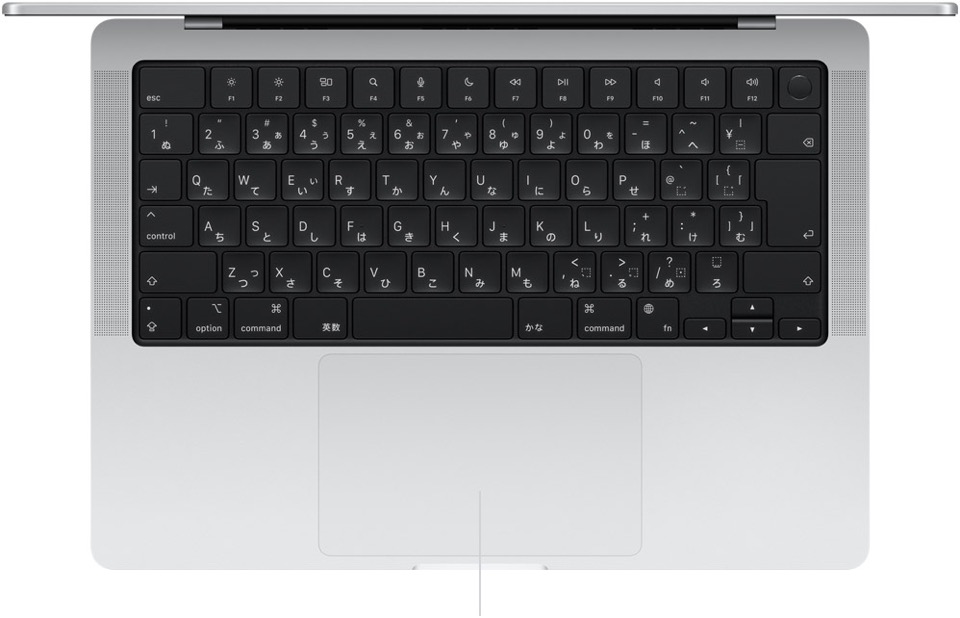
The Japanese keyboard is different. Here is a picture of the MacBook Pro keyboard (thanks to Adam, for the picture):
Both the laptop keyboard and Apple Extended Keyboard have the CapsLock key at the bottom-left. Fn key (on laptop keyboards only) is on the right-hand side, next to the arrow key.
Next to the Space bar, there are Eng/num key (on the left) and Jpn/kana key (on the right) for switching keyboard input source.
Many people, including myself, dislike the CapsLock key at the bottom-left position, and so we remap it to the Control key - so we have 2 Control keys on laptop keyboards, and 3 Control keys on Apple Extended Keyboard.
A very interesting and helpful article, @ace. Thank you!
I’ve kept an eye on my Fn key usage since I read it and noticed…
• I use it often simply to access Fn keys because I’m on a MacBook Pro with your “favorite” Touch Bar.
• I use it constantly – completely automatically – with arrow keys for navigation in windows and documents. If you had asked me if I did this I couldn’t have told you… I don’t recall how I started this behavior… in the Mac Stone Age.
• I use it regularly to “forward delete” with the Delete key, starting on a day in 2001 when a grumpy colleague complained that his wife’s new (and new-fangled) Mac didn’t have a traditional Delete key that deleted forward like on his beloved Windows PC.
Other than that… I had no idea about the other various Fn-shortcuts (other than using them on Macs with hardware function keys (my iMac at home) to access the corresponding control panels… er, I mean “Settings”… for the basic settings printed on those keys such as volume and brightness). Thank you for sharing them, and thanks to everyone who shared more.
Jeff
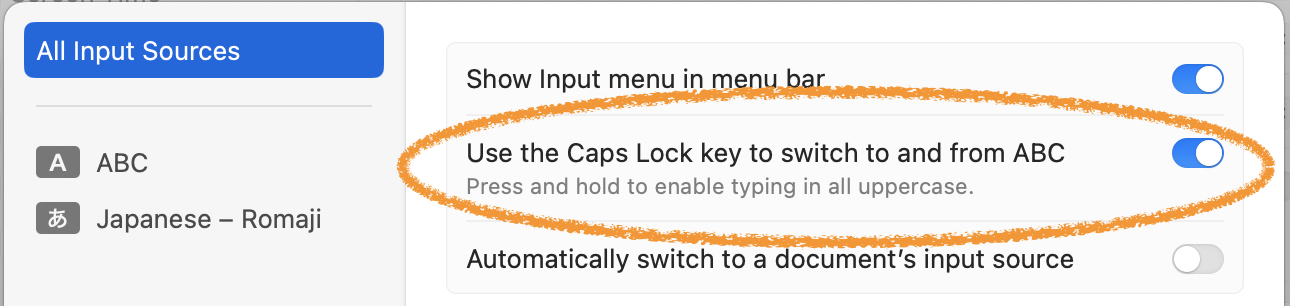
P.S. I switch between English and Japanese constantly… but on my two Macs I don’t have a “Globe” key. Since 1987 until earlier this year I have used ⌘-space to switch keyboards… then this year I found a setting that lets me change that function to the Caps Lock key while still retaining the Caps Lock function (I just need an ever-so-slightly-longer press).
System Settings > Keyboard > Text Input > Input Sources > Edit > “Use the Caps Lock key to switch to and from ABC”:
It’s changed the way I use my keyboard notably… it’s faster and somehow a more natural mapping of the function to a key, much as my Japanese colleagues have a key on their keyboard for this… and only a slight movement of my left pinkie is required.
macOS Sonoma adds a new caps lock / language indicator at the cursor (i.e. where one is typing), which delivers a charming and pleasant visual confirmation to successful mode changes via the Caps Lock key.
I’m another that maps Caps Lock to Ctrl. It makes it easy to type Ctrl+f to move the cursor right and Ctrl+n to move the cursor down (especially useful for pop-up menus). I use Ctrl+f without thinking any more so it’s always confusing when I’m on a machine with standard Caps Lock and get a capital F instead of a moved cursor.
Ctrl+a/Ctrl+e go to the beginning/end of the line in many apps, including Terminal. I’m pretty sure this is a Unix relic (as is Ctrl to the left of the “a” key). Ctrl key combinations can be the source for another article.
I’m 76, so, slow on the uptake if I try to learn too many things at once. Reading this article while trying to learn my first Apple Silicon Mac, AND a new OS version. puts me into overload too quickly, but:
On my new M3 Pro MacBook Pro, Fn-Q, does NOT create a new quick note; rather, it opens the Notes App to the most recently edited note (but that is configurable in Notes>Settings. Curiously, I don’t find an easy way to configure whether or when notes being edited are saved.
The behavior of Fn-H is interesting as well. If the Mac is currently in full screen mode in a specific application, Fn-H doesn’t bring up the Desktop picture, but either does NOTHING, or rather a black screen if Fn-F in invoked AFTER Fn-H
One other extraneous comment. It’s interesting how Apple can get credit for “inventing” the same thing twice. Early MacBook Pros had an LED on the MagSafe power port that would inform the user if he’d mistakenly plugged the a/c plugged into a de-activated switched outlet. On my new Mac, that function is back. Perhaps simultaneous use of a single port both for power and data transfer was a brdige too far. I’m happy too see what was old is new again!
When reading this article, I thought “where did I see this globe-icon before”…? And now I found out where: it’s in Safari’s URL-bar, when you edit it.
And it’s also in the title-bar, when you view a YouTube-video in full screen and hold the mouse pointer at the top of the screen (this is probably the same thing as the titlebar of a popup window, but in a popup window you see the favicon)
Edit: and of course as an URL icon with bookmarks (bookmark-bar, bookmark-menu etc.)
All in all the globe-icon seems have multiple meanings with Apple now.