But note that with only two drives, you have to choose between capacity and reliability:
As independent drives, it’s no different from two separate drives, except they share a single cable.
If mirroring is used (RAID-1), you get reliability, but no additional capacity.
If striping (RAID-0) or their “large” mode is used, you gain capacity, but lose reliability, because a failure of either drive causes the array to fail.
This doesn’t make it a bad product, but you need to know what you’re getting. A hypothetical enclosure that supports 3 or more drives could be configured for RAID-5, allowing increased capacity and reliability (no data loss in the event of a single-drive failure).
I did almost the same thing for someone but with 990 EVO Pro and OWC 1M2 that’s USB4, but seems to support SMART and Trim. How has your experience been since?
On a Mac Studio M4, that should handle two bus powered drives, it does with two of these, but periodically after waking from sleep macOS says one of the drives unexpectedly disconnected, with both drives already mounted. That message has appeared a few times for each of the drives, but never more than 1 drive at a time. Happens maybe once a week.
On a different similar Mac, but with only one of those OWC 1M2 cases connected, the same thing has happened, but less often, after waking from sleep. Preferences are set to not sleep on its own, it only sleeps when I tell it.
I don’t know if these Macs should not be put to sleep with these drives, or get a powered Thunderbolt 4 dock from OWC? Maybe a 2nd one that has HDMI too. If so, can anyone recommend a dock or two from OWC?
So far, with using the drive for holding archival files and my nightly duplicate, everything has worked perfectly. No disconnects, and extremely fast performance,
That’s one of the perks of choosing NVMe via TB/USB4 over USB3 or, God forbid, SATA. An NVMe SSD over TB/USB4 to your Mac is just PCI-attached flash and as such you directly benefit from goodies like TRIM (yes, technically it’s DEALLOCATE on NVMe, but irrelevant) and SMART.
Conventional wisdom says you only get the latter with TB/USB4 and the former requires NVMe. 99% of the time that’s correct[1]. You want these things. NVMe over SATA is a no-brainer. And with USB4 cases being only a little more expensive than decent USB3 counterparts, there’s little argument there either.
These are good times for external storage.
There are indeed rare exceptions. I still have an ancient Crucial SATA SSD in a cheap USB3 enclosure lying around. This SSD will in fact TRIM on every mount. It takes, per system logs, on the order of minutes (vs. 2 sec for the Samsung 990 PRO in its USB4 case) to finally get it done, but it does TRIM. This is clearly an exception though. ↩︎
In this case, if you choose capacity, you get almost double the read/write speed (2800 Mb/s v. 1500 Mb/s). Acasis does not claim that any of their other SSD RAID enclosures will deliver such a speed increase when configured as RAID 0, so my point was that this new enclosure offers much faster read/write speeds.
Slightly off topic, but figured it would be worth documenting. I’ve noticed that model from Acasis, and while they don’t provide the technical details, something seems off to me. They specifically state that one drive only gets 1500MB/s:
Measured speed: It can reach 2800 MB/s with a RAID 0 setup, and normally each SSD transfers at about 1500 MB/s.
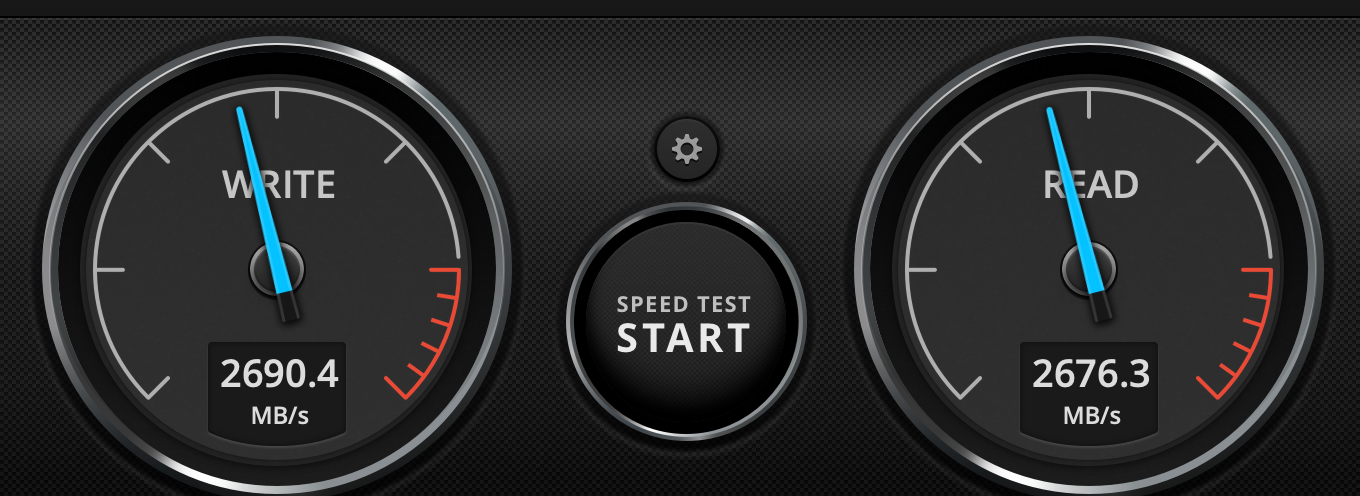
The single drive enclosure I have (TBU405) with a WD Black SN850 2TB already gets ~2800 MB/s speed (see attached speed test I just ran). Both have the same controller, JHL7440. So for the same controller with a single drive to get slower speeds in the 2-bay enclosure, I’m guessing that there are less PCI lanes per M.2 drive, probably half of what the JHL7440 supports, so that two drives are required to get the full speed. OWC did something similar in one of their multi-slot M.2 enclosures, and it took a lot of digging to figure out they had limited lanes to each drive.
So the two bay enclosure only makes sense to me if you want to mirror (Raid 1) or need more capacity than the largest M.2 drives currently available*. The Acasis 2 bay enclosure does not do the raid itself, it’s using OS provided software raid as they state on the product page.
*You could technically use two separate one drive enclosures and use Disk Utility to stripe (raid 0) then into a single volume, but not sure what would happen if you only attached one (suspect bad, hopefully not mount). You should get faster read times since data could be read from both drives at the same time, maybe ~4000MB/s? Total guess, but based off the Acasis increase from 1500 to 2800 seems reasonable. TB4 max theoretical throughput is 5000MB/s (40Gbps).
I’d check your calculations. 40Gbps is the raw data signaling rate of TB4. TB uses 10/8 encoding for data over the wire (8 bits of data are represented by 10 bits over the wire). That means that the data transfer rate for TB4 tops out at about 3200 MB/s.
Very true, my bad for just doing quick unit conversion and I had forgotten what the upper limit of actual throughput was for TB4. Knew it was well below 5000.
I wonder how useful RAID mirroring is for SSDs. Seems to me the failure modes for SSDs versus rotating drives might make RAID mirroring not worth the effort. Better, methinks, to do something that clones one SSD to the other. Part of this comes from my experience with RAID failures replacing a rotating drive with another drive of the same size, but not the same brand/model, and having the RAID rebuild fail.
I have been considering not bothering with RAID configuration for SSDs and just having a few SSD clones acting as individual backup drives. If one clone fails, then I still have redundancy with one or more other clones. Wanting RAID configuration with a bunch of SSDs in an external enclosure means an expensive SSD storage package.
Moreover Apple Disk Utility only does RAID 0 and RAID 1 and not my preferred RAID 5. SoftRAID does RAID 5, but SoftRAID is now an expensive subscription service and I’ve had issues with SoftRAID in the past.
Assuming you want software-based RAID, you’re absolutely correct.
But many multi-drive enclosures (that support 3 or more devices) offer hardware RAID. macOS will see the entire array as a single (USB or TB) storage device.
You’ll need the manufacturer’s utility software (which may be a web-based management interface) for managing the array, but you won’t be beholden to AppleRAID or SoftRAID.
Whether this is better or worse than buying a SoftRAID subscription is an exercise for the reader.
We seem to be getting more thunderstorms in eastern Australia and it is too easy to forget to disconnect external drives when storms approach. So I prefer to have at least two separate, non-RAID SSDs for backups and photo libraries and keep one of them disconnected unless in use.
Years ago, in HDD days, I experienced a complete failure of a Lacie RAID system, running RAID 1 I think, and that put me off the concept. But I wasn’ t doing work like video editing that was intensive on external drives so it was less important to have the reliability of RAID after the failure.
Do you use a UPS? If so, can you power your external drives from it?
On my system, my UPS powers my external storage devices and some of my network gear, so I can continue working through power glitches and outages.
I also experienced various kinds of failures with LaCie devices (mostly second-hand equipment), which is why when buying for myself, I always went with other brands.
Of course, they’re now a part of Seagate. I’m not sure if that is better or worse .
But at work, we used RAID systems all the time, and they were incredibly good. But those were not cheap desktop units. They were very expensive file servers from Network Appliance. Which had better be rock-solid, given the price.
I ran server based raids for years for a design office and came to the conclusion that they’re really only good for two things: video editing and multi-user high frequency transactions like for databases. Aside from those two purposes, it just wasn’t worth the hours of anxiety when there was a drive failure and it took overnight to rebuild a new one.
I learnt the hard way that UPS/spike protectors do not necessarily protect from nearby lightning strikes. As mentioned in other discussions, I suspect there is a massive EMP that sends a high voltage through the wires, including ethernet cables.
On topic… that is one reason I like to unmount and unplug SSDs if there is an approaching storm (usually alerted by my Apple watch)
BTW - we now have a Powerwall home battery system that keeps essential power going in a grid outage. It is very fast - my iMac stays on when it cuts in. The usual way I know of an outage is a notification from the Tesla app on my watch.
Yes, lightning strikes generate EMP, which can induce currents in nearby wires. But the strike would have to be pretty close to your home for this to manifest in any way other than a power surge on the utility lines.
Do you live in an area where you get a lot of strikes close enough for this to be a problem?
Speaking of lightning strikes, the Coax splitter my former ISP (Cox cable) used were very susceptible to lightning. If there was a strike anywhere near close, the internet/TV would go out and I’d have a service call. After the 2nd time, the guy gave me an extra splitter and said, “You can replace this yourself, and then call us for a new one.” (Apparently I needed a particular kind of splitter to keep internet, phone and cable TV all working.)


 .
. (Apparently I needed a particular kind of splitter to keep internet, phone and cable TV all working.)