Yes. That’s permissions. You’ll need to be logged in as the account that owns the files, and I think this means the numeric user ID needs to match, not the user name - which can be a bit tricky if they don’t match on the two computers.
You might try it from an admin account to see if it works.
But trying to move a TM backup to a new physical device is a different issue, since you have to deal with all the snapshots (one per backup) or rats-nest of hard links (if its an HFS+ volume). It may be possible, but it may be preferable to just start a new Time Machine volume and keep the old drive in storage, in case you need access to old files in the future.
Agreed. I wouldn’t waste time and effort on trying to migrate old TM contents, which in itself is a non-trivial operation. Get a new TM disk and start fresh. Store the old disk in a safe location (ideally somewhere else) where it can serve as a safety net need should you later need something from way back when. The old disk will still serve its backup purpose, but get a new volume to start the new TM backup.
Since what I see when I double-click my Time Machine volume (which is in a Time Capsule, if it matters) is a sparsebundle and not separate “drives” with individual snapshots, is my volume formatted with HFS? (Certainly the Time Capsule is old enough that it might be.) If I wanted to reformat as APFS, how would I do that with a disk in a Time Capsule? I can’t get it to show up in Disk Utility. FWIW, “Format: AppleShare” is in the Get Info window. Thanks.
Yes. If that drive is internal to a Time Capsule and was used with Time Machine, it is HFS+ formatted and will contain sparse bundles for each host. The sparse bundle for a specific host will contain various snapshots each presenting the actual backup at a certain moment in time.
Thank you. I’ll take your word for it; after telling the Finder to Show Package Contents, I cannot find anything that I can identify as a snapshot. As noted below, I am unable to open the sparse bundle.
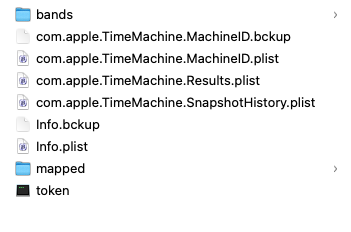
Thank you. The question that that begs is how to find the format of the backup volume stored in the sparse bundle. When I try to open the sparse bundle, I get a message “Resource temporarily unavailable”. Here is what I see when I Show Package Contents.
To find the format, mount the volume and see what Disk Utility says it is. You may be able to get around the “resource temporarily unavailable” issue and mount the disk image by doing so through Disk Utility (File > Open Disk Image…).
Thanks. I had seen that volume in Disk Utility, but assumed it had something to do with snapshots on the internal drive. Based on the size of the backup volume and the space used, it must be the Time Capsule drive.
The container and the volume are both APFS. Thanks again.
This is, as you’ve seen, the contents of the sparse-bundle kind of disk image. The bands directory contains a bunch of files which, all taken together, contain the contents of the disk image. The other files are metadata which, it appears, are mostly Time Machine-related.
The advantage of a sparsebundle over a more traditional kind of disk image is that the data is in those multiple band-files. This creates a few advantages:
If the disk image is on a remote/network volume, you don’t have to worry about the possibility that the disk image is larger than the remote system’s maximum file size. As long as each band is smaller than that maximum, the bundle will work.
If you frequently make backups of a disk image (e.g. one used for storing files, not one that’s a Time Machine target), incremental backups won’t necessarily have to copy the entire content. Your backup software will only need to copy the bands that have changed, which may be significant depending on the size of the bands and your usage patterns.