Apple accounts must have a password. Anyone whose Apple Account meets Apple’s requirements to sync keychain info will have a passkey assigned when they connect on an iOS/iPadOS 17 or macOS Sonoma device, so if you meet those requirements, you probably do have a Passkey assigned, but you also must have a password.
I’d strongly suggest, though, making sure that you have a recovery method for your account - (a) trusted contact(s), trusted phone number(s), recovery key, etc. - in case you do, in fact, lose all of your devices, because you won’t have a trusted device available to approve the log in from a new device. But that, of course, has nothing to do with passkeys.
I have a copy of my 1Password secret key stored in a couple of safe places in case of disaster. And, I believe I will not forget my master password. I practice it often.
You can store passkeys in 1Password instead of the Apple passwords app/iCloud Keychain, and they will also sync to all devices that use your 1Password account.
As for passkey to log in to your 1Password account, I’m not sure that 1Password supports that yet, and I’m not sure that it completely replaces the password on the account. Even if it did, 1Password has a recovery mechanism as well. Log in to 1Password.com with a browse, click your name top-right, go to My Profile. If you lose access to your 1Password account you can recover it with the recovery key.
I know at least some password managers that include 2FA (such as TOTP) make it relatively easy to see and export the underlying 2FA keys, so you can then add them into the PM on any of your other devices. Strongbox is one such password manager, though it runs only on Apple devices and has another issue (the app was recently sold, and many prominent users are fearful for its future).
1Password began offering a last-resort method for accessing your account a year or so ago: Recovery Code. 1Password forces all passkey-based logon users to set up a Recovery Code.
Apple has an established process for helping users with lost devices: About the security of passkeys - Apple Support . Plus Apple has a global retail store and customer service call center presence that can support people who need emergency assistance.
One of the biggest benefits of passcodes is that when a website, say, your bank, is successfully breached by an attacker, you don’t have a password that can be stolen and exploited by criminals. All the attacker gets, essentially, is half of your sign-in credential. That is a major reason why many companies encourage their customers to switch to passkey log-ins.
Personally, I view hacks and security breaches at companies and websites to be more of a risk than all of my Apple devices becoming inoperable simultaneously (obviously, as a multi-device owner my risk is lower than somebody who only owns an iPad). So for me, passkeys are superior to passwords in most circumstances.
Using passkeys is not a binary choice. It’s possible and perfectly acceptable to try passkeys out on a single, non-mission critical website before committing to changing more important logins.
As for 2FA apps, Google Authenticator now offers cloud and non-cloud based syncing across multiple devices. I have my G.A. codes on both an iPhone and an iPad. Apple Passwords probably does the same via iCloud only.
Thanks. I did not know all of this. I do have a recovery contact set up. And, if you are correct, I may already have a passkey for my Apple account. I wonder if I’ve used it without knowing on my iPhone. I may try to test that, although testing things like this makes me nervous.
I decided not to add a recovery key to my 1Password account because it seemed like it would increase my attack surface and I thought it unlikely I’d ever need it.
Some of Halfsmoke’s points are compelling. I’m about to switch to a new MacBook that has TouchID. That might inspire me to try passkeys on some of my less critical accounts.
The concept of passwords seems like an ugly kludge. There are many layers to alleviate the problems associated with passwords, so I’ll almost certainly switch to passkeys sooner or later.
If managing the risks of device failure is a top need, I would choose a password/passkey/2FA provider that has a global physical, telephone, and online customer service presence, massive financial resources, a history of stable ownership, experienced senior management, and an extremely large user base. All that is to reduce the possibility of a company going out of business, selling itself to or merging with a less trustworthy company or investor group, not being able to afford robust security practices, having a bug or breach go unreported by media sources, and, most important, not being able to help customers in an emergency.
Well, of course another alternative is an open-source provider using proven and well-established encryption protocols, such as KeePassXC, which allows you to choose the sync provider of your choice (online sync service, roll-your-own open-source sync service, etc.) which you control yourself.
I’ve been trying out Apple’s passwords app myself the last few months, but I think I am going to end up mostly staying with 1Password, and using Apple’s passwords app only for a few sites - there are too many things 1Password can do which Apple’s Passwords app cannot (yet?), but my wife will never use 1Password, so I will continue to use passwords that she should be able to access using Apple’s Passwords app, which she does use, shared with her using family sharing.
I use a third-party app for most of my one-time passwords, though I store a few for accounts I don’t care all that much about in 1P or Apple Passwords.
The issue for me going forward will be making sure that the ones that are stored in both apps remain in sync if there are any changes (new password, etc.).
A passkey does not shunt all authentication through a third-party server. If it did, then you’re right, the reliability and security of that server would be critical.
Instead, when a passkey is generated, your password manager (e.g. the macOS Passwords service or an app like OnePassword or something built-in to your browser) generates a cryptographic key-pair. You retain the private key and the public key is sent to the remote service. Later, when you want to log in, after identifying yourself (and maybe after password authentication as well), the server sends a “challenge” packet to you. Your password manager encrypts the packet with your private key and sends it back. The server decrypts the packet with your public key and compares the results against the challenge packet it sent. If they match, then you’re authenticated.
When you sync your passkey to new devices (using whatever means your password manager supports), your password manager software is actually syncing the private keys and the locations of the servers that require them for access.
The critical thing here is that there is no centralized passkey-provider involved in the process. The communication is entirely between you (via your password manager software) and the server you’re trying to access.
Yes and yes…adding that an open source solution probably is best for people who have the capability and time to review/research open source code and I think small company products and services have a lot of inherent risks that are very difficult to manage or fix for users who rely on a single device because they are not entirely comfortable with technology. So even though I am a big proponent of FOSS and public-private key encryption, I think many users are best off with a “big company” password manager.
Interestingly, I reviewed this thread this morning and saw the quoted response related to a question I had asked. Thus it was fresh in my mind this afternoon, when Google Voice failed (nothing shown as received) on three different attempts at receiving a 2FA text—and that was domestic, not ex-USA. (And I checked on both my phone and at Google’s web site.)
Maybe it depends on the sender. The failed 2FA texts this afternoon were from Amtrak, but I have received 2FA texts from Chase and TIAA in the past.
This may or may not have any relation to what’s happening to you but I’ve noticed when I have not interacted with my iPhone for a period of time—maybe 30-45 minutes—SMS, iMessage, or GV texts don’t wake the phone up with a Notification. But when the phone’s screen is activated by touching or moving the phone, a Notification immediately appears. So my assumption is that either iOS or my mobile carrier idles the data and SMS connection after some period of inactivity. And as you say, this behavior is really noticable when waiting for a 2FA code.
Another possibility is that Amtrak and the USPS use the same 2FA text provider. I often don’t receive USPS 2FA code texts on my first request. It also is not uncommon to see a message on the USPS website login page that says, “Text message verification is not available at this time”.
For the second and third attempts at received the 2FA text, the iPhone was awake. For the third attempt, Voice was the front application. It seems to be something else was interfering.
Huh. I didn’t know there was a spam folder in Voice. Thanks. Now I know, and the spam folder was empty.
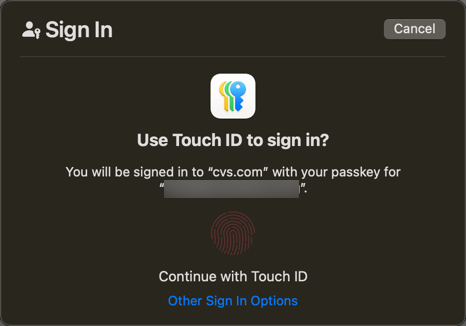
So, partly inspired by this discussion and partly because I just got a new Mac that has Touch ID, I decided to try using a passkey and the first site that offered it to me after that was cvs.com… and it didn’t work as expected. I got an error in 1Password. I contacted 1Password support and they told me cvs.com passkeys are not compatible with 1Password because they are “device bound passkeys”, bound to a particular device. I guess that means I would not be able to use it with the cvs app on my iPhone, for example. That seems a little nutty. Can I have more than one “device bound passkey” for one account?
So, I’m back in the mode of being unexcited about passkeys. Maybe I’ll try again in a few months with some different site.
So, I got this to work, using Safari (it won’t work with a 3rd party browser, as far as I can tell). When I clicked the “create a passkey”, and 1Password popped up the “save the passkey” dialog, I cancelled it. THEN the Apple Passwords app (aka Keychain) popped up and let me save it with my touch ID. And now I can log in with the passkey - I tell it my email address, and then I get the prompt - this is on my MacBook Pro.
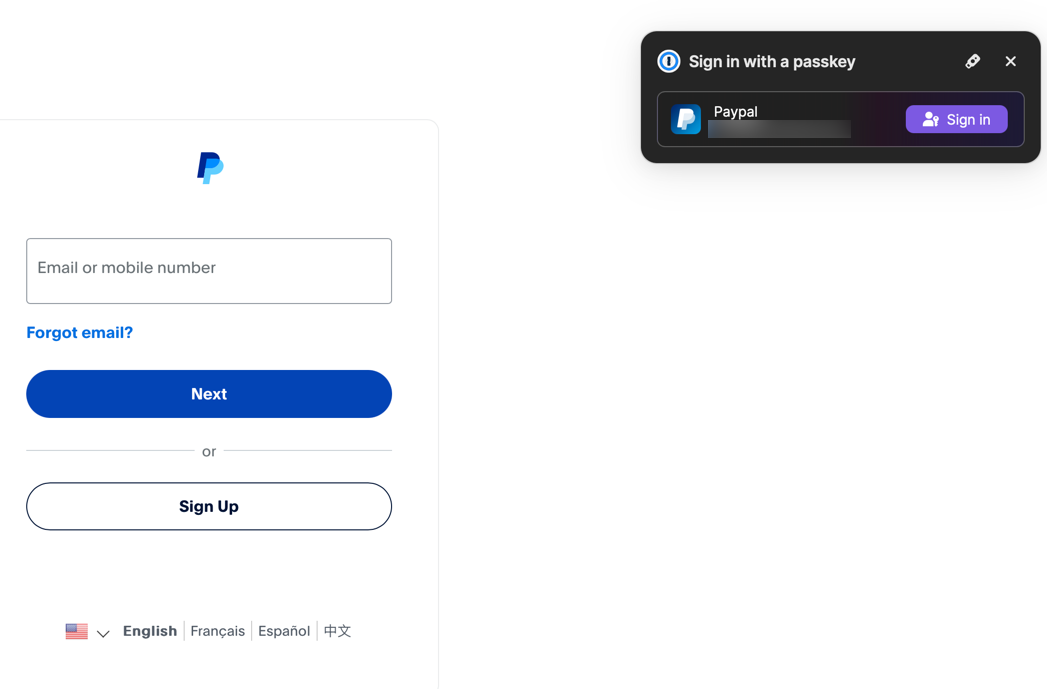
I’ll point out that I have a mix of Passkeys - some are in 1Password (and will often work in 3rd party browsers, depending on the implementation). Here’s an example of logging into PayPal using the Orion browser and the passkey stored in 1Password:
I have no doubt you have found a way to make it work but I have yet to be convinced this is at least as effective, convenient, and universal as a password manager.
Passkeys and other passwordless authentication methods are more secure than passwords. They’re not necessarily more convenient (although they’re getting better), and I doubt they’ll ever be universal - but then neither is MFA.
I work in Cyber Security. We’re consistently working towards more secure, phishing-resistent authentication methods. But then we also have legacy systems that aren’t ever going to support them (one of the banes of my existence).
At the end of the day, whether you choose to use passkeys or other secure methods (FIDO2 keys like Yubikeys, etc.) is going to be a personal decision on your potential exposure to a security breach. Nothing, not even passwordless, is 100% secure - the goal is to get as close to 100% as possible and to attempt to stay ahead of the threat actors.
Here’s another introduction to Passkeys from a different password manager:
I agree that passkeys add a level of security over passwords as the site to be accessed does not need to store information such as a password (encrypted or not) so hacking is less of a threat. Once these become more widely used and once we don’t have the type of issue that L Carl Pedersen encountered with CVS I will begin to migrate.