Urgh - I updated my iPad this morning and there is no longer a full stop or comma displayed on the keyboard! Fortunately they are still work with the unshifted ! and ? keys,
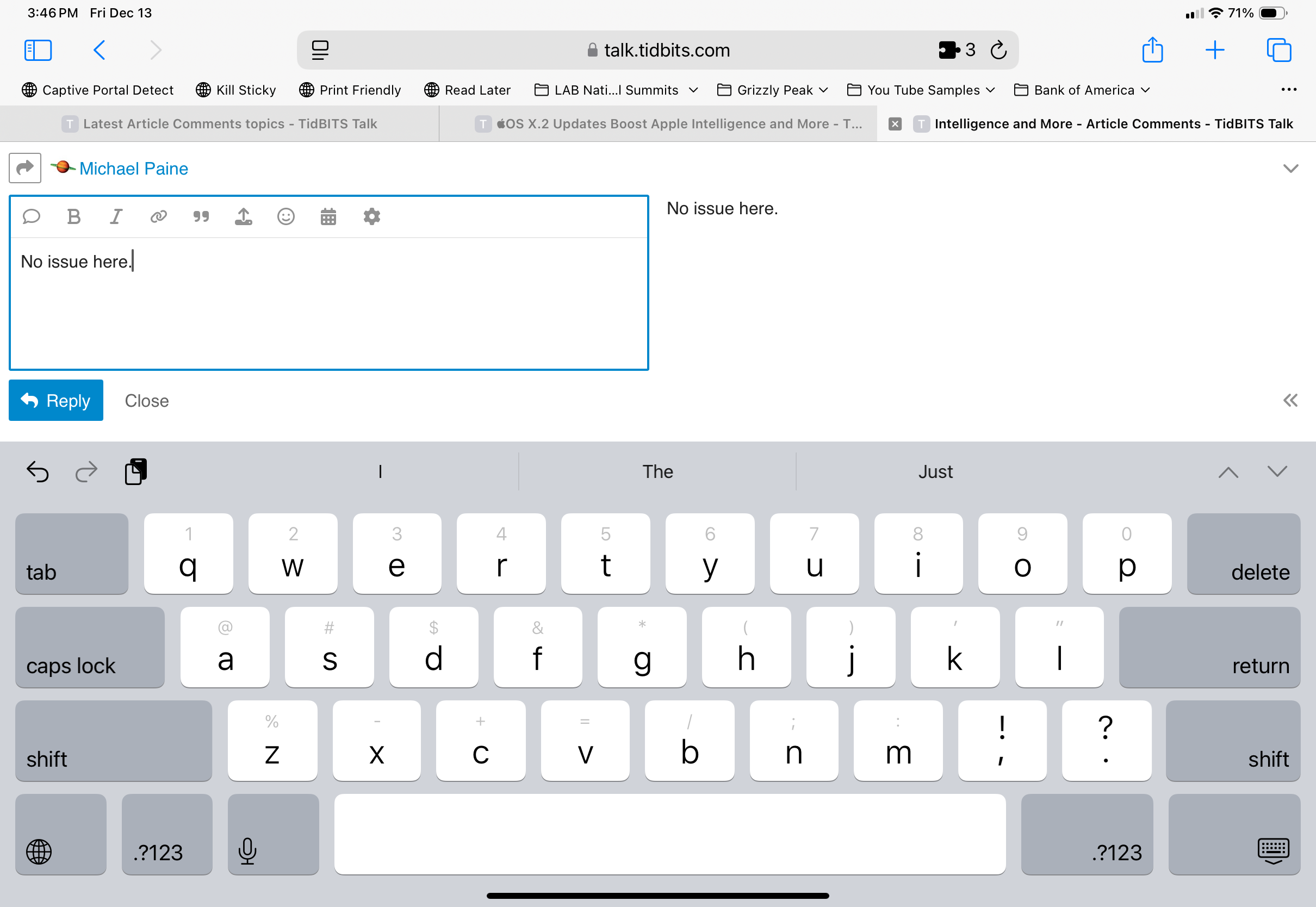
Here is what I see
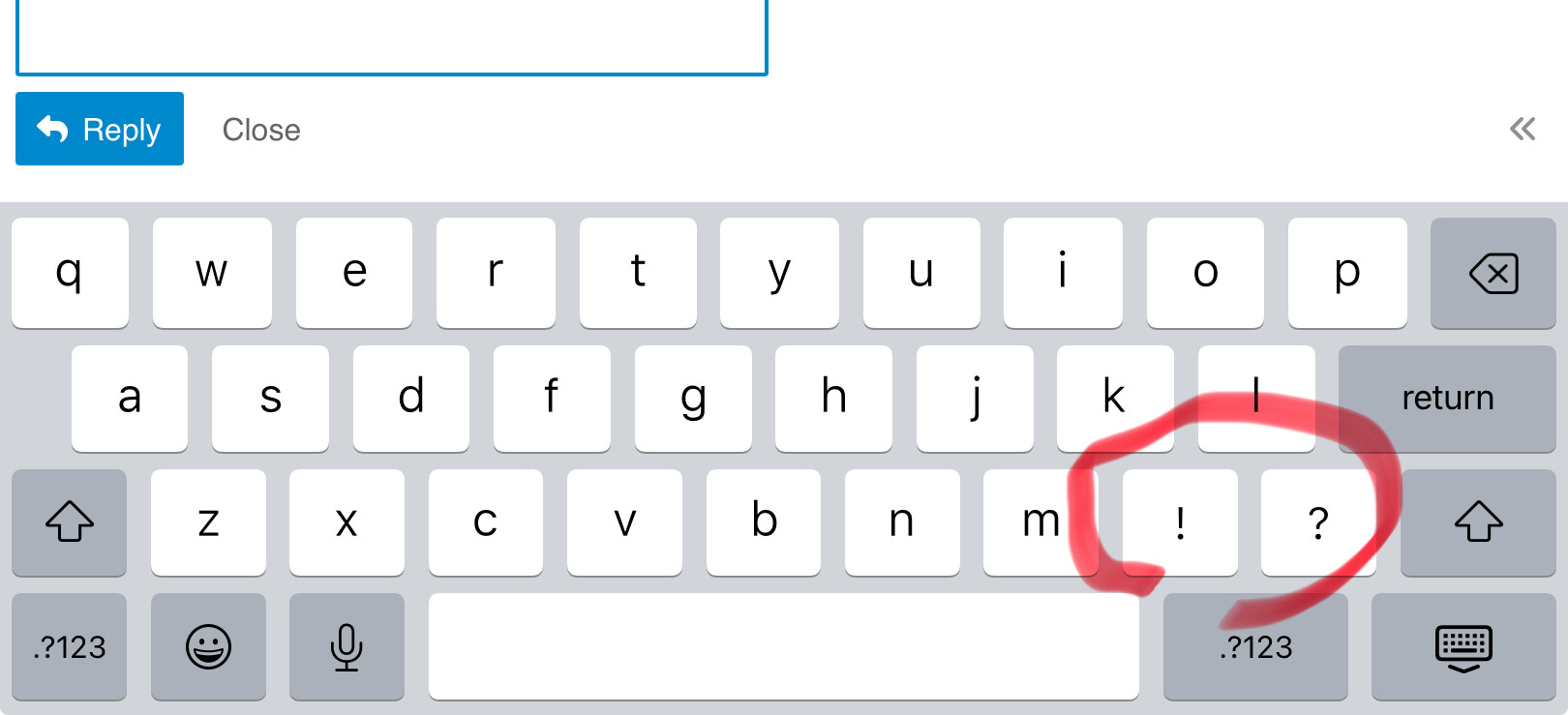
I will try a restart!
… I briefly saw the dot and comma and then they vanished when I started typing!?
When you started, was the CAPS automatically on since it was the start of the sentence?
CAPS is not on when I start typing and toggling the CAPS on/off is not making a difference.
I will try changing the keyboard settings.
… no change
The dot and comma are now back! The only change I can think of is that I was typing something else in landscape mode and the symbols appeared. Now they are there is portrait mode. Must have something to do with the system “optimising” space on a smaller iPad screen?
To all of the people cloning MacOS to external disks with tools like SuperDuper, I ran across this post from Dave Nanian that suggests that cloning the full system with MacOS 15.2 is broken at the moment.
https://www.shirtpocket.com/blog/index.php/shadedgrey/youre_a_mean_one/
1 Like
Mail Categorization on the iPhone (but not the iPad, oddly) sorts your email into buckets for Primary, Transactions, Updates, and Promotions. In my experience, its accuracy is poor, particularly with the distinction between Promotions and Updates, but it’s easy to retrain.
Of all of the things promised in Apple Intelligence for this year’s OSes, this is the one that I was looking forward to the most. I was a big fan of this back when Google implemented it in Gmail, particularly in the old InBox app. The Gmail app for iOS supports this still, but it has drawbacks compared with InBox and I really don’t like the app otherwise on iOS or iPadOS (one of the drawbacks are the inclusion of ads in the list of mail messages.)
I no longer use Gmail as my primary email account, so I hoped that Apple’s mail would offer a similar feature someday. But this isn’t working well for me so far, and the biggest culprit are the messages coming from this forum. Apple’s categorization implementation (so far) uses who sent the mail to allow re-categorization, but even though the mails from this forum are sent by the email address "tidbits-talk@tidbits.com", the “From” field in the header also resolve to the name of the person who created the content in the message and categorization ignores the email address associated with the content. So when I create this message, the headers of the email that will be sent will say:
From: Doug Miller <tidbits-talk@talk.tidbits.com>
And there is no way to train the filter to say anything that includes (or starts with) “[TidBITS Talk]” in the subject line should be categorized as Updates, for example. And so far Mail has categorized some of you as Promotions, some of you as Updates, some of you as Primary, and even some of you as Transactions. Right now my choices are to categorize each sender as the one I want (Updates), but there are a lot of us, and it also means that I need to remember not to delete messages from iPad Mail or MacOS mail until I get a chance to check the categorization on my phone. It also means that some content gets split between different categories though they have the same subject line. So right now I am just using the All Mail view.
Hopefully Apple will improve this going forward.
Huh! I’ve never seen ads in Gmail on my iPhone.
Oh boo, that’s weak. I recategorized a bunch of stuff when I was playing with it, but apparently nothing from a mailing list. (I read TidBITS Talk purely on the Web.)
1 Like
3 posts were split to a new topic: Ads in the Gmail app on the iPhone
Some users (on a different forum) who updated to iOS 18 experienced problems connecting with GM’s infotainment. Anyone experience problems with MyLink/CarPlay and iOS 18.2?
Just a quick comment about Genmojis, which are described as “custom emojis”. Note that they are actually much bigger than standard emojis—more like stickers. I sometimes add strings of emojis to my personal messages, but genmojis are not intended to be used this way. Otherwise, they are a welcome addition to the standard set of emojis, 90% of which are pretty lame.
I’m in a quandary. In the past, upgrades have resulted in a drastically slowed computer, resulting in having to upgrade the hardware to restore functionality. My 2023 M2 15" MBA is supposed to be able to cope with Sequoia 15.2, but I am wary. Should I or should I not?
1 Like
I wouldn’t worry with such a Mac Robin. My M1 Max Is sailing along, my issues are with an i9 intel iMac.
1 Like
The update to Mail in iOS 18.2 sucks. Please Apple get rid of the stupid categories. I can sort my own mail, thank you.
1 Like
I don’t think this is a good example to complain about Apple because, in this case, they actually give users complete control.
You can turn off all the new stuff:
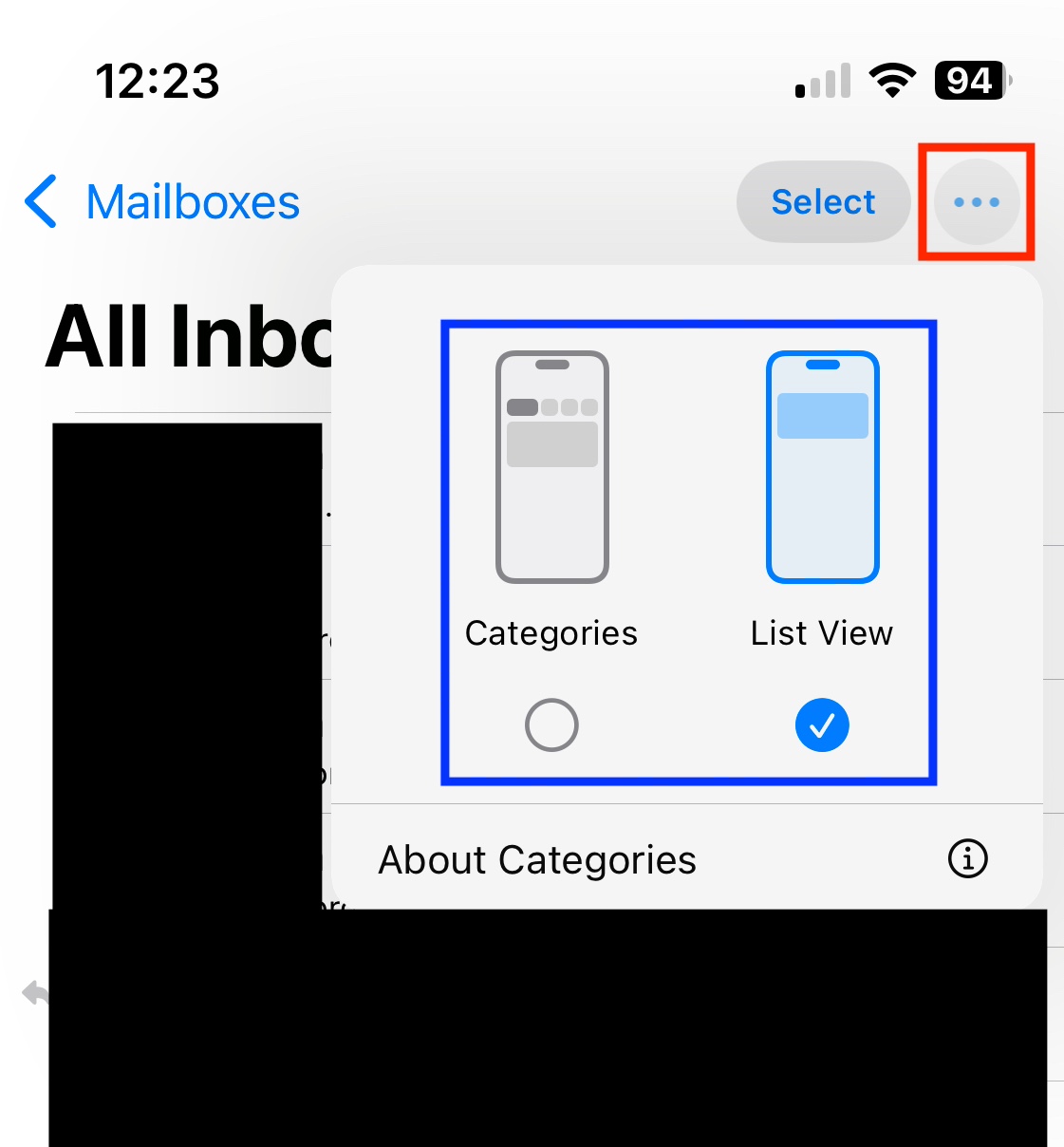
Mail > … (ellipsis menu at the top right of any inbox) > List View
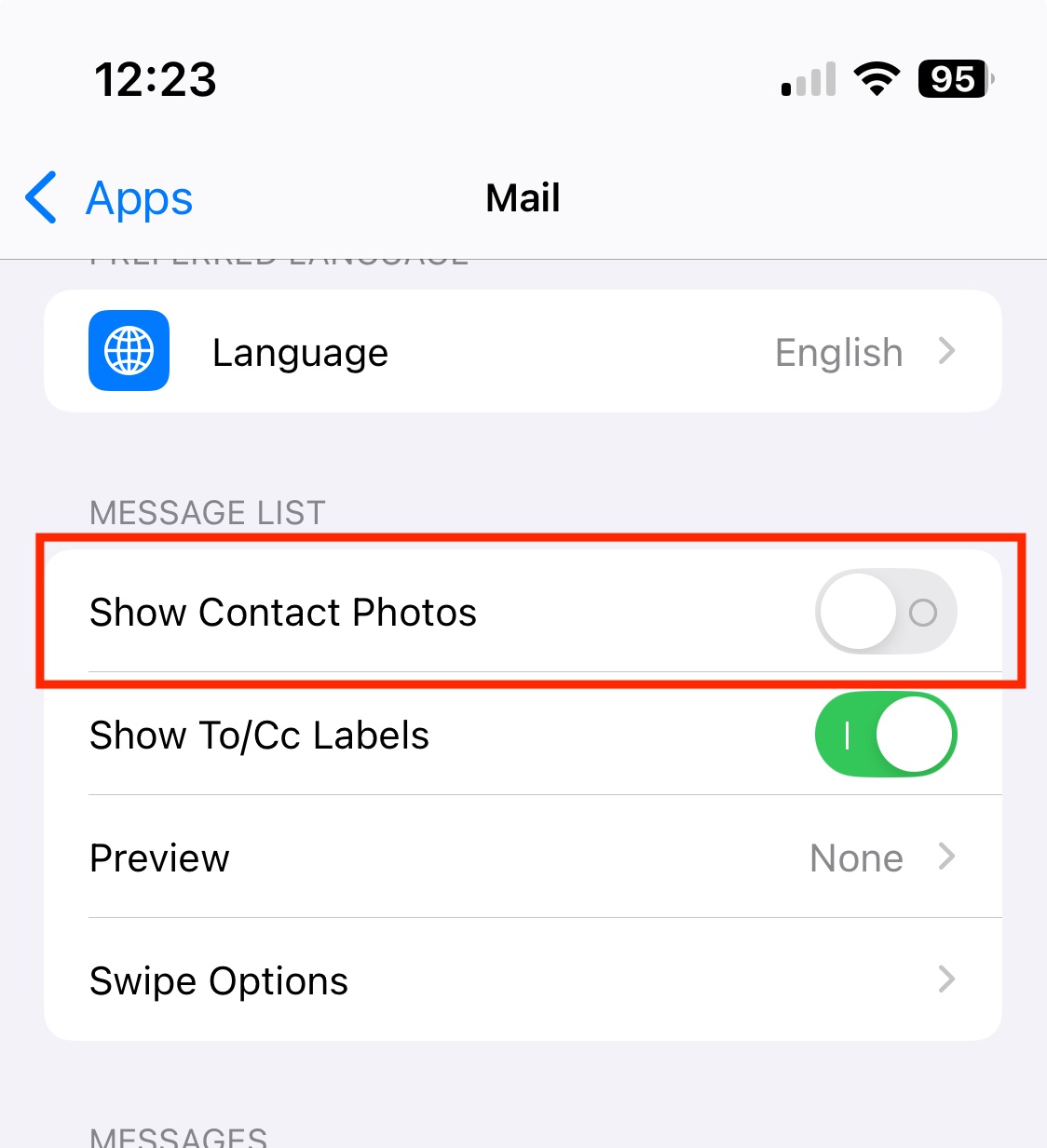
Settings > Apps > Mail > Show Contact Photos > Off
I personally haven’t found anything in 18.2 that I actually want or like, but I do appreciate that new stuff isn’t just being forced upon users, but rather folks are given the choice if they want new stuff or prefer sticking with the ≤18.1 way.  I wish it were always that way.
4 Likes
I agree completely. But you can turn them off.
Tap the “…” button in the upper-right corner of the Mail app (red box). You can select “Categories” or “List View” (blue box). Change it to List View in order to get rid of the categories.
Also, if you find the user-icons annoying or a waste of screen space (as I do), you can turn them off as well. Go to Settings → Apps → Mail. Then turn off the “Show Contact Photos” option.
2 Likes
Just a quick note to add that if you have multiple email accounts you need to do this in each of their In Boxes. Turning off Categories in the All Inboxes view doesn’t turn them off for the individual mail accounts.
I’ll also add that if you do leave categories on, I didn’t like the “Group by sender” feature, and you can turn that off for each category with the same menu control next to “Select”. For TidBITS talk messages, for example, this grouped messages by each if us rather than by subject, which was weird. Plus I also noticed the effect of having multiple shipping notification emails from the USPS gathered together, and I once accidentally deleted a bunch without noticing, since they were gathered together as one in the list. (I like to keep them until I actually receive the package.)
2 Likes
I’ll also add that while I’ve said that the categories aren’t working well enough for me (at least so far), I’ve left them on and will keep checking on them going forward. If you go all the way to the right in Categories, past “Promotions”, there is one called “All Mail” which is just the usual uncategorized view.
To add one more thing: I’d love the ability to drag a message to the category of my choice rather than using a menu command (from the reply button of all things) to re-categorize the sender.
I’d like the subject folders I created on my Mac, not the Apple created ones — or at least the ability to create my own for IOS.
Alan
2 Likes