I agree Microsoft’s decision is based on business considerations, but I think the primary business goal is to increase sales and the strategy being used is planned obsolescence – deliberately making the old version of the product unusable after a certain period of time. It’s consistent with MS’s push for Office 365 subscriptions to maintain corporate income. As long as software like Libre Office is available, MS’s action does not shut people out of using computers to write and use spreadsheets. Limiting the restriction to MacOS and iOS may signify that MS thinks they can afford to buy a new edition of Office. I don’t know what the costs would be of preventing the certificate from expiring.
OK thanks. I checked and my Office on Mac is even older. I think Word cannot open Pages docs.
If you sent the editor your article as a .txt file, or the body of an email, or even an .rtf, I would think those would also open in or be usable via copy-paste into Word.
Nope. It’s open source, available direct from source: https://www.libreoffice.org/ Looks a lot like Office so will probably not take long to learn if you want to give it a spin.
If your articles are not too heavily formatted, any of the alternatives that advertise compatibility should be fine. By “not too heavily formatted,” I mean that formatting is mostly limited to things like using bold, italics, and so on.
If you need to use tables or place graphics precisely on a page or use unusual line spacing, you may run into some issues. You’ll want to check with your editor if that would be too much trouble.
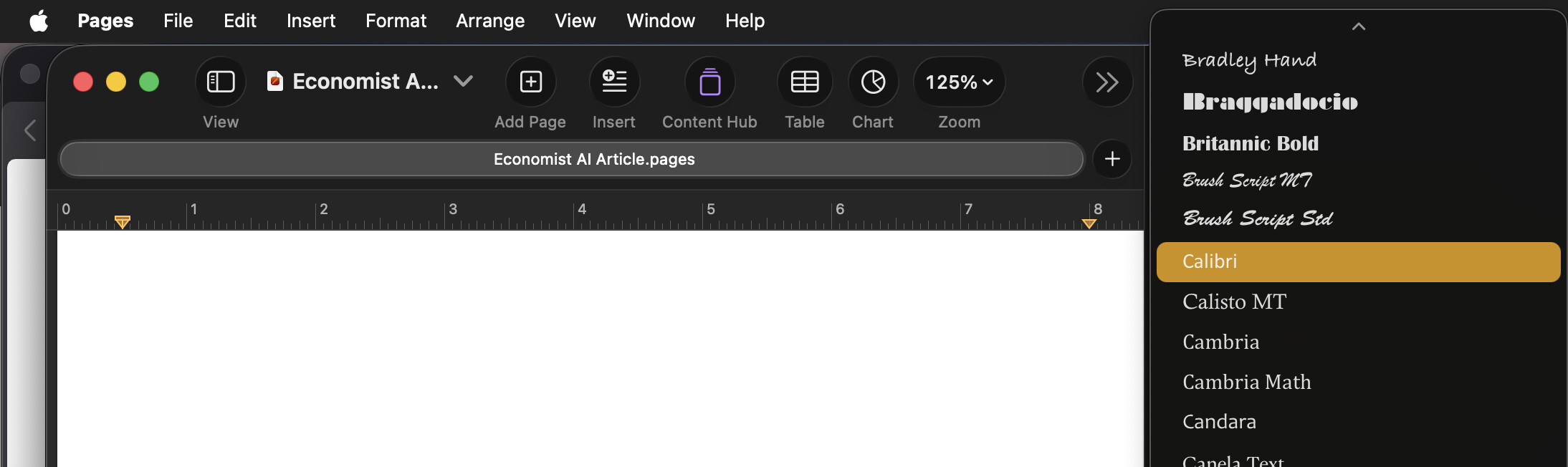
Fonts are an often overlooked compatibility issue. Office is bundled with a bunch of fonts that are only licensed for use within the Microsoft Office environment. For example, “Aptos” is the default font in the current version of Office, while “Calibri” was the previous default. In general, the fonts supplied as part of Microsoft Office are not available to other apps unless you license and install them separately.
You can download versions of Aptos from Microsoft that will work with apps like Pages and LibreOffice, but you may need to purchase a license for other Microsoft fonts. Again, check with your editor to see if a specific font is required.
LibreOffice includes fonts that are very similar to the Microsoft fonts, but, again, double check with your editor to see if that will be a problem.
Edited to add: If the price is not too prohibitive, I recommend buying either a new license to Office 2024, which will be supported until October 9, 2029, or buying a Microsoft 365 subscription. They will be the closest alternatives to what you already have.
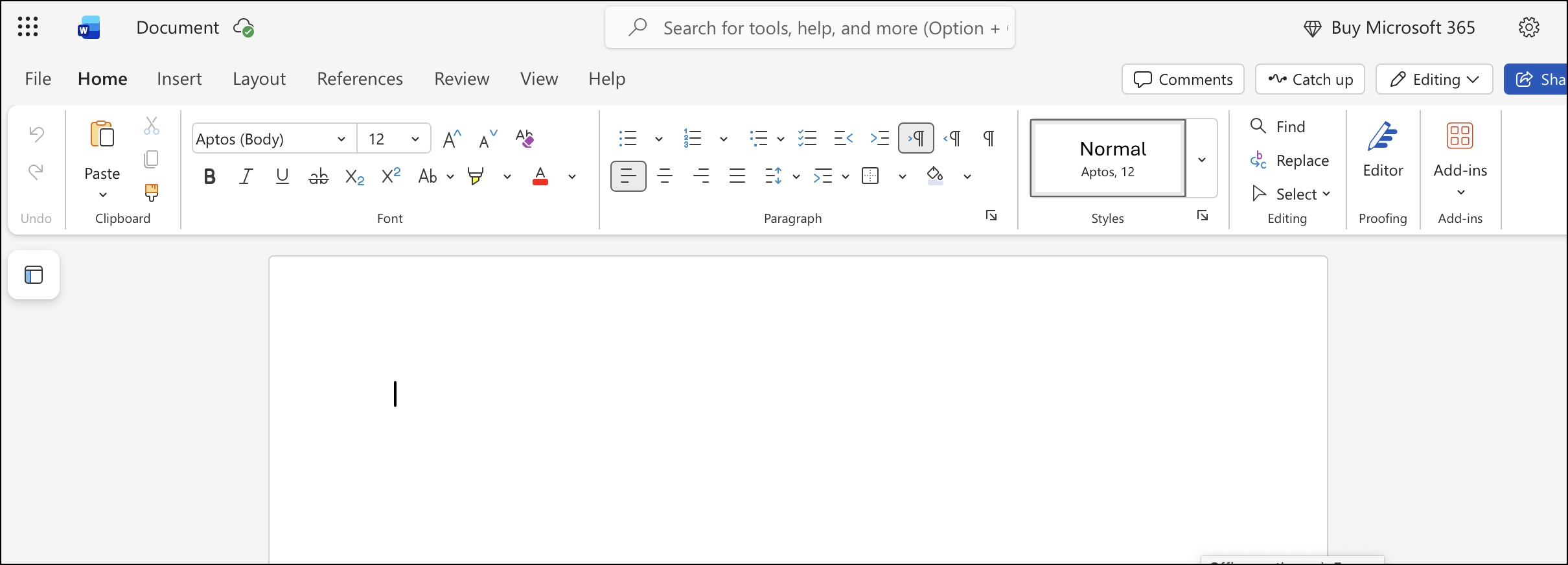
If you have a good Internet connection, and your needs aren’t too complicated, you might also consider using the free web version of Office 365, which works fine for simple documents. (See screenshot below.)
4 Likes
My articles are mostly just text. I usually use Geneva— is that MS Office “only” font? For formatting, I use quotes, bold, italics — nothing unusual.
Pages can Export to docx. That’s different than Save. You would save a Pages document. When you are ready to send it out, Export to Word, which will create a docx copy of your document. As others have said, fancy formatting or missing fonts might not match perfectly, but you will have a docx that can certainly be opened in Word.
Similarly, Pages can open a docx. It will translate it to Pages, and when you save, you will have a copy of the document in Pages format. If there are no strict formatting requirements, then Pages is a perfectly serviceable alternative to Word.
Geneva is a Macintosh font. It was developed by Apple for the first Macintosh. If your editors are using Windows, they probably don’t even have Geneva.
2 Likes
Ok, you should be able use any alternative program that is able to save in Word format. You just need to be sure to remember to save your files in Word format before sending them to your editor.
Geneva is not a Microsoft font, so no problem there. An easy way to tell if a font is a “Microsoft-only” font is to open a file in a non-Microsoft program, like Pages, and see if the font is available to use. For example, you’ll see Calibri in the Microsoft Office Font menus/dialogs, but you won’t see it in Pages.
1 Like
You may want to limit yourself to fonts common to both macOS and Windows:
- Arial
- Courier New
- Georgia
- Impact
- Palatino
- Times New Roman
- Trebuchet MS
- Verdana
Or check with your publisher for a list of available/preferred fonts. If they have one you like or that they recommend, you should be able to download/purchase a copy to use for editing.
Note:
- Arial and Helvetica, although very similar, are not the same font.
See also:
2 Likes
In the spirit of ‘keep it simple’ and ‘right tool for the job’, you could quite easily use TextEdit on your Mac for this. Send the resulting .txt document to the editor. There’s a decent chance they are taking the Word files you send and copy/pasting the text into their layout program. Or as noted, send your article as the body of an email, then editor copy/pastes into layout.
1 Like
That could mean one of several things. You may have installed it via some other package, or it may be from an old version of Office that didn’t put Microsoft fonts in a hidden location. If you do a clean installation of Office on a new Mac, the Microsoft fonts are hidden from non-Microsoft apps.
It’s also possible that you installed it using one of the workarounds that can be found on the net, or you separately licensed it. In any case, it’s very unlikely that Microsoft will go after you for a license violation.
+1 to this comment!
I have tried most/all of the office suites to read my Word documents. I test them on a simple text-only table that I update frequently and on my Ph.D. dissertation written a long time ago. The latter contained TOC, Chapters, MathType equations, auto-numbering of equations, tables, and more. It’s always interesting where the office suites fail – it is different for each of them.
Even though they can all read the simple text table they manage to munge up the spacing and layout.
3 Likes
Jane, if the only thing you’ve been using your MS Office for is basic word processing like this, then I think Office has been overkill for you. These needs, such as applying fonts, and bold and italic attributes, could be met easily by Apple’s TextEdit program, included on all Macs. You can use it to create Rich Text files (.rtf file name extension) which can be opened and read properly from MS Word on Windows and Mac, and as well as from TextEdit on other Macs, and by Microsoft’s WordPad program included with Windows. You should be all set with TextEdit, and could do some testing with your newsletter editor over the next couple of weeks to confirm. Just make sure you create/save your files in Rich Text (RTF) format rather than plain text (TXT) format, so you will preserve your font settings.
5 Likes
I use Excel, too.
LibreOffice has a Workbook/spreadsheet module that is quite similar. If you’re using advanced Functions, calculations etc that might be exclusive to Excel, see if they work in Libre before committing to it…
3 Likes
This document from Microsoft seems to maybe indicate that if you’re running macOS 12 or later this may not be an issue. Does anyone else have a better answer?
Prior to updating your Office apps, you need to ensure that you are running macOS 12 (Monterey) or later on your Mac, or iOS 17 or later on your iPad/iPhone.
Thanks. As I read their help, they would allow me to continue on Sequoia if I switch to Microsoft 365, and offer me a “free test” of MS 365, but apparently I would still have to pay after the test. Frankly, that does not appeal to me. Buying Office 2024 would cost less, I don’t need most MS 365 features, and I my experience with Microsoft accounts has been poor.
Same here, Jeff (or close to the same): I’m running Word and Excel, circa Office 2016 Home & Student version (16.16.27 for Word), on Sequoia 15.7.7, and haven’t heard anything from Microsoft about this.
Since only Microsoft Office 2019 and 2021 for macOS are called out in the original notice from Microsoft, I assumed my MS Office 2016 apps were exempt from this draconian restriction.
Or that MS Office 2016 is just too darn old for Microsoft to “switch off”. I don’t remember when Microsoft 365 came into being, but am wondering if Office 2016 predated this. I haven’t updated my Office software in forever (because no updates have been made in forever – and that’s OK with me). I didn’t have any problem moving Office 2016 to my new Mac recently.
Given that, I’m not too worried. And if worst comes to worst, I’ve started to train myself on LibreOffice (which so far, hasn’t been difficult).
Since I only use Word and Excel for my own personal use (basic documentation, finance and inventory work, all with no bells and whistles), LibreOffice seems like a great long-term fit – particularly for someone who is primarily seeking a relatively consistent UI going forward, ongoing bug fixes and support for new versions of macOS, and no gen AI “help”.
We’ll find out.
I know that before M365, Office licenses were installed via a code on the package, which would be saved into the installation. That code is pretty much permanent and you wouldn’t have to think about it until/unless you try to move your installation to a new computer, at which point Microsoft support would have to get involved.
I don’t think systems authenticated this way ever phone home - they just remain active until they detect a significant hardware change, much like how Windows authentication works (or at least used to work).
M365 subscriptions are dynamic. You log in to your Microsoft account to activate them, and log out to deactivate an instance. And they phone home every time, to ensure that your subscription is still active. If the subscription expires, or if they can’t connect to the server, a timer starts. If they can’t re-authenticate in 30 days, the apps switch into viewer-only mode.
At that same time, the “perpetual” licenses switched to a similar model, also requiring a login. The only technical difference between it and the subscription is that the perpetual license doesn’t require monthly or annual payments - the license always remains current. But it goes through the same authentication system and will switch over to viewer mode if they can’t verify the authentication at least once every 30 days..
I assume that the underlying issue here is that the certificates required to connect to the authentication system have expired. Without a valid certificate, the app can’t authenticate itself, no matter what your license status might be, which will result in the apps becoming viewers 30 days later.
So now the question is really whether the 2016 edition used the old one-time-key authentication/activation system or if it uses the subscription-type activation. If it’s the former, then I suspect you’ll be fine. If it’s the latter, then no.
4 Likes
I need MS Word for professional purposes. I write about science and technology, and need to be able to submit in MS .docx format, to be able to read and correct edited material send back to me in MS change tracking format, and on rare occasion to be able to present using Powerpoint. I get paid for such things, so I don’t want to annoy the people who pay me by using odd formats. So I’ll grumble a bit about how MS screws customers, but I’ll buy a new version of Office if it’s worth the money to me.
I don’t use Libre Office much, but it’s invaluable if I need to get into a format that other word processors have abandoned. I’m looking at Pages to replace Nisus Writer as my everyday word processor because Word has become unwieldy and too complex. But otherwise I think we have similar needs.
2 Likes
At one time, they were tied to the hard drive and not the computer. Upgrading the drive would invalidate the installation and Microsoft would have to issue a special code to get it working again.
I have Little Snitch block all requests to Microsoft and it’s been over a year since the installation – and it still works. I wonder why?
1 Like