My Mac is an Intel currently running macOS 12. If I upgrade it to macOS 13 it will be topped out and able to run Office 2024. My wife’s computer is also running macOS 12 (we have tried to keep the same OS to help when I am trouble shooting for her), but she has a Mac with an M1 chip, so she can upgrade to mac26.
According to the MS website, you need one of the latest 3 versions of the Mac OS. So if I understand that right, that would be 26, 15, and 14…but not 13…
Also note that the license from SoftMall is an “Office LTSC Standard for Mac 2024” license. That means SoftMall is selling commercial/educational/government licenses:
I’ll not say anything else about that 
Without wanting to intrude too much on this thread, I’ve been a member of a WordPerfect Mac user group for many years. It currently resides at wordperfectmac@groups.io | Home and has guides to installing WP 3.5 on all flavours of Mac from 680x0 to PPC to Intel to Apple Silicon.
1 Like
But remember that there’s a difference between “supported on…” and “will run on…”
The fact that Microsoft only supports particular versions does not automatically mean that the software won’t run on anything else.
2 Likes
Right. The current build may run. If not, you can probably just install an earlier build than the current one, which I would assume is available to download on the MS site.
The usual reasons I hear people give are 1) familiarity/inertia, and 2) the need to exchange documents with other MS Office users, often on a PC platform.
Personally, I’m in the #1 group. The occasional needs I have to exchange documents with MS Office users could likely be accommodated by “Save As” or “Export” functionality in other apps, but I’m so used to MS Office apps that an annual subscription that covers my wife and me is an acceptable price (for us) to pay compared to the anticipated (maybe imagined) pain of switching. Especially for her. Happy wife…
1 Like
So far so good for me too. I’ll post again if things unexpectedly go south, but I don’t expect that they will.
2 Likes
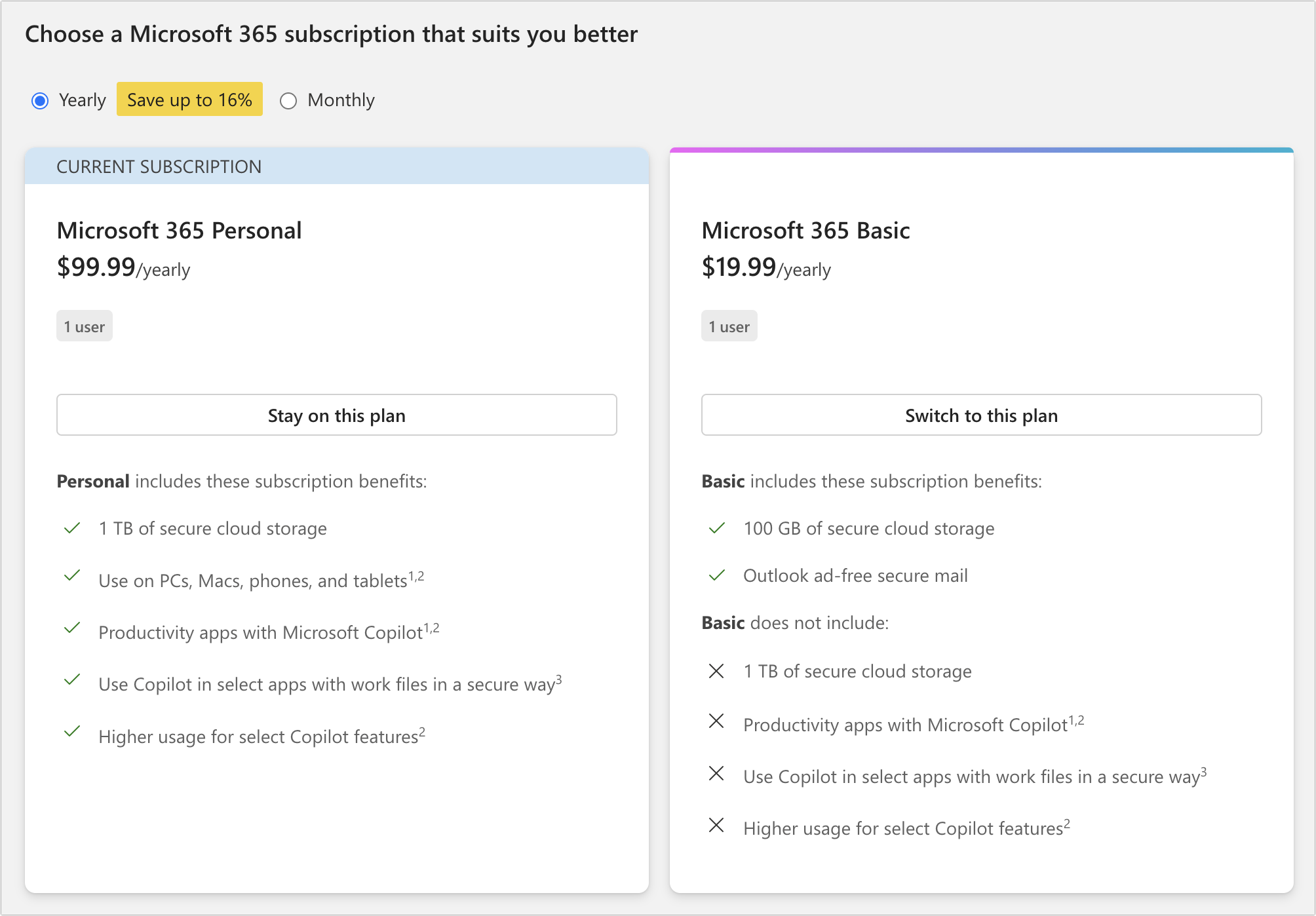
So this is amusing. I’ve been contemplating the standalone version that people have been talking about because I feel that I need to have the Office apps available on my Mac for research and troubleshooting reasons, but I don’t really use them. In the process of figuring out how I’d cancel my $99 annual Microsoft 365 subscription, I was offered this downgrade to Microsoft 365 Basic, which is only $20 per year.
https://account.microsoft.com/services/microsoft365/cancel?fref=billing-cancel
I would prefer not to, but my work environment uses Word. My choice was to use the loathsome Word on a loathsome PC at the office, or use the loathsome Word on my own Mac. The lesser of two evils and all that.
Dealing with Pages or OpenOffice I could cope with, but would rather not.
Even though I don’t have a 365 subscription, I am going to try your link and see what might offered.
Really? I need to see if I can find that. I have no interest in that extra stuff anyway. Just Word and the occasional Excel excursion.
Edit to add: I just checked the Microsoft website. Basic appears to be only Outlook mail and some cloud storage, but no other apps.
The cheapest plan that includes Word and Excel appears to be Microsoft 365 Personal, at $10/month. https://www.microsoft.com/en-us/microsoft-365/p/microsoft-365-personal/cfq7ttc0k5bf
1 Like
I have the Microsoft 365 Family subscription for $129.99/yearly. When I pull up this “Cancel subscription” page the Microsoft 365 Basic description is different than you posted. The last bullet in my “Basic” column says, “Basic does NOT include: ‘Word, Excel, PowerPoint, Outlook, and OneDrive desktop apps.’ ” Your post says,” in the second bullet, "Basic does not include: Productivity apps with Microsoft Copilot 1,2.” Has this page of your post been clarified since your screenshot or is there a difference in the Basic offering based on what your current subscription is? Is it saying the the apps are provided but without Copilot, or the apps are not provided at all?
The version I bought was labeled “Microsoft Office Home & Business for Mac 2021: Lifetime License”. Like “perpetual”, I guess it’s just marketing hype.
Or maybe the fine print would’ve defined “lifetime” as the lifetime of the software license, not the hardware or the human owner 
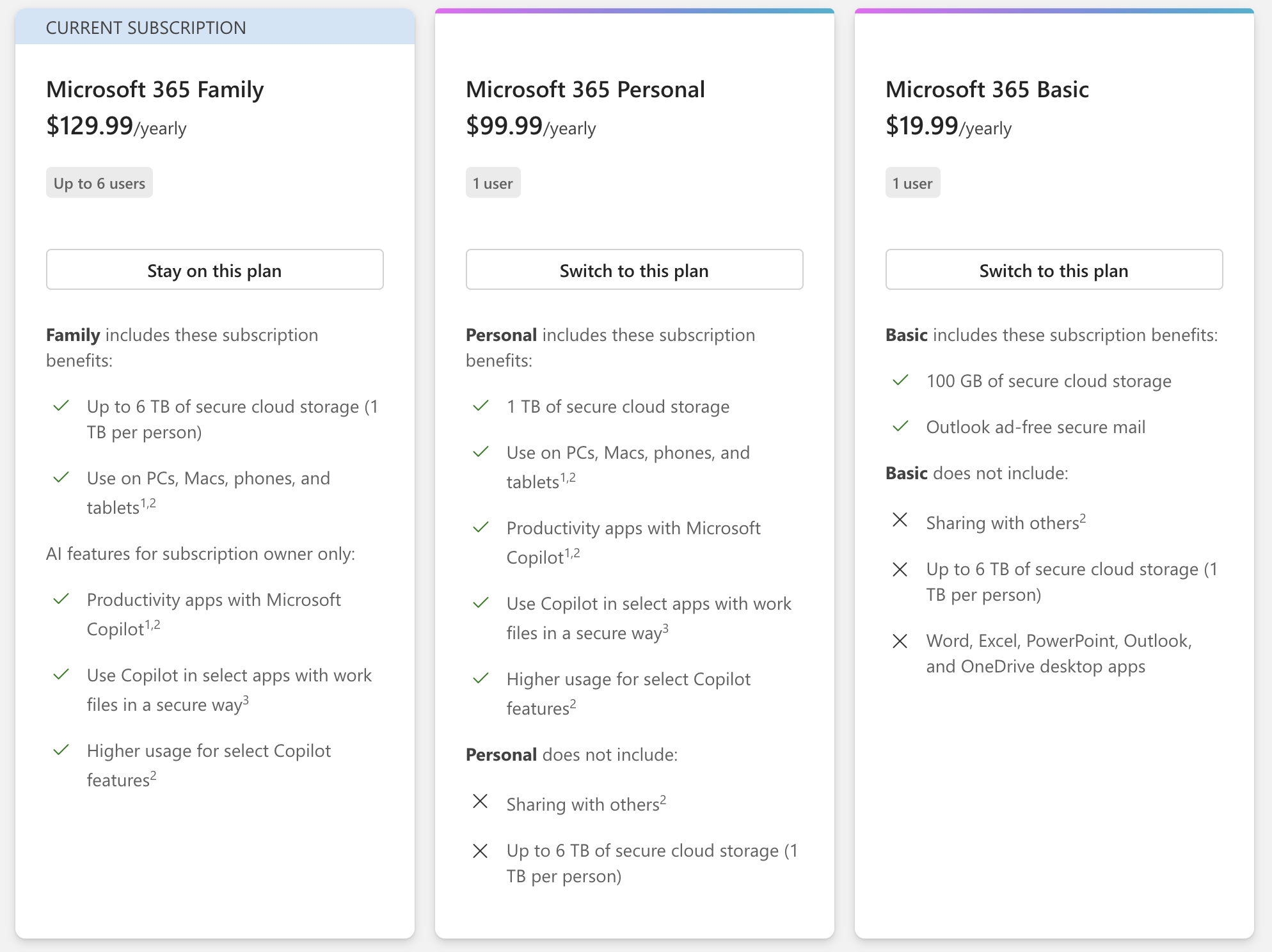
Maybe the 365 BASIC license provides an @Outlook email account address, but not the Outlook app to access the email account. What sense does that make?
Note, however, that the Basic tier does not include the desktop apps. Web, iOS and Android only. The desktop apps will be read-only.
It’s only marginally better than the free tier, which is also web/mobile apps only, but with only 5GB of storage.
2 Likes
Oh drat! Sorry for getting people’s hopes up. When I read that it didn’t include “Productivity apps with Microsoft Copilot,” I read that as the apps were present, but didn’t have Copilot. 
1 Like
It’s a standard Microsoft cloud account with extra storage and no ads on the webmail version of Outlook.
It’s basically the Microsoft equivalent of a Gmail account with 100 GB storage and no ads, and it’s priced the same as the Google equivalent.
For only $20 more, Softmall offers Office 2024 without VMWare Fusion, and mentions “Official updates from the App Store” 
1 Like