Clamshell mode works fine usually, but you need multiple conditions met for it to work. The Mac needs to be powered, it needs to be connected to an external display (that’s not junk), and it needs to be connected to some kind of input device (mouse or KB) through USB or Bluetooth.
Yeah, clamshell can be kind of flaky at times. I go through stretches where it works fine and then without changing things where it requires a click with the lid open to get it to recognize the world. No rhyme or reason as far as I can tell.
His had all those conditions. Yet it sure wouldn’t work for me. I asked him if it woke up and connected to the monitor consistently and he did say not always. Which makes me hesitate in getting a mac laptop. I need it to just work, not fiddle with it.
Clamshell mode has worked flawlessly for me from day 1 with my MBP M1 Pro. Just guessing, but is it possible it’s related to this setting (System Settings > Battery > Options…)?

I’ve used a wide variety of MacBook Pro models in clamshell mode over the years (since the PowerBook G4) and can count the number of problems I’ve had on less than two hands.
It just works. With the newer macOS releases (13+) you do need to approve the connection of the various external devices (Thunderbolt hubs, USB devices, etc.) which occasionally do throw the proverbial wrench into things. But, unlike a Mini where if the display isn’t working you can’t do anything, you still have the built-in display/keyboard/trackpad to see what is occurring.
I don’t believe my situation is related but I’ll toss it out there. I would guess that about 20% of the time (and usually but not always within three minutes of waking the MBA M1 in clamshell mode), my external display goes dark. It recovers after about three or four seconds. Very rarely, I’ll have a repeat during the same session. I have been unable to correlate it to anything.
1 Like
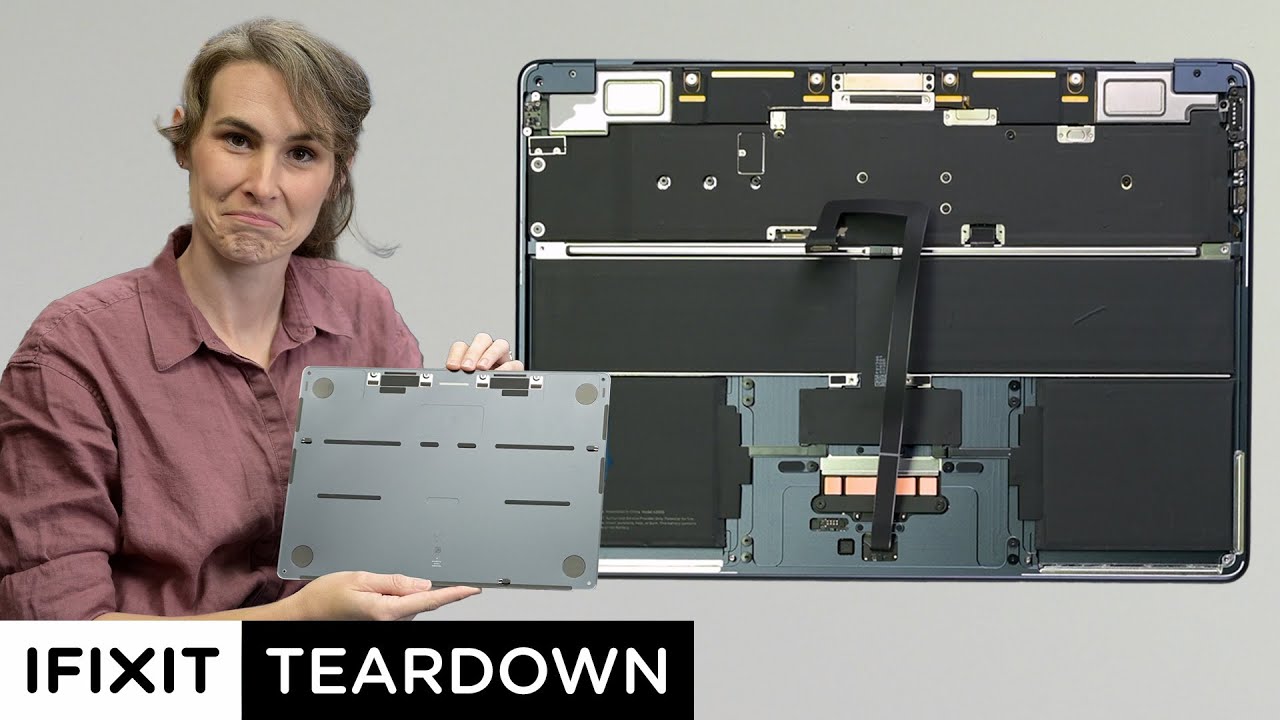
Lots of screws, clips, and connectors, but it looks pretty straightforward to do things like replacing the battery. A welcome improvement.
1 Like
Thanks. But after looking at this, I wonder why Apple needs adhesive strips at all. They are securing the top and middle parts of the battery with screws. It seems to me that two more in the lower corners would be enough to secure it without any adhesives.
If there’s no room for new threaded posts, they could use the existing corner screw holes (for closing the case) and have a thin piece of the battery’s bracket extend over there, to be secured with the case screws.
1 Like
My refurb-tracker.com RSS feed shows that refurbished M3 MacBook Airs became available starting on June 10. @ace maybe that’s worth a mention in a LittleBITS?
1 Like