Interesting. If that works, then there’s a bug in one or more of Apple’s caching algorithms. The whole point of a cache is that it is supposed to speed up system performance. If the cache consumes so many resources that the opposite is happening, then that’s a bug.
Just an update on this since I’ll be updating to MacOS 26 soon. My MBP has now been up 104 days without restarting.
When things start to slow down “sudo purge” seems to help.
If you need a bit more - like slowdowns with timestamp updates in the finder, these 3 commands, all relatively harmless, help bring things back to normal speed:
killall Finder
killall SystemUIServer
killall Dock
No windows get lost.
1 Like
I ruined an MBA by leaving it plugged in all the time. The battery became swollen bending the keyboard so I don’t do it on my MBP or my M2 MBA.
Maybe, but that happens even on Macs that aren’t plugged in, too.
3 Likes
My MBP has been on for 117 days now, connected all the time. Usually it seems power is holding at 80%, but at the moment it’s at 96%.
Since MacOS 26.01 came out today I think I might upgrade.
I’ve had to replace batteries in two MBPs that were not left plugged in and that were lightly or moderately used.
1 Like
I have a friend who left an iMac unplugged for a while and it became unchargeable. Some on-board needed battery lost its life. He would need to bring it to a repair shop to get fixed, but it’s too old to bother doing that.
An iMac wouldn’t charge in the best of times.  Perhaps you meant unbootable? There used to be a clock battery on the motherboard of old Macs and when that died—usually only after many years—the Mac wouldn’t boot.
I don’t think there’s a cause an effect there. Batteries sometimes swell when they wear out. Whether or not this is related to how long you keep power connected is a subject for heated debate.
FWIW, my 2011 Air is connected to power whenever I’m not using it. I usually use it only a few hours a week. It is on its third battery, but that’s because the old ones weren’t holding enough charge, not due to swelling.
All lithium batteries have a safety circuit that will prevent recharging if the voltage drops below some critical threshold.
Since all batteries self-drain over time, even if they’re not connected to a computer, leaving it unplugged for an extended period of time can result in the voltage dropping below that safety threshold.
(But as @ace pointed out, iMacs don’t run off of batteries. I’m assuming you meant some model of laptop, like a MacBook or iBook).
Or there is some kind of muddle involving symptoms, effects, PRAM batteries vs. main batteries, and Mac models.
1 Like
Come to think of it, it was in a 2011 MBA that the battery swelled. It was one I’d bought to use TurboTax on for doing my Mom’s taxes. After she passed it wasn’t really needed anymore.
If you still have the computer, it’s easy to put a new battery into a 2011 MBA:
I meant the onboard clock or PRAM whatever battery. It wouldn’t regain it’s life after being plugged in, so it wouldn’t boot. It wasn’t after many years, but it was probably after at least one year. It belonged to his late partner who passed away and he wanted to go in and look for old photos that might be there.
1 Like
Yes, it was, I believe, the PRAM battery on board that eventually died without the iMac being connected.
Anyway, a few days after upgrading to Mac OS 26.01 my MBP M1 from 2021 remains plugged in for about 18 months now - since my last U.S. trip. Looking at the battery settings it shows “on hold - 80%” which is what it shows most of the time.
So I assume MacOS is keeping it in good health.
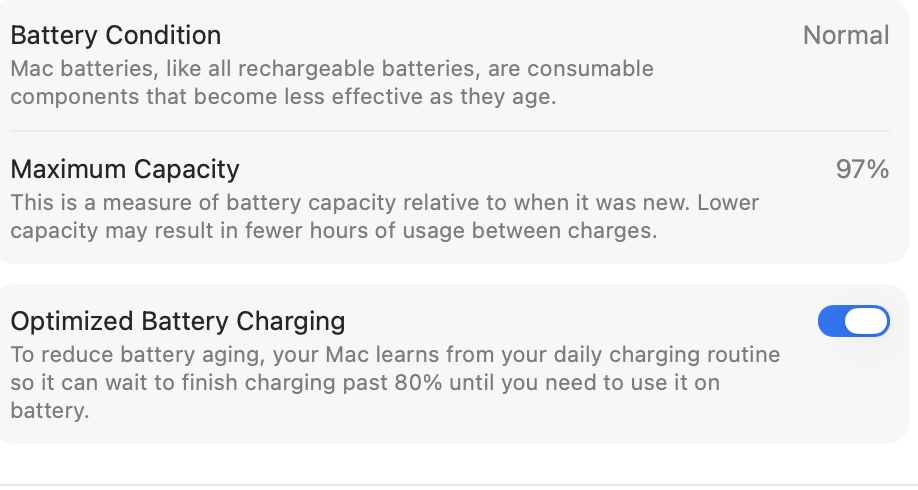
The battery health settings show this. That’s pretty good after 4 years of almost always being plugged in, isn’t it?
Yeah, many Macs won’t boot with a dead PRAM battery.
On an iMac, changing the battery is super easy once you get inside, but opening it up in order to get access to it can be a pain in the neck. Here’s one example from a 20" 2007-2008 model.
If you still have the computer, you might be able to try resetting the SMC chip. This chip manages the computer’s power, including turning it on. If the PRAM battery dies, the SMC controller can crash. Resetting it might help.
This was a few years ago now, and we tried a bunch of stuff like this with some suggestions from Apple Support. The final suggestion was to bring it in for a repair. But it was so old it wasn’t really worth it. I don’t even know if my friend has it anymore. Probably. He’s not very good about getting rid of stuff. 
Nope, but I do have one that the SSD crapped out. I put in a replacement from OWC (IIRC) but have been unable to reinstall High Sierra.