Curious to know if anyone has tried iOS 26 on a 2020 or 2022 iPhone SE. I’m hearing on Reddit that the UI is very cramped on the smaller screen on those devices. (I have a 2022 SE and am keeping it on iOS 18.7 for now, that has its own niggles but I can mostly live with those.)
I have 26 on an SE 3 and haven’t noticed any sizing issues in the apps I use.
I’m wondering if the issues with iOS 26 on the SE are where folks have increased the text size? I’m in that group, hence my concern.
1 Like
That feature was also added last year. 
No, seriously, that rang familiar so I just checked on 18.6.2 here. It’s there. 
Well, I guess that goes to show how much I’ve been paying attention over the past year. 
3 Likes
I installed iOS26 on my 2020 SE on day one. No problems so far.
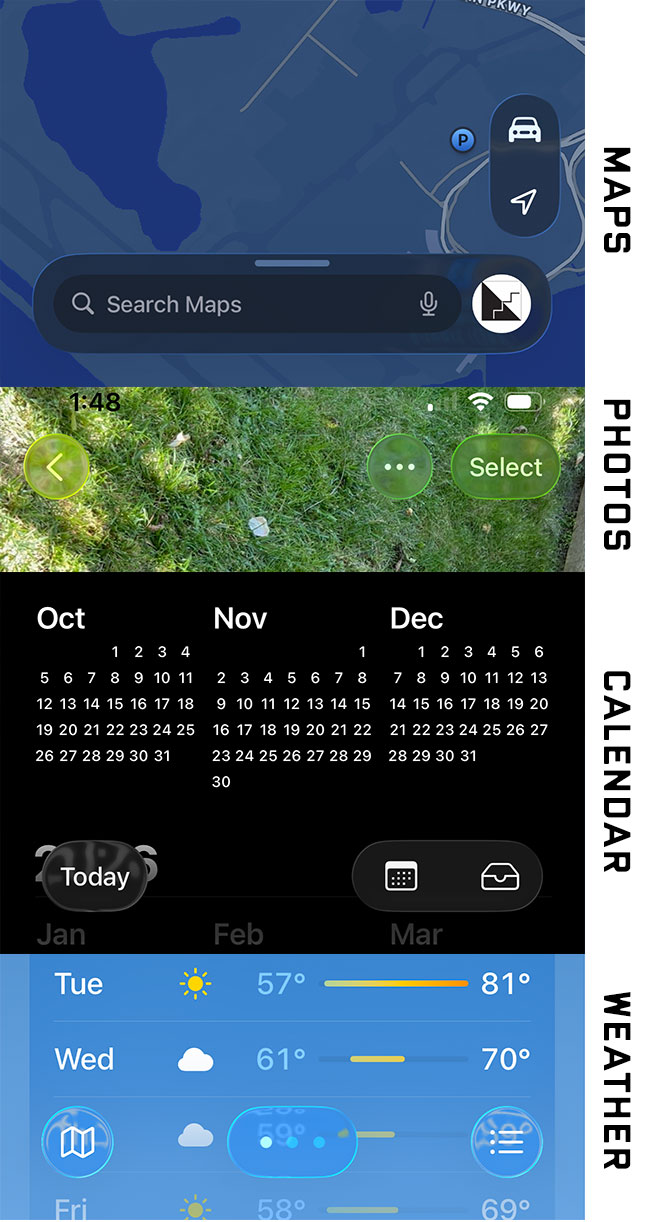
Here are just a few examples of how default Liquid Glass transparency makes user interface elements unreadable. (Apple acknowledges this problem by making the default Maps controls translucent.) Users should not need to tweak a dozen settings to make buttons readable.
I had a weird thing happen today, though I don’t know if it’s due to iOS 26 or my new iPhone 17 Pro. A caller left my iPhone’s very first voicemail. The red badge on the Phone icon said “2”, one for the missed call and one for the voicemail.
However, the voicemail was not present in the Voicemail tab, so I wasn’t sure there actually WAS a voicemail. And yet, even after visiting all 5 tabs in the Phone app, I couldn’t get the badge’s “1” to go away. Finally, when reviewing my notifications in Notification Center, I saw one showing a preview of the voicemail message. So I tapped it and was then taken right to the Voicemail tab and into the specific message, where I could read the transcript and listen to the recording. After doing that, the iPhone badge finally disappeared. And, I can now see the voicemail whenever I go the tab.
So it’ll be interesting to see what happens with subsequent missed call/voicemail events.
As of Sept 22, according to Marcus Mendes at 9TO5Mac, Apple has stopped signing iOS 18.6.2. So … if you’ve been thinking you might want to downgrade from iOS 26, you’ve now “missed your chance”.
2 Likes
Found my first app conflict with iOS 26: the OMRON connect app for the blood pressure monitor from the same company. Data from the device won’t sync with phones running iOS 26. I was astonished to learn from their tech support that “iOS 26 is still in beta” but they’re working on compatibility. 
[If we get enough of these, perhaps they should have their own “iOS 26 app conflicts” thread.]
2 Likes
Thanks for the information. That is interesting to hear. I also use the OMRON connect app for syncing my blood pressure readings and have had difficulties on my new iPhone 17 Pro. Strangely, I don’t recall issues with iOS 26 on my iPhone 16 Pro. I have managed to work around the problems somewhat by the drastic step of reinitializing the device and re-pairing it. But today I was having problems logging in (with the correct password).
So I hope they update their app soon.
Has anyone experienced an issue with Messages not coming through after an update? I had cause to log into my (rarely used) Amazon account and couldn’t receive a OTP via text. Clicked the "didn’t receive’ button and tried again - nothing. Clicked ‘didn’t receive’ again and told it to call my number (rather than text) and within a few seconds I had the robo-call with the OTP. I’ve not seen this before so it seems a little strange.
I also saw the behaviour someone mentioned earlier where I received a message in the car. CarPlay acknowledged it was there, but was somehow unable to read it (it was a simple text message, not graphical). I then tried initiating a message and it was fine.
You might already have checked this but Messages handles incoming texts differently now, with some filtering and category sorting turned on by default in many cases. Hit the “funnel” icon to see the new categories.
2 Likes
Many thanks.
I’ve checked the settings and turned off unknown number blocking, and spam filtering, but I still can’t receive texts from Amazon. Off the top of my head I can’t think of anything else which requires OTP but it will be interesting to see if it’s only Amazon or it’s across all platforms.
That’s the one feature I don’t like very much. A lot of unknown senders send important text messages. Automatically sorting them somewhere away from the main screen makes them easy to miss.