-
I’d say travelers to the UK and the EU will be able to handle pretty much any situation with a mobile phone, “smart” or “flip”, an ATM card with a 4-digit PIN, a credit card with tap-to-pay enabled, and a positive attitude. Further, I view a major advantage of staying in a hotel or hostel versus an Airbnb or Vrbo is the support and help staff can provide…especially if something unusual or unexpected comes up.
-
At US airports, anybody carrying a passport or a Global Entry card does not have to worry about having a REAL ID driver’s license. In fact, for most uses any federally-issued ID is as acceptable as a state-issued ID.
-
@janesprando : if you tell us the specific fears you have, we might be able to provide more tailored advice for your situation.
I will be bringing my iPhone 15 and my iPad. I worry about having either of those devices being tracked/ hacked/ searched as others have mentioned possibilities here. Mainly because of the chilly relations our country has with Mexico. (No politics intended.)
A few quick suggestions based on how I prepare for trips…
Whenever I travel outside of the US, I like to have a look here before leaving:
US Dept of State Travel Advisories
This is a good guide when thinking about security and privacy for your devices when crossing borders:
There are some organization-specific aspects to this guide but I think the general advice is sound:
University of California Guidance
The EFF has a printable sheet you can carry with you, as well as lots of online resources if you want to do a deep dive into its recommendations:
Some things I do personally when I want to increase security and privacy on my devices when on the road:
- Remove bank and brokerage apps (if I need to get in touch, I telephone them)
- Minimize use of public Wi-Fi as much as possible
- Use my own charger and cables to charge devices, not public USB outlets
- If a device must be left unsecured somewhere (for example, a hotel room without a safe), power it down completely before leaving
- If you like to scan QR codes, the Sophos Intercept X iOS app lets you check what a QR code links to before scanning it with your phone’s camera:
Sophos Intercept X for Mobile on the App Store
or
https://www.sophos.com/en-us/free-tools/ios-security-app
I see that Sophos Intercept is free, which is surprising. However the App Store does indicate that they collect and might share browser history.
I suppose this may make you feel better, but it shouldn’t be necessary. The apps for my bank and brokerage (Bank Of America) require you to authenticate (password or Face ID) whenever you launch them.
So if someone can get past the lock screen, they’re still going to need your credentials.
I hope other financial institutions employ similar techniques and don’t just blindly connect whenever you launch the app.
Probably a good idea, simply because unknown hotspots can be a source of malware, but these days, nearly all network connections (especially for anything sensitive like banking or shopping) will use encryption, via TLS (including https:// URLs).
This will prevent an unethical hot-spot from snooping on your communication. They will, however, still have access to the IP addresses of any remote servers. If this matters to you, using the cellular network and/or a VPN should mitigate that issue.
Probably a good idea, in the “better safe than sorry” department.
While there have been advisories from various security agencies, there have been no reported instances of Juice Jacking outside of proof-of-concept demonstrations at hacker conventions.
Definitely a good idea. Especially for a laptop, since this will ensure that the storage device remains locked and inaccessible without the unlock credentials.
But if you’re not someone who is going to be explicitly targeted, I think the danger is more that your device may be stolen, vs. someone exfiltrating your data and leaving the device in-place.
There are many QR-decoding apps that either let you preview the link or just display it. Sophos isn’t the only one.
The app I use, QR Reader has an “Ask before opening” preference (sadly, not on by default) which shows you the URL you scanned and asks for confirmation before visiting the link.
I recommend you download and test out many different QR-scanning apps to find one you like. For testing, I use the example on the Wikipedia page.
For me, this is less a protection against losing my phone than protecting myself from tourist targeting by muggers, reducing sending and receiving sensitive data over public Wi-FI or cellular networks in countries with high levels of digital surveillance (in places where this is especially important, VPNs may be illegal or blocked), and, to the original thrust of this thread, eliminating a possible source of problematic information when crossing borders.
Now I realize that the reason use of credit cards did not surface is that the option for the contestants to start up a friendly chat and easing into giving a stranger cash for a purchase via mobile is easier than with credit cards. A credit card you are absolutely certain works in Europe is probably a safe way to pay for travel.
I will say that I know of a few locations from my travels that I think use QR codes specifically for entrance. La Sagrada Familia in Barcelona; The Book of Kells in Dublin; and any Premier League football (soccer) match. And I think The Churchill War Rooms in London sell tickets at the location, but I think almost everyone pre-books tickets online. I know we did, when we were in London, a couple of days in advance with a smartphone.
That said: you can, of course, purchase the tickets before you leave home and print the QR codes on paper. (Obviously that’s the case for Premier League games; I sincerely doubt there are day of game tickets available.)
But it sure came in handy to have all of those tickets on a smartphone, if only for backup purposes (you lost the paper, for example, or the QR code that you printed was not readable.)
Apple Pay using a smartphone was also a bit more convenient (for me) than taking a credit card out of my wallet and tapping or inserting into a machine. Our last two-week trip to the UK and Ireland we barely used cash at all - just for taxis, and I think even then we could have managed with credit card or even Apple Pay, though I think the taxi drivers really preferred cash. I had to convert both Euro and Pounds when I returned home - we had way too much.
Plus, as others have said, it comes in really handy to have a GPS-equipped phone if you get lost while you are walking about - just to find out your actual location. More than once I’ve stopped and carefully how to get where we wanted to go. Using an Apple Watch with walking directions going on Apple Maps makes it so you can follow directions and get directions in your wrist so you don’t have to worry about someone snatching the phone from your hand.
I’m at an age now where I want to make things easier on myself, not harder, when I’m in an unfamiliar location. Using paper maps is surely possible, but so much harder.
Of course, all of that is possible with a “burner” Android or iPhone and a little preparation at home before the trip. Not so much with an “old-fashioned” feature phone.
I see that the privacy declaration of QR Reader indicates it does not gather browsing history, which is promising.
Also it has an NFC scanning feature, which could be useful, if combined with the option to confirm visiting a website. In my opinion it is too easy for a nefarious agent to trigger an NFC action on compatible smartphones. An NFC tag can be the size of a postage stamp (remember them!)
Your trivia of the day:
In Settings > Camera you can turn off Scan QR Codes
I did that a long time ago, to avoid accidentally scanning QR codes (and getting directed to a web site or wherever) while taking photos.
If you want be able to scan QR codes, add a “Scan Code” control to Control Center. When run, it turns on Camera only for finding and scanning QR codes, not for taking photos.
Additional trivia for today, putting controls like these in Control Center, means a few less app icons on my Home Page(s):
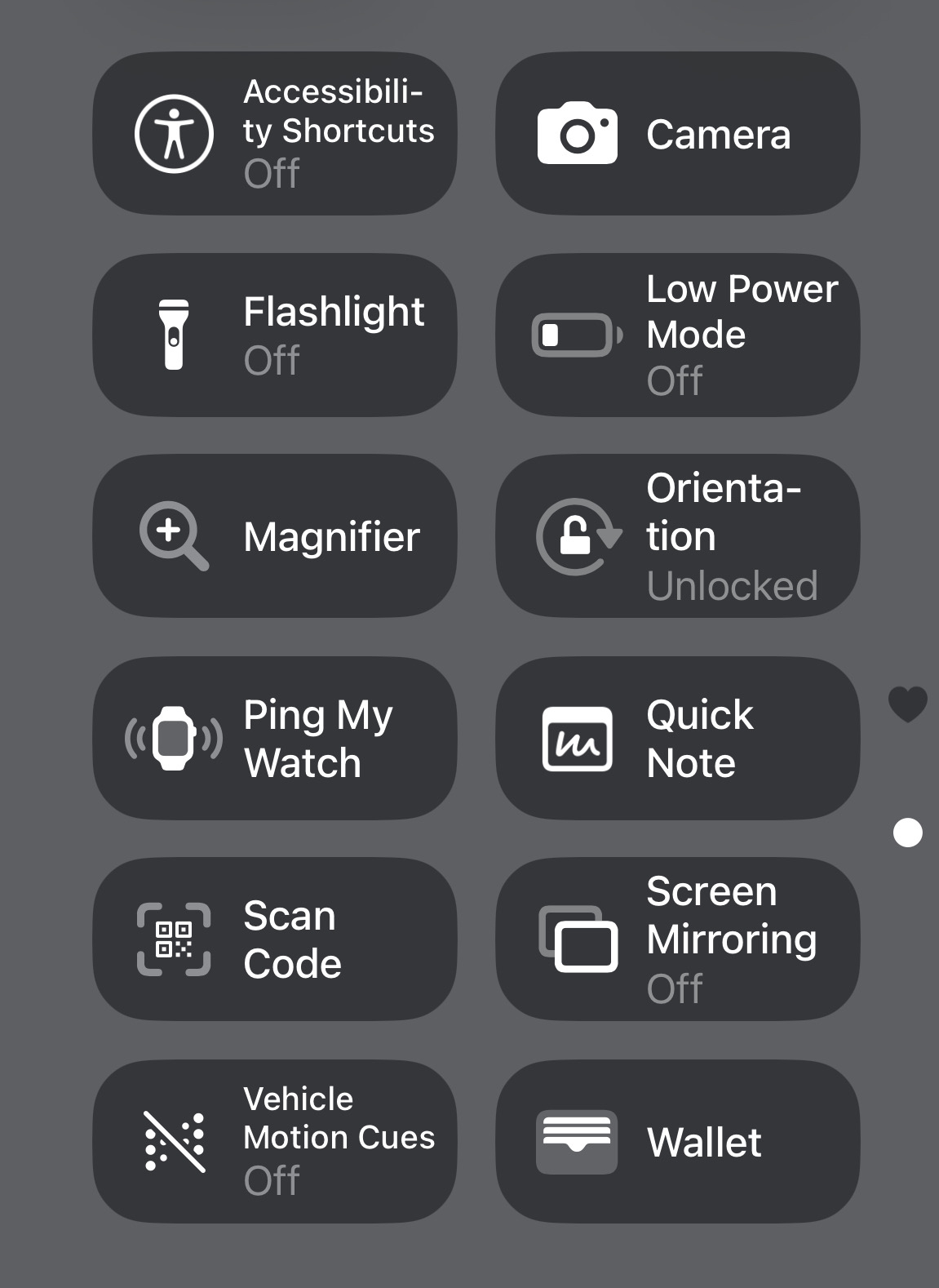
… as well as the controls directly accessing functions otherwise buried deep in Settings or wherever where they’re hard to find in an emergency.
Note that the camera won’t automatically open a website when it detects a QR code, it displays a little yellow button at the bottom that you have to press to be taken there. So there’s no risk of accidentally being taken to a website when you’re taking a photo.
I use both this feature and the QR code scanner in Control Centre depending on the situation, as the behaviour is different. Using Camera, after you tap the yellow button you are taken to Safari which loads the website. This is good when I want it to be amongst my open tabs or generally stick around for a longer interaction. Using the QR scanner widget opens a popover web view which is good for quick actions, but risks losing progress for anything that requires switching away before you’re done. The web view can disappear when you switch back.
You could just as easily say that growing up we had no Internet and we were “fine”. But that doesn’t mean ripping the Internet out of my life today — a very different life that now depends on it — would be “fine”.
Similarly, ripping out my digital identity in 2025 is nothing like 1975 when it never existed. I get all my legal and financial correspondence via email. Security and monitoring systems alerts. Credit card fraud notifications. Critical work messaging is rarely via phone or text but rather Teams or Hangouts or something requiring credentials linked to my digital ID. Many airlines and hotels effectively require access to your portals on the web or dedicated apps to step in the door.
Reading this thread makes me feel like I’m living in an alternative pre-iPhone reality.
I get your drift and I think all the commenters are wholly-in on the convenience of modern digital life.
But I think you’re missing the subtext of many of the comments (particularly mine): you can’t assume it’s always going to work. If you’re in a big modern metropolis, sure; airports, sure; multi-national hotels, sure; your ultra-wired workplace, sure. But sometimes it doesn’t work even then. Go outside those places and all bets are off. Maybe 80% of the world?
When you travel to other countries this is even more the case. You can’t assume they work exactly like yours so you should be prudent. Yes, if they don’t like foreigners it would be a good idea to avoid provoking them (as the original post enquires) but even more than that you need to assume that the way you conduct your business at home is not at all the way they conduct their business even if their culture looks like yours.
So, when traveling to new places, look at how the country works and dismiss your of-course-they-wont’s before you go, get a smartphone (particularly for China), carry a credit/debit card and learn how to use it over there and . . . carry cash. Yes, real cash. There are still places in Europe much less the rest of the world where vendors, hotels, whatever only accept cash.
You might want to keep some cash at home, too. Those solar flares are getting surprising.
Dave
@rda just one more idea popped up for me, maybe already suggested above and forgotten (apologies if so). If you don’t specifically need mobile phone service during the trip you might be able to get an iPod Touch or iPad mini for your digital travel needs, and when setting it up as new, only activate those things necessary for the trip. Perhaps even under a new Apple ID.
That might be more costly and complex than you want, just a thought.
Please post a new Thread on your return from the trip and let us know how it went, what you did etc, I’d be quite interested to know.
David,
Thanks for your note.
(It is the first one in almost a week that addresses my opening
– Tidbits is a remarkably diverse, interactive, and particularly interesting forum ;-)))
I proceeded as follows
– I bought myself a newer iPhone (reconditioned to save a few dollars)
– transferred my older iPhone to the newer (Apple actually makes that quite easy)
– erased my older iPhone … twice
– ordered an Italy eSIM for it
– registered it to a different Apple Account
– downloaded a few key apps (passwords, maps, mail – all registered differently than my usual)
– brought in key travel docs
I will freely confess this has taken more time and effort than I anticipated. But I am pretty much there.
The best alternative I could find for having a Android phone in Italy was to rent one from a US dealer (https://cellularabroad.com/) that provided the following (all for 10 days that I needed)
– phone
– eSIM with 80GB local data, several hours of calls back to US, unlimited local calls, unlimited incoming calls
– $150 all inclusive – shipping to and from (return) US location, 100% insurance
– it was the best and least risky “burner” I could findin terms of cost and not having to try to configure an Android all by myself.
– it was a close call
– the major factor was I know how to configure an iPhone
– and, of course, a new iPhone was a big win (isn’t it always ;-)))
How will it all work out? I will update on return, but I am reasonably confident it will all be ok.
Best,
Bob
I have not seen any mention of parking here, but payment for parking without a smartphone app can be a problem in the US. At least some MBTA stations in the Boston area have parking systems that only work with a smartphone app – not with a credit card. I don’t use payment apps because I can’t read tiny type on a tiny screen. However, the MBTA does read license plats, so after I drive away they bill me as if it for an unpaid parking ticket.
Bryan X Chen in the New York Times has a good, simple, article about travel with smartphones, etc.:
Dave
I have to sign in with my email to read this article. I don’t want to add my email to The NY Times. Is there another way to read the article?
Here is a gift link: https://www.nytimes.com/2025/04/30/technology/personaltech/travel-burner-phone-cbp.html?unlocked_article_code=1.D08.IkM8.K6islbpRSm4Y&smid=nytcore-ios-share&referringSource=articleShare
Basically he says just about the same things that we’ve been discussing here.