It is not a temporary file; it’s a duplicate, for sure. As an example, I download a monthly credit card statement from a bank (and it is not a large file). I give it the name I want. But I end up with two identical PDF files, one with the name I specified and one with the name the web site offered and I overwrote with the name I wanted.
In case it matters, in Firefox > Settings > General > Downloads, I have changed “Save files to” to my Documents folder, and I have checked “Always ask you where to save files”. With the monthly statement, I save the PDF to my Documents folder, and Firefox puts the duplicate with the original filename there as well. (I changed the “Save files to” from Downloads to Documents because Firefox was putting the duplicates there, and I’d rather clear them from Documents than Downloads.)
Very strange. If the “.part” file isn’t going away after the download completes, then there may be something preventing Firefox from deleting it.
I wonder if the destination folder has something (permissions, ACLs, other security settings) that allow it to create but not delete a file in that location.
I do know that on Windows, the temporary file appears to remain after the download, but it’s just the GUI desktop interface. Telling it to “refresh” the window or the desktop makes it go away. I wonder you might be seeing something similar.
Do you see the file from a command-line? The Finder doesn’t have an option to refresh a window, but does it remain after restarting the Finder?
Are we talking about the same file? What is the full name of the duplicate file? Does it end with “.pdf” (the extension of the actual file) or with “.pdf.part” (meaning it’s a Firefox-temporary file).
Update. The bank changed its web interface sometime in the past month and now I can avoid the issue. (It used to be that my only option was Download; now I can View or Download. If I View, I can then save and avoid the duplicate file problem.)
Having said that, I just tried it and I believe I was misunderstanding the sequence. It used to be that I needed to click the Download button to see the statement. Clicking the Download button put the statement in a new tab in Firefox, from which I would save the document with the name I wanted. This time, I paid more attention. When I clicked download and got the statement in a new tab, Firefox created the file that I don’t want at the same time as putting it in a new tab. Then when I saved the statement with name I wanted, I had two files. Until just now, I hadn’t looked at the Documents folder between clicking Download (which I thought only put the statement in a new tab) and saving the statement.
Thank you for trying to help.
I started to answer your post before visiting the bank’s web site and making the above discoveries. You wondered about ACLs. Terminal shows the permissions of my Documents folder as drwx------@. How do I find what the @ is signifying?
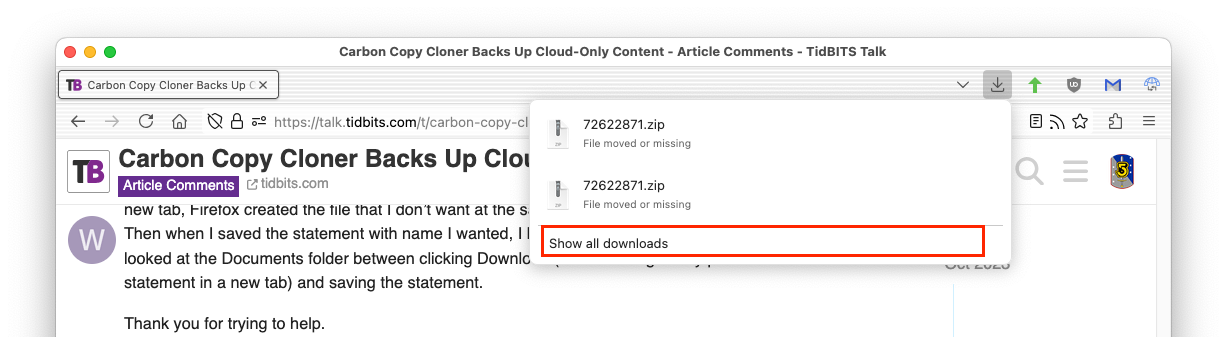
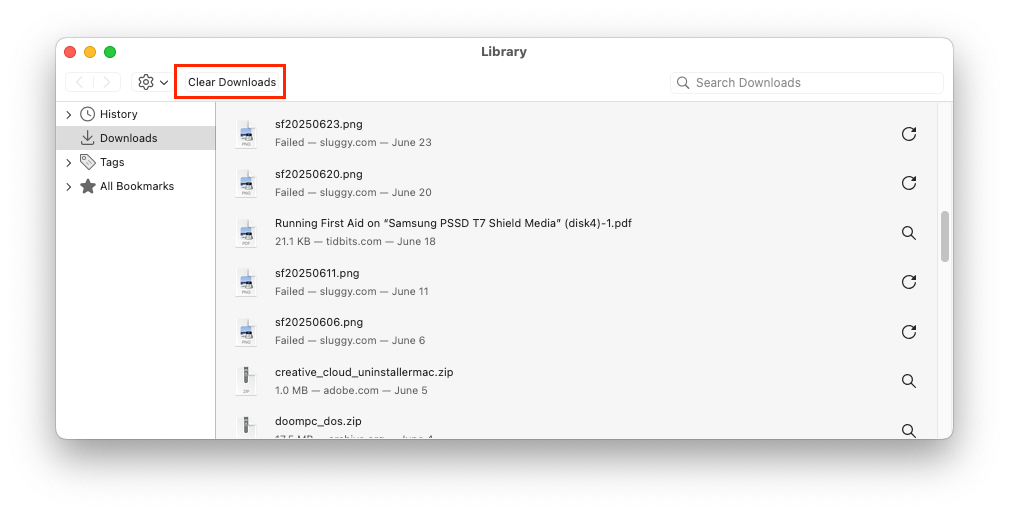
On a related-in-my-mind issue, is there a way to clear all entries in Firefox’s Downloads list at once, or do I need to removed the entries one at a time?
At some point (not too long ago), Firefox gained a feature where after downloading a PDF, it will open a window presenting the file (with a file: URL pointing at the file just downloaded). If you then perform a “save” operation (CMD-S), it saves another copy of the file, in addition to the one you downloaded.
If you see this, then don’t try saving the file. Just locate the already-downloaded file and rename it. On my system, the files appear on the desktop (my default download folder), so I can quickly see it and then delete/rename/move it.
When you tell it to view the file, it won’t create a local file, but will display the embedded image. Saving that will only create the file you want. I generally prefer this because, for things like credit card statements, I just want to print the statement, not save a copy.
I think this article describes how to disable this feature, so download will just perform a download instead of viewing it.
Yes. From the download icon in the toolbar, click “Show all downloads”:
This will purge the download history and will remove any “.part” files from incomplete/aborted/failed downloads. (It will not purge in-progress downloads).
It does not, however, delete the downloaded files themselves. That’s up to you to do.