Can I program an app with minimal coding skills?

This is a big point. A lot of “apps” we write are for personal use only, and in that situation, the bar is not only lower, but there’s no need to go through the App Store process. With AI those personal solutions can be full-fledged iOS or macOS apps, not just shell scripts, AppleScripts, or dedicated databases or spreadsheets.

I’m just talking through these ideas here, but I’d argue that one way of thinking about “vibe coding” is as enabling “personal development” in the sense of writing apps purely for personal use. I suspect that with TestFlight, it would be possible to share them with a small number of others as well, without publishing them. The answer would seem to be yes, though there is some App Store involvement.

Will be trying out BB as a first try.

Does it help to write out all the prompts ahead of time, or it one element done and then go to work on another element? It seems that writing the script will be my first challenge. Sounds fun.

@cngarrison can say more since he’s the expert, but my experience (informed by his help) has been that you start a chat for a particular granular task and keep going with that chat until you’re done, which is usually fairly quick. You might write out your initial prompts separately if you wanted, but since tasks can be quite small, I’m not sure there’s any real win there. After the first prompt, you can’t know how the conversation will proceed, so there’s no way of doing anything in advance. Once you’ve completed that task, you start a new chat for the next one to keep the context window smaller and cleaner.

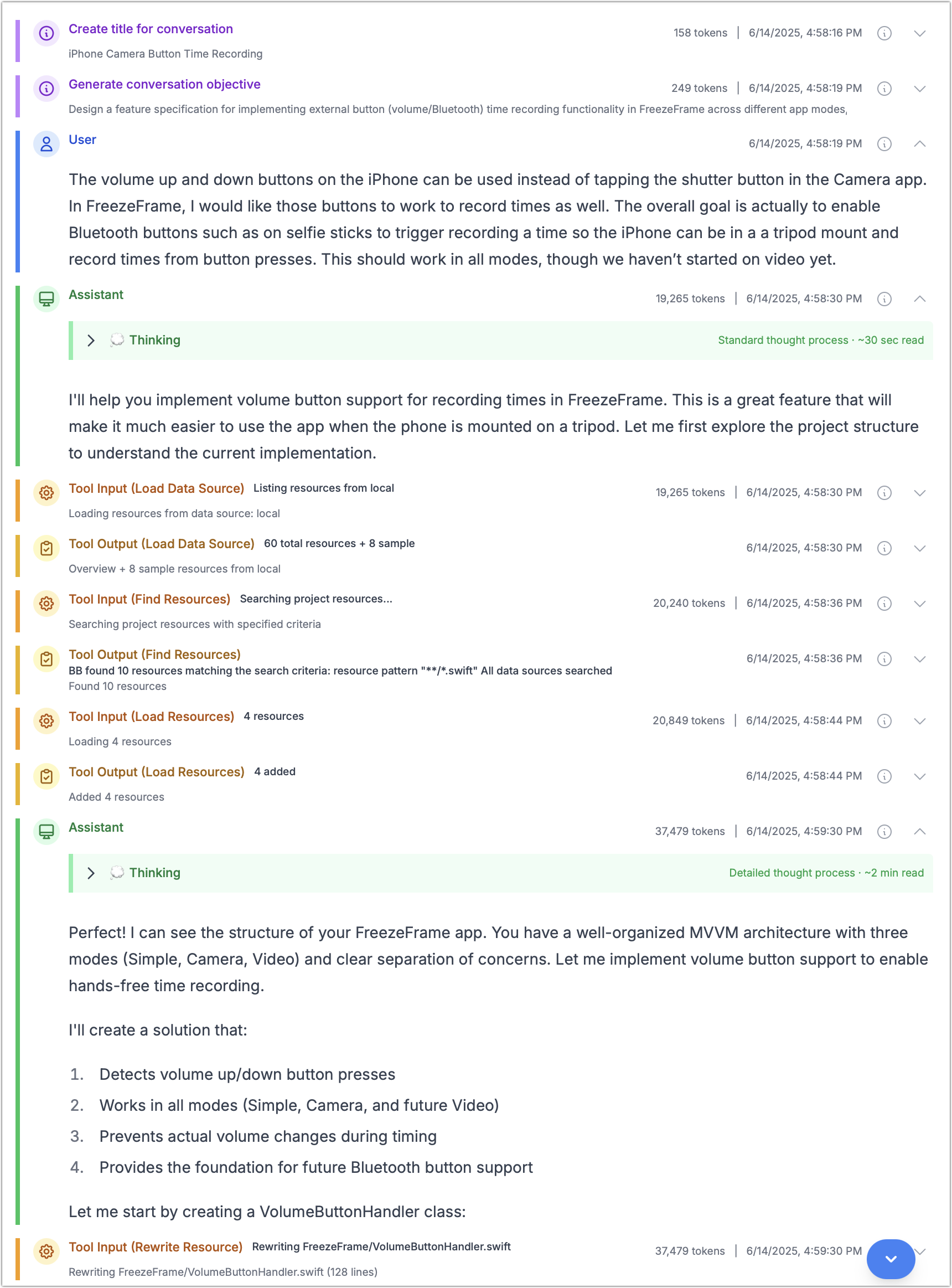
I can’t paste a nicely formatted copy of text from Beyond Better in Discourse, but here’s a screenshot that shows my initial prompt for a feature to add support for the volume buttons and Bluetooth selfie stick buttons for recording times in FreezeFrame

Fantastic. User feedback is very important, so please reach out with any questions/concerns/feedback.

Start with one task, which depending on the project means starting at a very high level to define the project objectives. Once those objectives are defined, ask BB to write a planning and implementation document (that will be saved to your projects data source folder).

Then use that document as starting point in subsequent conversations. Assuming document is named planning.md, start a new conversation with a prompt like:

Read planning.md and start implementing step 1. Stop and ask me questions if anything needs clarification.

Keep conversations short and focussed; it helps both with costs and keeping the AI on task. And the end of each conversation, ask BB to update planning.md.

Update planning.md with progress so far, along with anything relevant you learned during this conversation.

Keep repeating that process.

BB has support for a project “Guidelines” document. I highly recommend creating one of those as either the first or second conversation in your project.

As mentioned above, I would focus on a planning document, rather than writing out all the prompts that would be needed.

When you hover over as section in the conversation history, a copy-to-clipboard button appears at right side of the header bar that gives you markdown formatted copy of the text. But that is just for the one section; there is no copy for the whole conversation. If you think that’s an useful feature, please create a request for it:

1 Like

Swift/SwiftUI
There are many good tutorials available, especially for iOS. Deployment to an iOS device is simple. You have to ‘define’ Your device in Xcode, set that into developer-mode - and You can just select Your device in Xcode and run/compile that. Afterwards, Your app is on the device.
Swift is not that easy to learn, to get familiar with. Some tasks require further programming (printing, sorting, searching, etc.)
You’ll get a fully native app with all the native elements (Buttons, etc.), inclusive the new Liquid Glass (with the latest Xcode/Swift versions, that are early beta)

Xojo
Much less support (tutorials,) than with Swift. I stopped working with xojo in 2022/2023 (only SwiftUI today), so I’m not sure about changes in xojo.
I found it not so easy for iOS, but my focus at that time was macOS. As with Swift, printing, searching, etc. requires further programming. I found the xojo-listbox (?) cool, sorting was easier.

Developer Account (Swift-Apps)
If You want to deploy many apps to Your devices, I believe that a dev’ account is needed. If You want to use SwiftData for storage and CloudSync, a dev’ account is needed (IMHO)

AI
IMHO the future. If one can describe an app very well (requirements, inputs, outputs, etc.), AI should be able to create an app - in the future…
As of today, I’m not so happy with it. Some of the AI created apps (or parts of an app) would not compile in Xcode, You as the developer are never sure, if a solution/method is deprecated or not, etc.
Desperately missing time-stamps and sources…

The good thing with AI is, that You got much more a feeling of talking to a human (what is not the case when trying to get help on Apple forums…)

I’m developing apps for my personal needs, no app-store, mostly SwiftUI with SwiftData and CloudSync - and I’m still a beginner (-:

There are low-code environments that let You deploy an app to iOS - for example FileMaker Pro from Claris. Could be easier - but license are not cheap
1 Like

If you’re familiar with HyperTalk/Hypercard, Livecode is all that modernized, with the same code base that can be used to create Mac,Win,iOS,Android,Linux,server apps. So you would use the same stack/card metaphor as Hypercard, and drop on fields, buttons, etc., and program them using Livecode script which is virtually identical to HyperTalk. You can get something going in a day on your Mac, then output the files to transfer to your iPad. Livecode, the company, is currently developing an environment called Create, which is more modernized Livecode, and which they consider ‘low code,’ along with AI enhancements.

I’d recommend Cursor. The free trial is very generous. Plus you don’t need to pay for access to any extra services (like a separate plan for Claude, ChatGPT, etc).

My personal approach would be to build the MVP (minimum viable product) of your idea to get it on screen, and then iterate and add features. This is analogous to my approach developing software over the past several decades. There are other ways to approach things, so I’m sure you’d find one that suits your way of working.

You’d benefit from getting to grips with Xcode at a surface level, but you can simply ask the ai to get step-by-step instructions. A good starting point would be to ask what type of xcode template to start from and why, how, and go from there.

This is no longer true with Cursor. (I wonder if it ever was but, alas, my experience with Cursor doesn’t go back very far. Things move so fast I’ve also read that ChatGPT, etc, recently gained the ability to interact with the current editor window, but I’ve not tried those as yet.)

Cursor makes changes directly to your files, you can roll back edits at any time to any point in the chat. If you ask it to run the code, it will first ask for permission to do so, and then it will use xcode terminal command to build and run the app. You could make an app without ever touching the mouse or keyboard, which is pretty wild—what a time to be alive.

1 Like

For sake of feature comparisons - Cursor is a full IDE (and not nearly as pleasant as BBEdit) which may not be the right solution for everyone. It’s also specifically for coding projects. In contrast, Beyond Better is IDE/editor agnostic, and will work with many different types of projects (not just coding).

For “getting things done” Beyond Better also makes changes directly to your files, supports running commands, fetching web pages and screenshots, plus more. The real benefit of Beynd Better though is access to a variety of data sources (currently just Notion, but more like Google Docs coming soon).

For a limited time, Beyond Better has a free plan too.

That’s true. I do all my editing in my preferred editor (which depends on project type) and switch the Cursor when I want some help. That may not work for everybody but I like the separation.

With Beyond Better do I need a separate subscription to a model or pay for a model API access?

Both options are available with Beyond Better.

Using ‘local-only’ mode you can bring your own API key and there is no cost for using Beyond Better itself. Or get a Beyond Better subscription and we take care of all the API keys and costs with providers (Anthropic, OpenAI, Google, DeepSeek, etc).

Beyond Better has a (limited-time) Free plan so you can try it out, no need to bring your own API key.

The local mode also supports using Ollama so you use open-source models directly.

1 Like

So glad someone asked this question! I’ve toyed with the idea and can now consider it more realistically.

You can do anything you put your mind to, but any environment new-to-you has a learning curve. Make up your mind that you will do it, use the aids that are available (AI, Youtube, other), and plow ahead.

1 Like