Today, my iPassword account on macOS 27.2 keeps closing to the lock screen after about 10 seconds, even when I enter edit mode.
1Password still works on my iPhone 17 updated to IOS 27.2.
I’m running 1Password on an Intel iMac but will be buying an Apple Silicon machine before the end of the year. So, I’ve been following and thinking about the time-out problem here. After some poking around on my machine and the Web, here are some things that might be related (since I’m not running Golden Gate on any of my Macs, I can’t test anything) :
Get Info on 1Password.app, v. 8.12.44, it shows as an Intel only app. This means Rosetta is used by Apple Silicon machines to run 1Password.app .Get Info for 1Password for Safari.app, v. 8.12.42 shows the app was written for both Intel and Apple Silicon processors.I experienced the lock problem which was cured only by installing the next version of macOS on my M1 MacBook Pro after purge and reinstall of 1Password had made no difference. This implies the existence of corruption or bug in macOS. I would look for an update or re-install macOS.
1Password doesn’t have a Universal version of the desktop app, which is odd because Google says there’s a Universal version of the Electron framework.
Instead there’s two version of 1Password: Intel only, and Apple Silicon only.
The 1Password stub installer downloads and installs the application version that matches your architecture. So, when you migrate from Intel to Apple Silicon, you need to re-run the stub installer to get it to download and install the Apple Silicon version.
There’s no reason to run it using Rosetta, and I don’t think it actually works that way.
Charles,
Have you tried creating a new macOS user account, signing into it, and then running 1Password there? If it runs fine under a fresh user account, then maybe there’s something associated with your regular user account that’s causing the difficulty?
This is quick and easy to try. Who knows?
I wish you all the best in resolving this.
--Brian
I was thinking that some people might be running legacy installations of 1Password—possibly due to Migration Assistant or use of files stored in a backup—or that its updater might not handle switching installations from Intel to Apple Silicon.
I agree that you should run for the hills when you get the chance. Fortunately, it does sound like a general issue, not specific to you, but equally it looks like there’s still no way to perform an export of your data without a working app, which is utterly unacceptable IMNSHO. So, once it’s working again, do an export, and find an alternative that makes it easy for you to maintain a local vault, or at the very least makes it easy for you to obtain a readable version of your vault in another application.
Best of luck!
A combination of Apple’s Passwords and Uplock (a subscription but much cheaper than 1PW) have made me quite happy to have left 1PW.
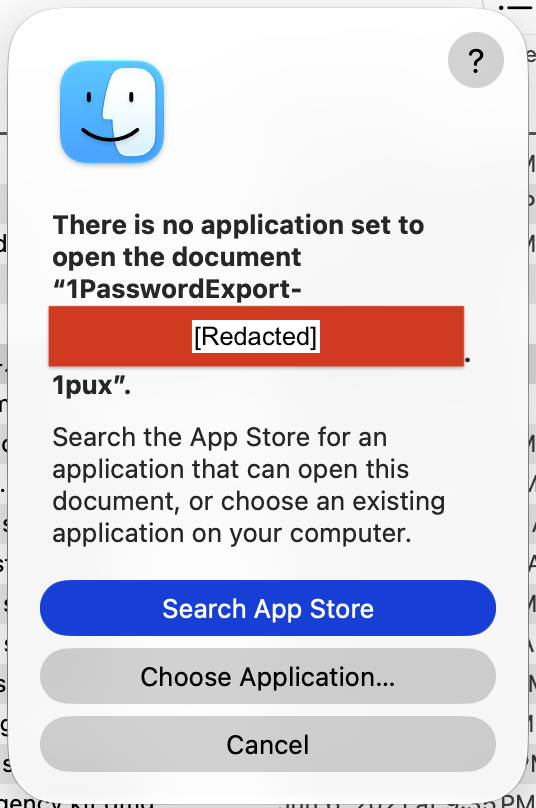
I have succeeded in exporting my passwords to a file whose name extenson is .1pux.
However, I do not yet know how to open this export file. The macOS Finder says:
-CCC.
Many password manager apps can import from the .1pux file directly - the popular app Bitwarden is one of them.
Unfortunately, Apple Passwords cannot. If you do want to switch to Apple Passwords, hopefully you can somehow manage to export the 1Password data into CSV, then you can import that file into Apple Passwords. This is the method I used when I switched from 1P to Apple Passwords earlier this year. (I also use the previously-mentioned app Uplock to store non-password secrets that I used too store in 1Password - that app can read the .1pux file that you’ve already exported.)
I’ll also note that once you are sure that you have imported everything, remember to delete (and then empty from trash) the 1pux and csv exports from 1Password - the data will not be encrypted in those formats.
Just want to add that exporting to CSV only covers Login and Password data. Anybody storing additional information should use 1PUX.
Next, 1Password says 1PUX files rely on JSON formatting. I don’t have much experience with JSON so I don’t have any recommendations for a JSON reader or editor.
Let me also join the others who’ve been extremely disappointed with the lack of support you’ve received from AgileBits on this issue. I used 1Password for a long time, but decided that the recent increase in subscription cost was not worth what I was getting as someone who uses Apple devices exclusively and switched a few months before my 1Password annual subscription was set to renew in August.
I did try BitWarden as well as Apple Passwords but decided that Apple’s solution works best for me - particularly because my wife has used Apple Passwords for several years, is not interested in a third-party solution, and I knew it was the best way for us to share passwords, as well as for her to continue on if I should happen to die or become incapacitated unexpectedly.
Anyway, I find it extremely disappointing knowing that AgileBits increased subscription costs as much as 33% this year to hear that they then ignore a critical support issue like yours as long as they have so far. Best of luck getting this resolved.
You can view JSON in TextEdit, if you really want to. It probably won’t be pleasant, but it’s possible. Various tools can pretty-print (nicely format) the output, but it’s essentially already human-readable.
And, yes, a 1pux import will be richer than CSV, especially if you’ve used 1Password’s categorisation and custom fields extensively. My app of choice, Strongbox, has strong (pardon the pun) support for importing 1pux and that’s how I migrated over myself. I am extremely pleased with Strongbox, FWIW, and am amazed that Applause haven’t enshittified it. However, if they do, I’ve got a parachute, because the format it reads and writes is used by other apps, including KeePass(XC) and KeePassium, among others.
@ccc: I’m really glad you were able to export your 1Password data as a .1PUX file. You can import that file into many other password managers, including KeePass XC, Strongbox, and Bitwarden. Although I primarily use 1Password, I regularly export my 1Password data to a .1PUX file and import it via KeePass XC into a local password vault (.kdbx file) that I securely backup. The process works really well for me. Good luck!
P.S. Just remember that the .1pux file is NOT encrypted, so you should not upload the file to the cloud or store it anywhere that is not safe. I would suggest that you (1) import the data from the .1pux file into a password manager of your choice, (2) create a “1Password Export” item in the new password manager and add the .1pux file as an attachment, and then (3) delete the .1pux file from your system.
Thank you. At GitHub I found an app that reads a .1pux file and displays it in neat rows and columns, so I’m OK now. -CCC
It’s a clunky workaround, but you should be able to use a third-party password manager, like Bitwarden, as an intermediate between a 1pux file and Apple Passwords. The basic idea would be to set up a trial account with the third-party password manager, import the 1pux file into it, export your passwords from the third-party tool into an Apple Passwords-compatible CSV file, and then import the CSV file into Apple Passwords.
You should delete the third-party account and all import/export files when done. Double check the third-party tool’s documentation that it imports 1pux and exports CSV before proceeding. I think Bitwarden will let you do it all via a web browser, without needing to download any apps, but that info was from a superficial Internet search.
There also are command-line scripts that supposedly will handle the issue, but you need to be comfortable using Terminal.app, and you should be able to read through the script and understand what it is doing before proceeding. An A.I. suggested this one, but I haven’t reviewed the script and can’t vouch for it.
Edit: @ccc Looks like you solved the issue while I was typing. Let us know if it works!
Thank you. I transformed my .1pux file to a .kdbx file, which I encrypted ; then I deleted the .1pux and .kdbx files. Phew!
I don’t use cloud storage.
-CCC
Thank you. I’m OK now. -CCC
In my case, I found that there was an update to 1Password which I installed and 1Password on my Mac is working again.
When I
Get Infoon 1Password.app, v. 8.12.44, it shows as an Intel only app. This means Rosetta is used by Apple Silicon machines to run 1Password.app
That’s very odd. When I do a get info (command-i) on 1Password 8.12.44 on my Mac Studio running macOS 27.2, I get Apple Silicon (only).